As websites become faster, more interactive, and available across multiple platforms, businesses are looking beyond traditional WordPress setups. One of the biggest trends shaping modern web development is Headless WordPress. If you’ve been searching for a headless WordPress guide, you’re likely wondering whether this architecture is worth the investment.
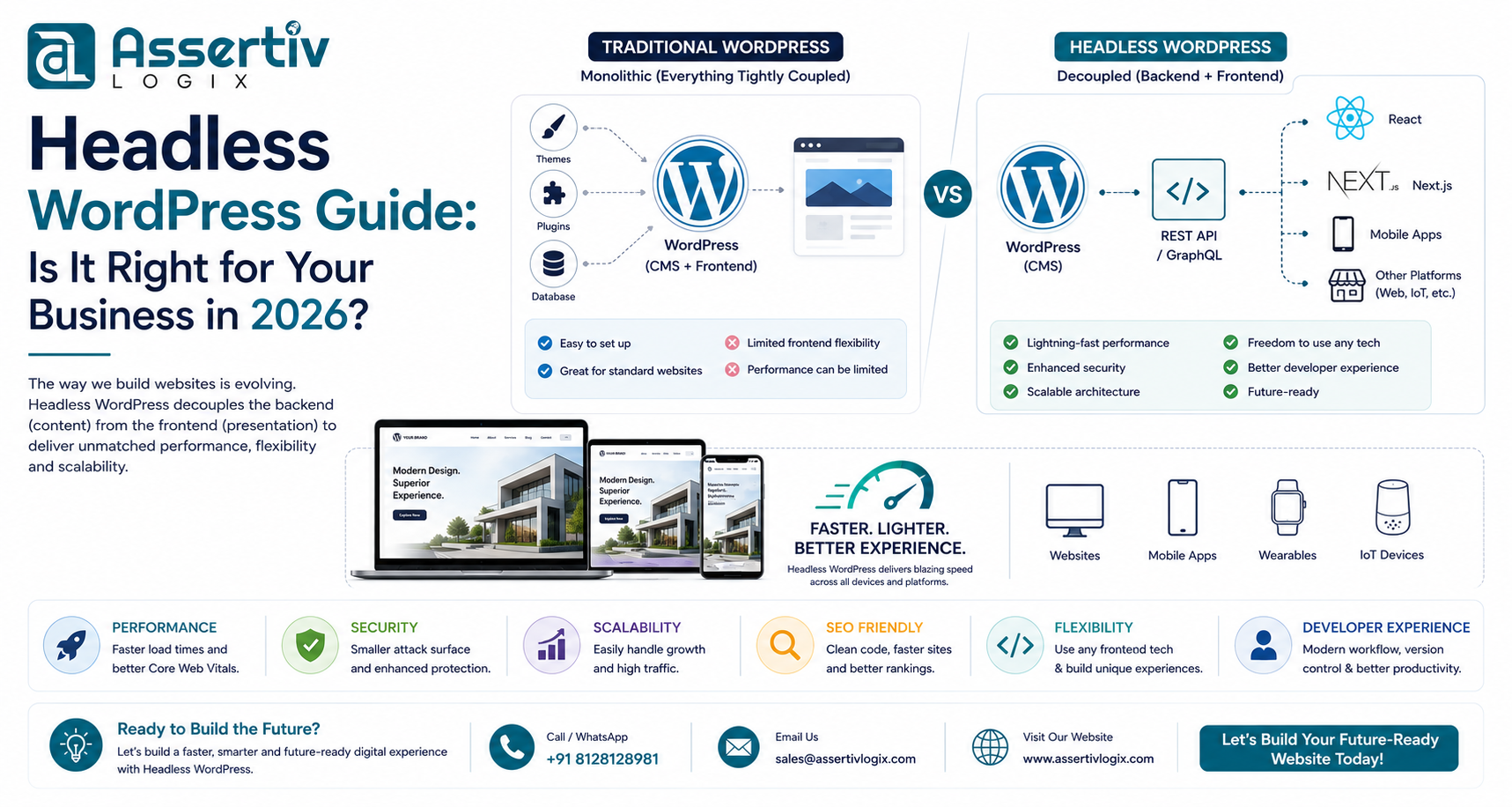
Headless WordPress separates the content management system (CMS) from the front-end presentation layer, allowing developers to use modern frameworks like React, Next.js, Vue.js, or Angular while still managing content through the familiar WordPress dashboard.
In this comprehensive guide, we’ll explain what Headless WordPress is, how it works, its advantages and disadvantages, common use cases, and whether it’s the right solution for your business in 2026.
What Is Headless WordPress?
In a traditional WordPress website, the backend and frontend are tightly connected. WordPress manages your content and also generates the pages visitors see using PHP themes.
With Headless WordPress, these two layers are separated:
- Backend: WordPress manages content, users, media, and publishing.
- Frontend: A JavaScript framework such as Next.js or React displays the content using the WordPress REST API or GraphQL.
This approach gives developers more flexibility while allowing content editors to continue using the familiar WordPress admin interface.
How Does Headless WordPress Work?
The workflow is straightforward:
- Content creators publish content in WordPress.
- WordPress exposes the content through REST API or GraphQL.
- The frontend application requests content from the API.
- The frontend renders pages for users using modern JavaScript frameworks.
Benefits of Headless WordPress
1. Faster Website Performance
Headless websites can deliver lightning-fast page loads using static generation, server-side rendering, and modern optimization techniques. This often leads to better Core Web Vitals and improved user experience.
2. Improved SEO
When implemented correctly with frameworks like Next.js, Headless WordPress supports excellent SEO through fast loading speeds, optimized metadata, and server-side rendering.
3. Better Security
Since the WordPress frontend is decoupled, attackers have fewer opportunities to exploit traditional WordPress themes and rendering mechanisms.
4. Omnichannel Content Delivery
Publish content once and deliver it to:
- Websites
- Mobile apps
- Digital kiosks
- Smart TVs
- IoT devices
- Progressive Web Apps (PWAs)
5. Modern Development Experience
Developers can work with modern technologies including:
- React
- Next.js
- Vue.js
- Nuxt.js
- Angular
- Tailwind CSS
Potential Drawbacks of Headless WordPress
Headless architecture isn’t the right fit for every project. Consider these challenges:
- Higher development costs
- More complex deployment
- Requires experienced developers
- Additional hosting requirements
- Plugin compatibility may vary
- Separate frontend maintenance
Traditional WordPress vs Headless WordPress
| Feature | Traditional WordPress | Headless WordPress |
|---|---|---|
| Ease of Setup | ★★★★★ | ★★★☆☆ |
| Performance | ★★★★☆ | ★★★★★ |
| Customization | ★★★★☆ | ★★★★★ |
| Development Speed | ★★★★★ | ★★★☆☆ |
| Scalability | ★★★★☆ | ★★★★★ |
| Maintenance | Simple | Advanced |
When Should You Choose Headless WordPress?
Headless WordPress is an excellent choice if you:
- Need exceptional performance
- Expect high traffic volumes
- Want to build Progressive Web Apps
- Need multi-platform content delivery
- Have a dedicated development team
- Require complex frontend experiences
When Traditional WordPress Is Better
Traditional WordPress remains the better option for:
- Small business websites
- Blogs
- Simple company websites
- Budget-conscious projects
- Quick website launches
- Businesses relying heavily on WordPress plugins
Headless WordPress Technology Stack
A typical stack includes:
- WordPress CMS
- WPGraphQL or REST API
- Next.js or React
- Node.js
- Vercel or Netlify deployment
- Cloudflare CDN
Common Business Use Cases
- Enterprise websites
- SaaS platforms
- News and media websites
- Large ecommerce stores
- Educational platforms
- Corporate portals
- Content hubs
Headless WordPress and SEO
Many businesses assume Headless WordPress automatically improves SEO. In reality, success depends on proper implementation.
Best practices include:
- Server-side rendering (SSR)
- Static Site Generation (SSG)
- Optimized metadata
- Structured data
- Fast Core Web Vitals
- XML sitemaps
- Canonical URLs
Learn more in our Core Web Vitals WordPress Guide.
How Much Does Headless WordPress Cost?
| Project Type | Estimated Cost (USD) |
|---|---|
| Business Website | $3,000 – $8,000 |
| Corporate Website | $8,000 – $20,000 |
| SaaS Platform | $15,000+ |
| Enterprise Solution | $25,000+ |
Actual costs depend on design, integrations, functionality, infrastructure, and long-term maintenance requirements.
Frequently Asked Questions
Is Headless WordPress faster?
Yes. When implemented correctly using frameworks such as Next.js with static generation or server-side rendering, Headless WordPress can significantly improve loading speeds and Core Web Vitals.
Can I use WooCommerce with Headless WordPress?
Yes. WooCommerce can be used in a headless architecture through APIs, although development is more complex than a traditional WooCommerce implementation.
Is Headless WordPress suitable for small businesses?
Not always. Many small businesses achieve excellent results with traditional WordPress. Headless architecture is often more beneficial for larger or more technically demanding projects.
Our WordPress architects can evaluate your website, performance goals, and technical requirements to help you decide whether a headless architecture is the best fit. Get expert guidance before investing in your next project.
Conclusion
This headless WordPress guide demonstrates that decoupling your frontend from WordPress can unlock greater flexibility, performance, and scalability. However, it’s not the right choice for every business. The decision should be based on your goals, budget, technical requirements, and long-term growth strategy.
At Assertivlogix, we build both traditional and headless WordPress solutions tailored to your business needs. From custom WordPress development and WooCommerce stores to React, Next.js, and API-driven applications, our team helps businesses create scalable, high-performance digital experiences.