

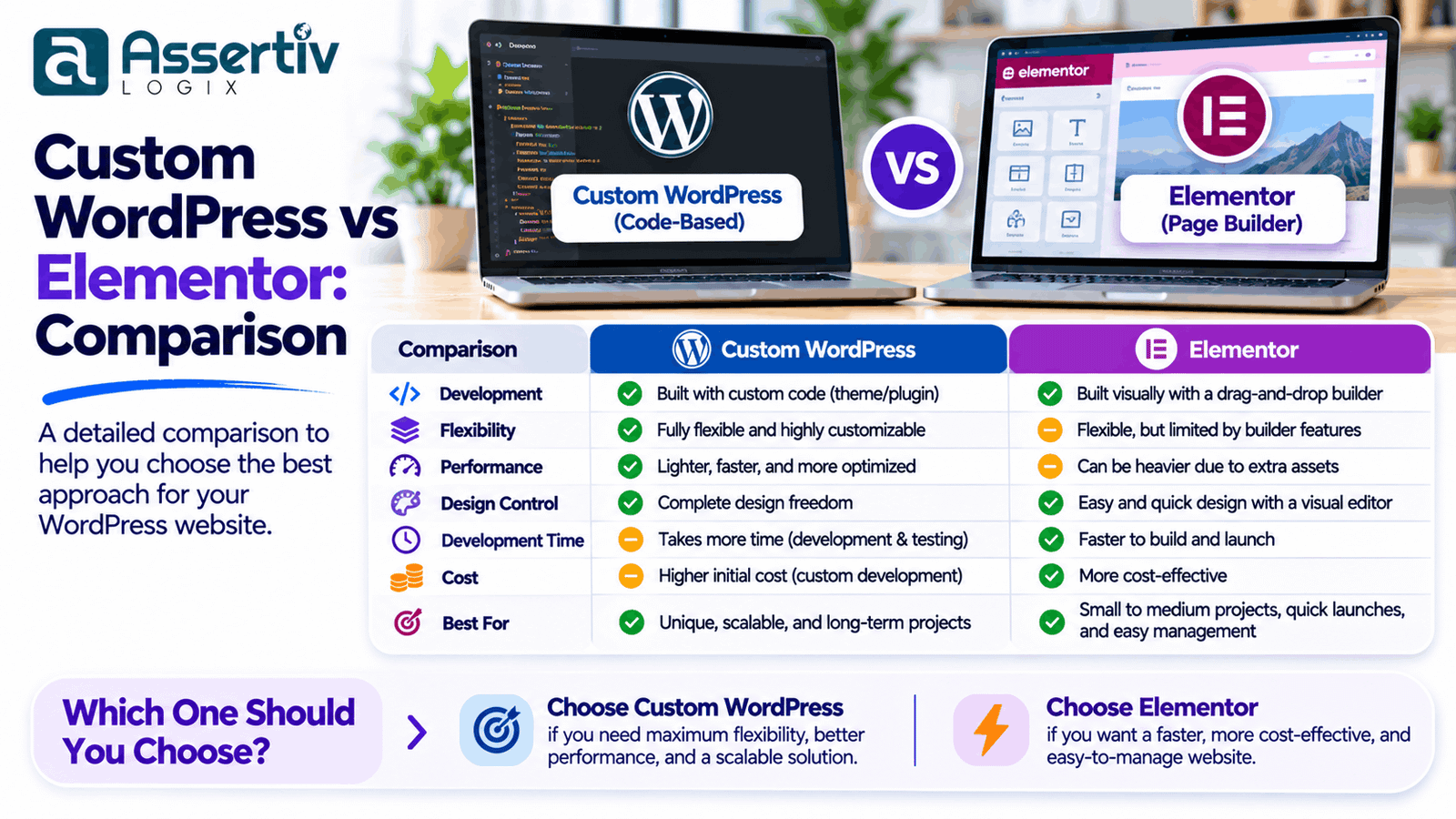
Choosing the right approach for building a WordPress website can significantly affect its performance, design flexibility, maintenance, and long-term scalability. One of the most common decisions businesses face is whether to use a page builder such as Elementor or invest in custom WordPress development.
Both approaches can create professional, responsive websites, but they serve different requirements. Elementor provides a visual website-building experience that allows users to create and manage layouts with less coding. Custom WordPress development offers greater control over the website’s architecture, functionality, design implementation, and technical optimization.
For a small business website, Elementor may provide a convenient and practical solution. For a complex business platform, custom eCommerce website, or application with specialized functionality, custom WordPress development may offer more flexibility.
In this guide, we compare custom WordPress vs Elementor across design flexibility, performance, SEO, development cost, maintenance, security, and scalability to help you choose the right solution for your business.
What Is Custom WordPress Development?
Custom WordPress development involves building a website using WordPress with functionality, design, and technical architecture tailored to specific business requirements.
Instead of relying entirely on a visual page builder, developers can create custom themes, templates, plugins, reusable components, and integrations using WordPress development technologies.
Custom development commonly involves:
- PHP for backend functionality
- HTML5 for website structure
- CSS3 and SASS for styling
- JavaScript for interactive features
- MySQL for database management
- WordPress theme development
- Custom plugin development
- WordPress REST API integrations
Developers can build custom page templates, content management functionality, business workflows, and integrations based on the project’s requirements.
For example, a company may require a custom quotation system, advanced product filtering, customer dashboards, or a specialized booking workflow. These features can be implemented through custom WordPress development rather than depending entirely on prebuilt page builder elements.
What Is Elementor?
Elementor is a visual website builder for WordPress that allows users to create website layouts using a drag-and-drop interface.
Instead of writing code for every design element, users can add widgets, edit content, adjust spacing, change typography, and configure responsive layouts through a visual editor.
Elementor provides tools for creating:
- Website headers and footers
- Homepages and landing pages
- Service and business pages
- Blog layouts and post templates
- Portfolio pages
- Contact forms and promotional sections
- WooCommerce layouts with supported features
Elementor is available in different product editions and feature sets. Some advanced capabilities depend on the installed version and plan.
Its visual editing experience makes it particularly useful for businesses that want to manage page layouts without depending on a developer for every content change.
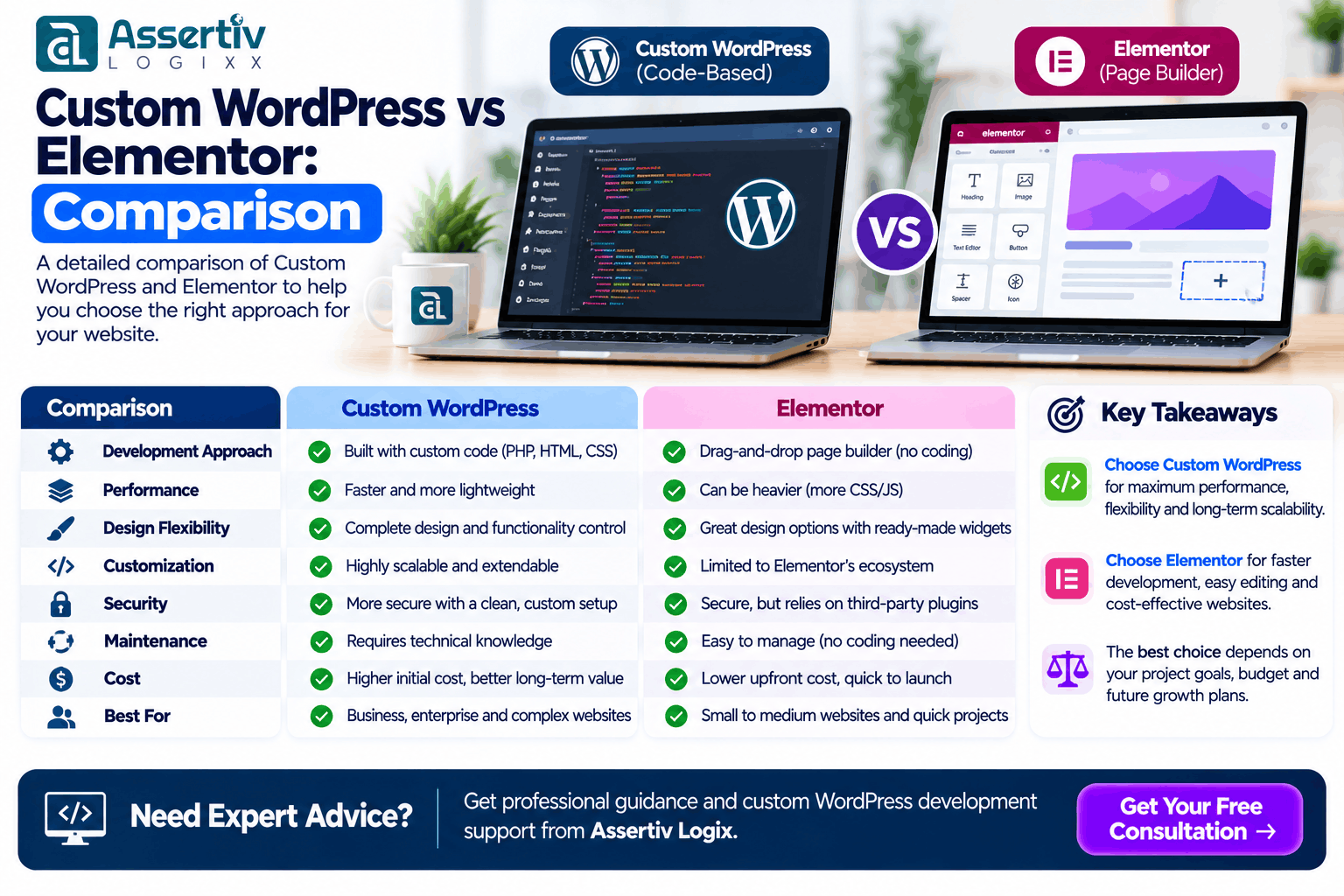
Custom WordPress vs Elementor: Key Differences
Both solutions use WordPress as their content management foundation, but their development approaches are different.
| Comparison | Custom WordPress | Elementor |
|---|---|---|
| Development approach | Custom coding and theme development | Visual drag-and-drop building |
| Design flexibility | Very high | High within builder capabilities |
| Performance control | Direct control over implementation | Depends on builder configuration and optimization |
| Customization | Can be tailored to specific requirements | Uses widgets, templates, and supported extensions |
| Content editing | Depends on the custom admin experience | Visual editing interface |
| Development skills | Usually requires technical expertise | Less coding required for common layouts |
| Initial development | May require more development time | Can be faster for standard layouts |
| Maintenance | Depends on code quality and architecture | Includes builder and extension maintenance |
| Scalability | Can be architected for specific requirements | Depends on implementation and ecosystem |
| Best suited for | Specialized websites and custom functionality | Business websites and visually managed pages |
1. Design Flexibility and Customization
Design flexibility is an important consideration when selecting a WordPress development approach.
Custom WordPress Design
Custom WordPress development provides control over how the website is structured and implemented. Developers can create layouts, components, animations, navigation systems, and interactive elements according to the approved design.
It is particularly useful when a business requires:
- A completely unique website interface
- Custom navigation and user experiences
- Specialized interactive components
- Complex content layouts
- Custom product or service presentation
- Business-specific functionality
Because developers control the implementation, they can avoid relying on builder widgets when a more specialized solution is needed.
Elementor Design
Elementor provides a visual editor that allows users to create page layouts using available widgets and design controls.
Users can adjust colors, fonts, spacing, backgrounds, animations, columns, and responsive settings without writing code for every section.
It is useful for businesses that want to:
- Build pages visually
- Update website content independently
- Create landing pages quickly
- Reuse design templates
- Make regular layout changes
However, highly specialized functionality or unusual layouts may require custom CSS, JavaScript, PHP, or additional plugins.
Winner: Custom WordPress offers greater implementation freedom, while Elementor provides a more accessible visual design workflow.
2. Website Performance and Loading Speed
Website performance affects user experience, conversion opportunities, and search visibility. Both custom WordPress and Elementor websites can perform well, but the implementation approach matters.
Custom WordPress Performance
With custom development, developers can control the code and assets included on individual pages. They can avoid loading unnecessary functionality, optimize database queries, implement efficient templates, and choose appropriate caching strategies.
Performance improvements may include:
- Loading only required CSS and JavaScript
- Optimizing images and responsive media
- Reducing unnecessary database queries
- Implementing page and object caching
- Using efficient theme architecture
- Optimizing third-party scripts
However, custom development does not automatically guarantee a faster website. Poorly written code, oversized images, excessive scripts, and unsuitable hosting can still cause performance problems.
Elementor Performance
Elementor provides a convenient way to build pages, but the builder and its extensions introduce additional assets and runtime functionality.
Performance depends on the number of widgets, third-party add-ons, animations, templates, images, fonts, and other plugins used on the website.
Elementor websites can also be optimized through:
- Using lightweight layouts
- Removing unused widgets and extensions
- Optimizing images
- Configuring caching
- Reducing unnecessary animations
- Optimizing fonts and external scripts
Winner: Custom WordPress provides more direct control over performance optimization, but either approach can achieve good results with appropriate development and optimization.
3. SEO Capabilities
Search engine optimization is not determined solely by whether a website uses Elementor or custom WordPress development.
Both approaches can support SEO-friendly websites when technical implementation and content are handled correctly.
SEO With Custom WordPress
Custom WordPress development provides control over page structure, semantic HTML, metadata implementation, structured data, internal linking, and technical functionality.
Developers can create templates that support:
- Semantic HTML headings
- SEO-friendly URLs
- Meta title and description management
- Structured data integration
- Responsive layouts
- Image optimization
- Canonical URL handling
SEO With Elementor
Elementor can also support SEO-friendly pages. Users can create headings, paragraphs, images, links, and page layouts while using SEO plugins such as Rank Math or Yoast SEO for metadata and related settings.
However, users should pay attention to heading hierarchy, page structure, image optimization, duplicate content, and unnecessary page elements.
Google’s SEO Starter Guide provides useful guidance on creating search-friendly websites regardless of the page-building approach.
Winner: Both approaches can support strong SEO. Custom WordPress offers more implementation control, while Elementor makes page creation and editing more accessible.
4. Development Cost and Budget
Development cost depends on the number of pages, design complexity, functionality, integrations, content requirements, and the amount of custom work involved.
Custom WordPress Development Cost
Custom WordPress websites may require additional planning, design implementation, coding, testing, and documentation.
Costs can increase when a project includes:
- Custom themes and templates
- Advanced user functionality
- Custom plugins
- API integrations
- Complex database operations
- Specialized eCommerce features
Elementor Development Cost
Elementor can reduce development effort for websites that use standard layouts and supported functionality.
However, businesses should also consider builder licensing where applicable, paid extensions, design customization, performance optimization, and ongoing maintenance.
Extensive customization can reduce the initial cost advantage if many custom features are still required.
Winner: Elementor may be more economical for standard websites. Custom WordPress can be a better investment when the project requires specialized functionality, control, or a tailored architecture.
5. Website Maintenance and Updates
Every WordPress website requires maintenance. WordPress core, themes, plugins, PHP versions, and hosting environments need to be managed over time.
Maintaining Custom WordPress Websites
Custom websites require developers to maintain theme code, custom plugins, integrations, and compatibility with WordPress updates.
Good documentation, coding standards, version control, and structured development practices can make maintenance easier.
Maintaining Elementor Websites
Elementor websites require updates to WordPress, the Elementor plugin, any associated extensions, themes, and other installed plugins.
After major updates, businesses should test page layouts, forms, responsive behavior, and important functionality to identify compatibility issues.
Winner: Neither approach is maintenance-free. Custom websites depend on code quality, while Elementor websites also require attention to builder and extension compatibility.
6. Scalability and Advanced Functionality
A website should be built with future business requirements in mind. The right solution should support new functionality without creating unnecessary technical complexity.
Custom WordPress Scalability
Custom development can provide a strong foundation for websites with specialized business logic and integrations.
Examples include:
- Membership platforms
- Customer dashboards
- Booking and appointment systems
- Custom product configurators
- Advanced search and filtering
- Third-party CRM integrations
- Custom business workflows
- Complex WooCommerce functionality
Developers can design the architecture around these requirements, including custom database structures and API integrations when appropriate.
Elementor Scalability
Elementor can support growing websites with multiple pages, templates, dynamic content, and supported integrations.
It is a practical option for many business websites, but projects with increasingly complex functionality may require additional custom development and careful architecture planning.
Winner: Custom WordPress is often more suitable when advanced functionality and highly specialized architecture are central to the project.
7. Content Management and Ease of Use
Businesses often want their internal teams to update website content without involving developers for every small change.
Custom WordPress Content Management
Custom development can create tailored editing experiences using WordPress blocks, custom post types, custom fields, and dedicated admin interfaces.
Developers can control which content areas users can edit while keeping the overall design consistent.
Elementor Content Management
Elementor allows users to visually edit page layouts and content. This can be convenient for marketing teams that frequently update landing pages, promotional sections, and other page elements.
However, businesses should establish editing guidelines to prevent accidental design changes or inconsistent layouts.
Winner: Elementor is convenient for visual page editing. Custom WordPress can provide a more controlled content management experience when designed specifically for the business.
8. Security Considerations
Security depends on the entire WordPress environment, including hosting, software updates, user permissions, code quality, plugins, and website configuration.
Custom WordPress Security
Custom development allows developers to implement functionality with specific security requirements and reduce reliance on unnecessary third-party extensions.
Developers should follow WordPress security practices, including proper input validation, output escaping, capability checks, and secure database queries.
Elementor Security
Elementor websites need regular updates to the builder, WordPress, themes, and extensions. Only trusted extensions should be installed, and administrative access should be limited to authorized users.
Using Elementor does not automatically make a website insecure. Similarly, custom development does not guarantee security without appropriate coding and maintenance practices.
Refer to the official WordPress Security Guide for recommended security practices.
Winner: Both can be secure when properly developed, configured, updated, and maintained.
When Should You Choose Custom WordPress Development?
Custom WordPress development may be the better choice when your website requires specialized functionality, a unique design system, or greater technical control.
Consider custom development if:
- You need a completely custom website design.
- Your business requires advanced functionality.
- You need custom plugins or integrations.
- Your website includes complex business workflows.
- You want control over frontend and backend implementation.
- Your project requires a tailored content management experience.
- Performance and architecture requirements need specialized implementation.
When Should You Choose Elementor?
Elementor can be a practical choice when you need to build and manage standard website pages through a visual editor.
Consider Elementor if:
- You need a business website with standard pages.
- You want to manage layouts visually.
- Your marketing team frequently creates landing pages.
- You need to launch a website within a limited budget.
- Your requirements fit available widgets and integrations.
- You want to make routine design changes without coding.
Can You Combine Custom WordPress Development and Elementor?
Yes. Custom WordPress development and Elementor do not have to be mutually exclusive.
A hybrid approach can combine Elementor’s visual editing capabilities with custom development for specialized functionality.
For example, a business could use Elementor for marketing pages while using custom plugins or theme functionality for:
- Advanced enquiry systems
- Custom quotation calculators
- Customer dashboards
- API integrations
- Specialized WooCommerce functionality
- Custom data management
This approach can provide flexibility for content editors while allowing developers to build functionality beyond standard page builder capabilities.
However, the architecture should be planned carefully to avoid unnecessary plugin dependencies, duplicated functionality, and performance issues.
Custom WordPress vs Elementor: Final Verdict
There is no universal winner between custom WordPress development and Elementor. The right choice depends on the website’s purpose, technical requirements, budget, editing needs, and long-term plans.
Choose custom WordPress development when you need advanced functionality, unique design implementation, specialized integrations, or a tailored technical architecture.
Choose Elementor when you need a professional business website, flexible visual editing, standard layouts, and convenient page management.
Choose a hybrid approach when you want Elementor’s visual editing experience combined with custom functionality developed specifically for your business.
Why Choose Assertivlogix for WordPress Development?
Assertivlogix provides professional WordPress development services for businesses that need customized websites, advanced functionality, and scalable digital solutions.
Our development capabilities include:
- Custom WordPress website development
- Custom WordPress theme development
- Elementor website design and customization
- Custom WordPress plugin development
- WooCommerce development
- API and third-party integrations
- Website redesign and migration
- WordPress performance optimization
- Website maintenance and technical support
Whether you prefer Elementor, a fully custom WordPress theme, or a hybrid development approach, we can help evaluate your requirements and select an appropriate solution.
Explore Assertivlogix WordPress Development Services or learn more about our WooCommerce Development Services.
Discuss your website requirements with Assertivlogix. Our team can help you plan a custom WordPress, Elementor, or hybrid website solution based on your business goals.
Frequently Asked Questions
Is custom WordPress better than Elementor?
Custom WordPress development offers greater control over design, functionality, and technical architecture. Elementor provides a convenient visual editing experience. The better option depends on project complexity, budget, and content management requirements.
Is Elementor good for professional business websites?
Yes. Elementor can be used to build professional business websites, landing pages, service pages, and blogs. Proper design, performance optimization, responsive implementation, and maintenance are important for a good result.
Is custom WordPress faster than Elementor?
A custom WordPress website can be optimized to load only the code and assets required by its functionality. However, actual performance depends on implementation quality, hosting, images, caching, plugins, and third-party scripts. A properly optimized Elementor website can also perform well.
Which is better for SEO: Elementor or custom WordPress?
Both can support SEO-friendly websites. Search visibility depends on content quality, technical SEO, website performance, mobile usability, internal linking, structured data, and other ranking factors rather than the page builder alone.
Is Elementor suitable for WooCommerce websites?
Yes. Elementor can be used to design supported WooCommerce page layouts and store experiences. Advanced eCommerce functionality may require WooCommerce extensions or custom development.
Can I migrate from Elementor to a custom WordPress theme?
Yes. A website can be rebuilt using a custom WordPress theme, but the migration requires planning for page layouts, content, templates, URLs, metadata, forms, and existing functionality. Test the new website before switching the live version.
Can developers build custom functionality for Elementor websites?
Yes. Developers can extend an Elementor website using custom PHP, JavaScript, CSS, WordPress plugins, and integrations. The implementation should be designed to work with the existing website architecture.
Which option is best for a small business website?
Elementor can be a practical option for a small business website with standard pages and visual editing requirements. Custom WordPress development may be more appropriate when the business requires unique functionality or a tailored design system.
Conclusion
Custom WordPress development and Elementor both offer useful approaches to building professional websites. Elementor simplifies visual design and content editing, while custom development provides greater control over implementation and specialized functionality.
For standard business websites, Elementor may provide an efficient solution. For complex websites, advanced eCommerce projects, and custom business platforms, custom WordPress development may offer greater flexibility.
The most important step is to evaluate your requirements before selecting a development approach. A well-planned website should support your current business needs while remaining maintainable and adaptable as your business grows.