WordPress design and development is not simply about installing WordPress, choosing a theme, and publishing a few pages. A successful WordPress website requires careful planning, user-focused design, clean development, SEO, performance optimization, security, testing, and ongoing maintenance.
Whether you are building a corporate website, startup website, WooCommerce store, SaaS platform, membership website, or content-driven publication, understanding the complete WordPress design and development process can help you plan the project more effectively and avoid expensive mistakes.
In this guide, we explain the complete WordPress design and development process from the initial discovery phase to post-launch maintenance. We will also explain where design, development, SEO, performance, security, and content fit into the overall workflow.
WordPress Design and Development: Complete Process in 2026
WordPress design and development combines creative design with technical implementation to create a website that looks professional, works reliably, performs well, and supports business goals.
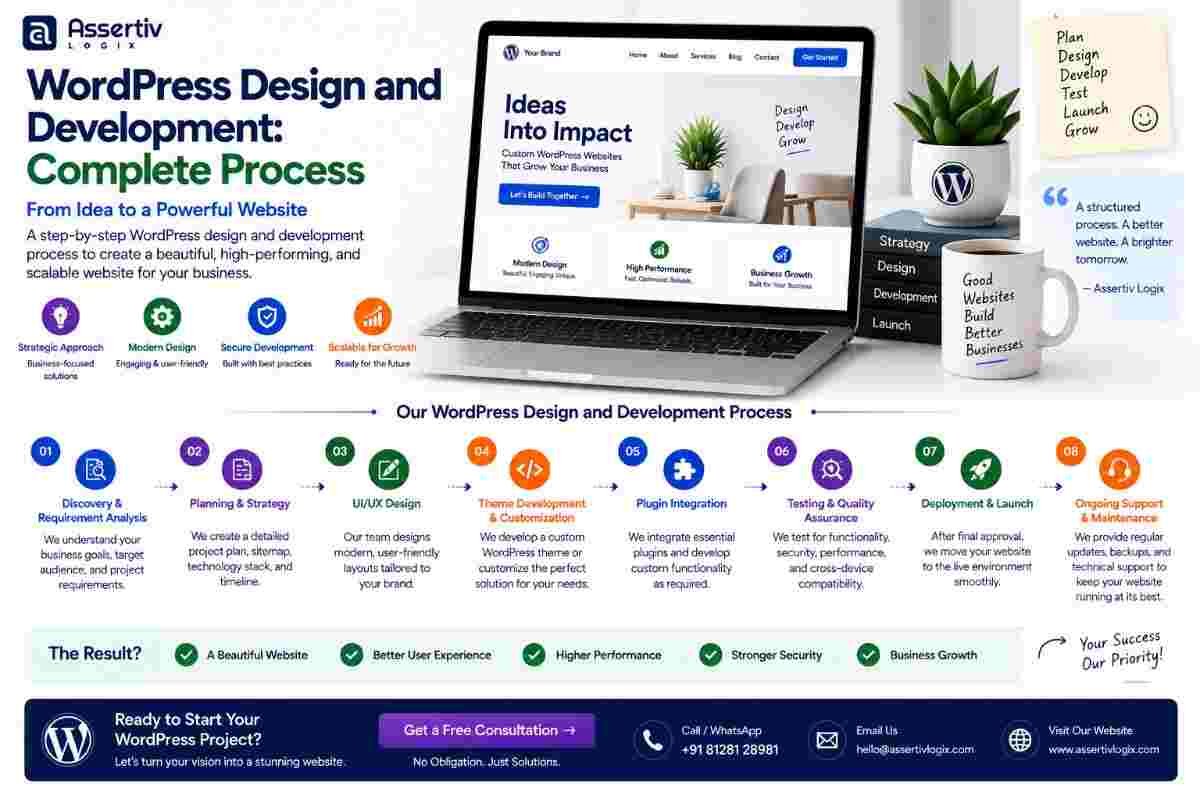
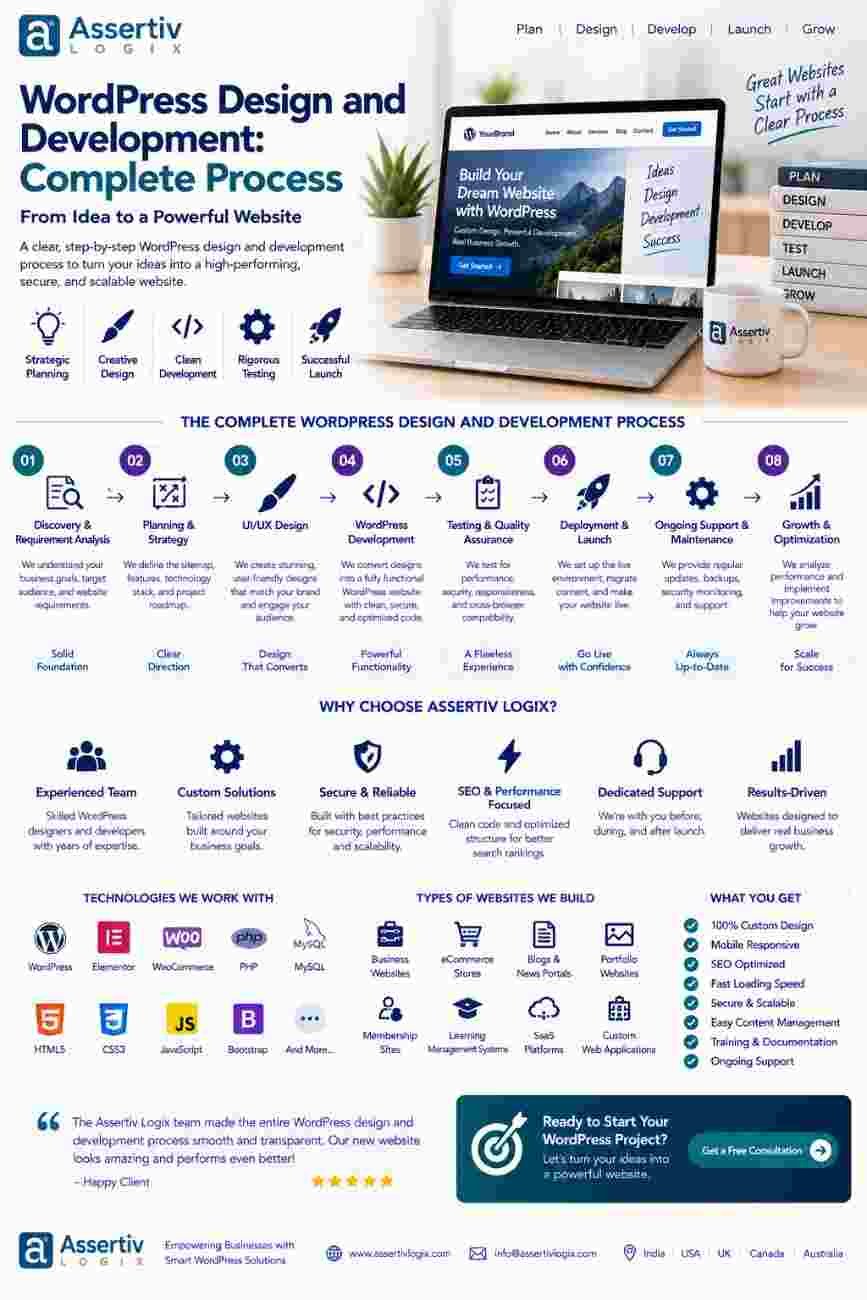
A professional project typically moves through several connected stages:
- Discovery and requirement gathering
- Competitor and audience research
- Website planning and sitemap creation
- Wireframing
- UI/UX design
- Technology and WordPress planning
- WordPress development
- Content implementation
- SEO implementation
- Performance optimization
- Security implementation
- Testing and quality assurance
- Launch
- Monitoring and maintenance
Let’s look at each stage in detail.
What Is WordPress Design and Development?
WordPress design and development refers to the complete process of planning, designing, building, testing, launching, and maintaining a WordPress website.
WordPress design generally focuses on the visual and user experience aspects of a website, including layouts, typography, colors, navigation, responsive behavior, and conversion paths.
WordPress development focuses on turning those designs into a functional website using WordPress, themes, plugins, custom code, APIs, databases, and other technologies.
The best projects treat design and development as connected disciplines rather than two completely separate activities.
Step 1: Discovery and Requirement Gathering
The first stage of WordPress design and development should be understanding the business.
Before designing a homepage or writing code, the development team should understand what the website needs to accomplish.
Important questions during discovery
- What is the main purpose of the website?
- Who is the target audience?
- What products or services are being promoted?
- What actions should visitors take?
- What pages are required?
- Are there existing branding guidelines?
- Does the website need eCommerce?
- Are third-party integrations required?
- What are the SEO goals?
- What are the expected traffic levels?
- Does the existing website need migration?
Clear requirements at this stage reduce confusion during later stages of the WordPress development process.
Step 2: Audience and Competitor Research
Effective WordPress website design should be based on more than personal preferences.
Research helps determine how users interact with similar websites and what competitors are doing well or poorly.
Research can cover:
- Competitor websites
- Search results
- Target customer behavior
- Industry trends
- Common website features
- Competitor positioning
- Content gaps
- Conversion opportunities
The objective is not to copy competitors. Instead, research should help identify opportunities to create a more useful, clearer, and more differentiated website.
Step 3: Create the Website Sitemap
Once requirements are understood, the next stage is planning the website structure.
A sitemap defines the primary pages and their relationships.
A typical business WordPress website might include:
- Home
- About
- Services
- Individual service pages
- Case studies
- Blog
- Contact
- Privacy Policy
- Terms and Conditions
For an eCommerce website, the structure may also include:
- Shop
- Product categories
- Product pages
- Cart
- Checkout
- My Account
A well-planned sitemap improves navigation and creates a foundation for both UX and SEO.
Step 4: Create Wireframes
Wireframing is one of the most useful stages in the WordPress design and development process.
A wireframe provides a simplified representation of a page before visual design begins.
Wireframes can define:
- Header structure
- Navigation
- Hero section
- Content sections
- Calls to action
- Forms
- Images
- Testimonials
- Footer structure
Creating wireframes first makes it easier to identify structural problems before developers start building the website.
Step 5: UI/UX Design
After the wireframes are approved, designers can create the visual interface.
WordPress website design should balance visual appeal with usability and business objectives.
The UI/UX stage commonly covers:
- Typography
- Color systems
- Buttons
- Forms
- Cards
- Navigation
- Spacing
- Images and illustrations
- Responsive layouts
- Interaction states
Designs should be created for different screen sizes because visitors may access the website using desktops, tablets, or mobile devices.
The goal is to create an interface that is attractive while remaining easy to understand and navigate.
Step 6: Choose the WordPress Development Approach
Once the design is approved, the technical implementation strategy needs to be determined.
Depending on the project, developers may choose:
- A carefully selected existing theme
- A customized theme
- A fully custom WordPress theme
- Custom plugins
- Existing plugins with customization
- WooCommerce
- WordPress REST API integrations
- Custom database functionality
The correct approach depends on project requirements rather than simply choosing the fastest development method.
The official WordPress Developer Resources provide technical documentation for developers working with WordPress.
Step 7: WordPress Development
This is where the approved designs are converted into a working website.
During WordPress design and development, developers implement the visual design and connect it with WordPress functionality.
Development can include:
- Custom theme development
- Theme customization
- Plugin configuration
- Custom plugin development
- Custom post types
- Advanced fields
- Forms
- Search functionality
- User accounts
- Membership functionality
- WooCommerce
- Payment integration
- API integration
- Third-party services
Clean and maintainable code is important because the website may need additional functionality in the future.
Step 8: Content Implementation
Content should not be treated as an afterthought.
During WordPress website development, developers and content teams need to ensure that text, images, videos, downloadable resources, and other content are implemented correctly.
Content implementation may include:
- Page copy
- Blog posts
- Product descriptions
- Images
- Videos
- Case studies
- Testimonials
- FAQs
- Calls to action
Content should also be structured in a way that makes it easy for the website owner to update later through the WordPress dashboard.
Step 9: Technical SEO Implementation
SEO should be incorporated into WordPress design and development rather than added at the very end.
Technical SEO considerations can include:
- SEO-friendly URLs
- Heading hierarchy
- Metadata
- Canonical URLs
- XML sitemaps
- Internal linking
- Structured data
- Mobile responsiveness
- Page performance
- Indexability
Google’s Search Central documentation provides guidance on helping search engines understand website content.
For structured data, developers can also reference Schema.org.
Step 10: Performance Optimization
A professional WordPress website should be optimized before launch.
Performance optimization can involve:
- Image compression
- Modern image formats
- Browser caching
- Page caching
- Code optimization
- Script management
- Database optimization
- Plugin optimization
- Content delivery networks
- Server optimization
Tools such as Google PageSpeed Insights can help identify performance opportunities.
Performance should be evaluated on real pages rather than only the homepage because different templates and features can create different performance profiles.
Step 11: WordPress Security
Security is another essential part of professional WordPress development.
Security measures can include:
- Strong authentication
- Appropriate user permissions
- Secure coding practices
- Plugin and theme management
- Secure API connections
- Regular updates
- Backup systems
- Security monitoring
- Spam protection
- Server-level security
Developers can refer to the official WordPress security documentation when implementing security practices.
Step 12: Testing and Quality Assurance
Before launch, the website should go through a structured quality assurance process.
Testing should cover:
| Testing Area | What to Check |
|---|---|
| Functional Testing | Forms, buttons, navigation, search, accounts, and features |
| Responsive Testing | Desktop, tablet, and mobile layouts |
| Browser Testing | Compatibility across major browsers |
| Performance Testing | Loading speed and Core Web Vitals |
| SEO Testing | URLs, metadata, headings, indexability, and structured data |
| Security Testing | Permissions, authentication, forms, and integrations |
| Accessibility Testing | Keyboard navigation, labels, contrast, and usability |
Testing is one of the stages that should never be skipped simply because the website looks correct visually.
Step 13: Client Review and Final Changes
After internal testing, the website can be provided for client review.
The client should review:
- Content
- Images
- Branding
- Navigation
- Forms
- Calls to action
- Products or services
- Contact information
Any final changes should be completed before production deployment.
Step 14: WordPress Website Launch
Once testing and approval are complete, the website can be launched.
A professional launch process should include:
- Final website backup
- Production environment preparation
- Domain and DNS verification
- SSL verification
- Database and file migration if required
- URL verification
- Redirect testing
- Form testing
- Analytics verification
- Search engine configuration
- Final performance check
A controlled launch reduces the possibility of broken pages, missing assets, incorrect redirects, or configuration issues.
Step 15: Post-Launch Monitoring and Maintenance
WordPress design and development does not end when a website goes live.
Websites need ongoing maintenance because WordPress, plugins, themes, hosting environments, browsers, security requirements, and business needs change over time.
Post-launch maintenance can include:
- WordPress updates
- Plugin updates
- Security monitoring
- Backup verification
- Performance monitoring
- Bug fixes
- SEO monitoring
- Content updates
- Feature development
- Database maintenance
For businesses that depend heavily on their websites, ongoing maintenance can help keep the platform secure, stable, and useful.
WordPress Design vs WordPress Development
Although WordPress design and development are closely connected, they address different aspects of the project.
| WordPress Design | WordPress Development |
|---|---|
| Focuses on visual appearance | Focuses on technical implementation |
| Creates layouts and user interfaces | Converts designs into working functionality |
| Defines typography and visual systems | Handles themes, plugins, APIs, and code |
| Focuses heavily on UX | Focuses heavily on functionality and architecture |
| Creates responsive designs | Implements responsive behavior |
A successful website requires both disciplines to work together.
Custom WordPress Design and Development vs Templates
Businesses often need to decide whether to use a ready-made theme or invest in custom WordPress design and development.
| Factor | Template-Based Website | Custom WordPress Development |
|---|---|---|
| Design Flexibility | Limited by the template | Designed around requirements |
| Brand Differentiation | May look similar to other sites | Highly customizable |
| Functionality | Depends on theme/plugins | Custom functionality possible |
| Performance | Depends on theme architecture | Can be optimized specifically |
| Scalability | Can become restrictive | Architecture can support growth |
| Maintenance | Can involve multiple dependencies | Can be structured for maintainability |
The right option depends on the project’s budget, complexity, timeline, functionality, and long-term goals.
Common Mistakes in WordPress Design and Development
A poorly planned project can create problems even when the final website looks attractive.
1. Starting Development Without Requirements
Developing before understanding the business requirements can result in unnecessary rework.
2. Designing Only for Desktop
Mobile responsiveness should be considered throughout the design and development process.
3. Installing Too Many Plugins
Plugins can add valuable functionality, but unnecessary dependencies can make maintenance and performance more difficult.
4. Ignoring SEO Until Launch
SEO-friendly architecture should be considered during planning and development.
5. Skipping Performance Testing
A website can look excellent while still having serious performance problems.
6. Ignoring Security
Security should be part of the development process rather than something addressed only after launch.
7. Forgetting Future Scalability
A website should be designed with reasonable consideration for future content, traffic, features, and integrations.
How Long Does WordPress Design and Development Take?
The timeline for WordPress design and development depends on the complexity of the project.
| Project Type | Typical Complexity |
|---|---|
| Basic Business Website | Low |
| Custom Corporate Website | Medium |
| WooCommerce Store | Medium to High |
| Membership Website | High |
| SaaS/Custom WordPress Application | High |
| Enterprise WordPress Platform | High to Very High |
The actual timeline depends on the number of pages, design requirements, content readiness, integrations, custom functionality, revisions, testing, and migration requirements.
Why Choose Professional WordPress Design and Development?
Professional WordPress design and development can provide a more structured approach to building a website.
Instead of simply installing a theme and adding plugins, a professional development team can consider the complete ecosystem, including:
- Business objectives
- User experience
- Design systems
- Technical architecture
- SEO
- Performance
- Security
- Scalability
- Integrations
- Maintenance
This approach can result in a website that is easier to manage and better aligned with the organization’s long-term goals.
Why Choose Assertivlogix for WordPress Design and Development?
At Assertivlogix, we approach WordPress design and development as a complete process rather than simply a theme installation project.
Our WordPress capabilities include custom website development, custom theme development, plugin development, WooCommerce development, API integrations, website redesign, migration, performance optimization, security improvements, and ongoing WordPress support.
We focus on understanding the business requirement first and then creating a WordPress solution around the project’s goals, audience, functionality, and future requirements.
Whether you need a new business website, WooCommerce store, custom WordPress platform, or ongoing development support, our team can help you plan and execute the project.
Learn more about our WordPress development services or explore our guide on WordPress development for small businesses.
Get professional WordPress design and development built around your business goals, users, SEO requirements, performance needs, and future growth.
Frequently Asked Questions
What is the WordPress design and development process?
The WordPress design and development process typically includes discovery, research, sitemap planning, wireframing, UI/UX design, technical planning, WordPress development, content implementation, SEO, performance optimization, security, testing, launch, and ongoing maintenance.
How does WordPress design differ from WordPress development?
WordPress design focuses primarily on the website’s visual appearance and user experience, while WordPress development focuses on implementing the design and building functionality, integrations, themes, plugins, and technical architecture.
Should I use a WordPress theme or build a custom website?
A ready-made theme can be suitable for simple projects, while custom WordPress design and development can be more appropriate when a business needs unique branding, custom functionality, advanced integrations, better control over performance, or long-term scalability.
Is SEO included in WordPress website development?
SEO can be incorporated into the development process through search-friendly URLs, site architecture, responsive development, performance optimization, structured data, internal linking, metadata implementation, and technical SEO practices.
How long does WordPress website development take?
The timeline depends on project complexity, page count, design requirements, custom functionality, integrations, content readiness, testing, and migration requirements. A basic business website generally requires less work than an eCommerce, membership, SaaS, or enterprise platform.
Why is testing important before launching a WordPress website?
Testing helps identify broken links, form problems, responsive layout issues, browser compatibility problems, performance issues, security weaknesses, and other errors before visitors use the production website.
Does WordPress website development end after launch?
No. WordPress websites require ongoing updates, security monitoring, backups, performance optimization, content changes, bug fixes, and feature improvements as the website and business evolve.
Final Thoughts
WordPress design and development is a complete process that combines strategy, design, technology, content, SEO, performance, security, testing, and ongoing maintenance.
A successful WordPress website should not only look good. It should provide a smooth user experience, support search visibility, load efficiently, remain secure, integrate with the tools your business needs, and provide room for future growth.
By following a structured WordPress design and development process, businesses can reduce development risks and create a website that delivers value beyond its launch date.
If you are planning a new website, redesign, WooCommerce store, or custom WordPress platform, professional WordPress design and development can give you a stronger foundation for long-term digital growth.