15 Questions to Ask Before Hiring a WordPress Developer
Hiring a WordPress developer can feel easy when you first start looking.
There are thousands of developers available online. Some have years of experience, some specialize in WooCommerce, others focus on Elementor, and some build custom WordPress plugins and applications.
But here’s the problem: not every WordPress developer is the right developer for your project.
A developer may be excellent at building basic websites but have very little experience with custom PHP development. Another developer may be great at Elementor but not know how to troubleshoot a complex WooCommerce checkout problem.
That’s why asking the right questions before hiring someone can save you a lot of time, money, and frustration.
Whether you’re building a new website, redesigning an existing WordPress site, launching a WooCommerce store, developing a custom plugin, or looking for ongoing maintenance, this guide will help you evaluate potential developers properly.
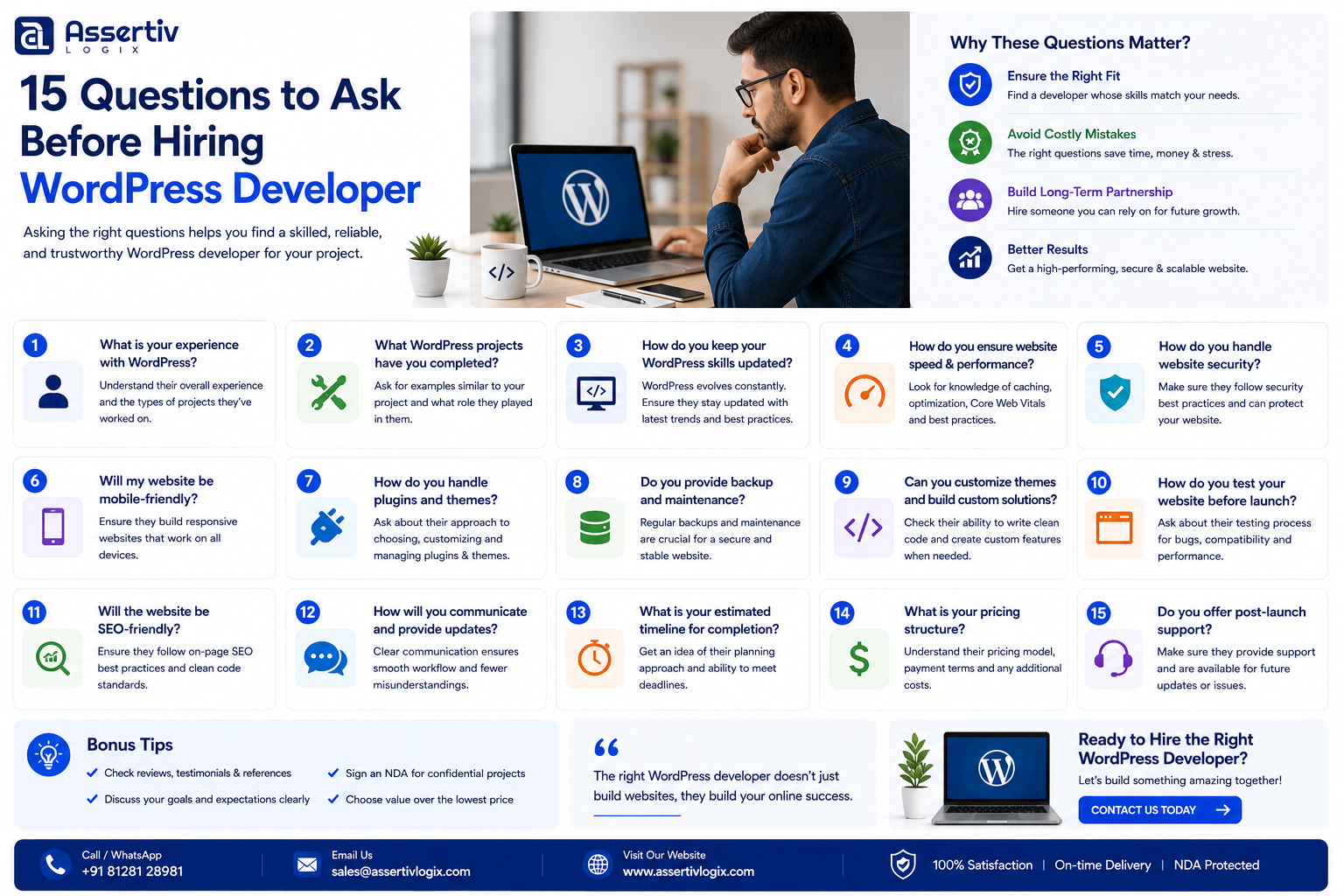
In this article, we’ll cover 15 questions to ask before hiring a WordPress developer, along with what you should look for in their answers.
Why You Should Ask Questions Before Hiring a WordPress Developer
Hiring a developer isn’t simply about finding someone who knows WordPress.
You are potentially trusting that person with an important part of your business.
Your website may handle:
- Customer information
- Payments
- Orders
- Leads
- Business data
- Marketing campaigns
- Product information
- Customer accounts
A poor development decision can result in slow performance, security problems, broken functionality, unexpected costs, or difficulty maintaining the website later.
On the other hand, the right developer can become a long-term technical partner who helps your website grow with your business.
15 Questions to Ask Before Hiring a WordPress Developer
1. How Many Years of WordPress Development Experience Do You Have?
This should be one of your first questions.
However, don’t focus only on the number of years.
Someone might say they have five years of WordPress experience, but that could mean five years of installing themes and plugins.
Another developer might have three years of experience building custom plugins, WooCommerce systems, and WordPress applications.
Those are very different skill sets.
Ask the developer to explain what they have actually worked on.
For example:
- How many WordPress websites have you developed?
- Have you built custom themes?
- Have you developed custom plugins?
- Have you worked with WooCommerce?
- Have you handled WordPress migrations?
- Have you worked on high-traffic websites?
What you want to hear: specific examples rather than a generic statement about years of experience.
2. Can You Show Me Relevant WordPress Projects?
A portfolio can tell you much more than a resume.
Ask for examples that are similar to your project.
If you’re building an ecommerce website, look for WooCommerce projects.
If you need a custom plugin, ask for examples of plugin development.
If you’re building a corporate website, look for similar business websites.
Don’t just ask:
“Can you build WordPress websites?”
Ask:
“Have you built something similar to what I need?”
Relevant experience can reduce development risk because the developer has already encountered similar technical challenges.
3. What Exactly Will You Handle in My Project?
This question is particularly important when hiring through a company or agency.
The person you speak with during the sales process may not be the person who actually develops your website.
Ask:
- Who will develop my website?
- Will you personally work on the project?
- Will another developer handle the implementation?
- Will there be a project manager?
- Will a QA specialist test the website?
If you’re hiring a freelancer, this question is simpler because you’re usually working directly with the developer.
If you’re hiring a company, make sure you understand the delivery team.
4. Do You Work With Custom WordPress Development or Only Page Builders?
This is an important technical question.
WordPress development can mean many different things.
A developer might primarily work with:
- Elementor
- Divi
- Gutenberg
- WPBakery
Those tools can be perfectly suitable for many websites.
But custom projects may require knowledge of:
- PHP
- WordPress hooks
- Filters
- Custom post types
- Custom taxonomies
- REST APIs
- AJAX
- MySQL
- Custom plugins
If your project requires custom functionality, make sure the developer has genuine coding experience.
5. Do You Have WooCommerce Experience?
If you’re building an online store, this question is essential.
WooCommerce development can involve much more than installing WooCommerce and adding products.
Ask whether the developer has experience with:
- Custom checkout
- Payment gateways
- Shipping integrations
- Subscriptions
- Memberships
- Product variations
- Custom pricing
- Order automation
- ERP integrations
- CRM integrations
- WooCommerce hooks
If your store is business-critical, choose someone who understands WooCommerce architecture rather than someone who has only created basic stores.
You can also review our WooCommerce Conversion Rate Optimization Guide for additional ecommerce considerations.
6. What WordPress Development Process Do You Follow?
A professional developer should have a clear development process.
Ask them to explain what happens from the beginning of the project to launch.
A typical process might include:
- Requirement gathering
- Project planning
- Design or design review
- Development
- Staging deployment
- Testing
- Client review
- Bug fixing
- Final approval
- Production deployment
If someone immediately says, “I’ll start editing the live website,” that’s a warning sign for anything beyond a very small task.
7. Do You Use a Staging Environment?
This is one of the most important technical questions to ask.
A staging environment is a separate version of your website where developers can make and test changes before pushing them to production.
For example:
Development → Staging → Production
This approach reduces the risk of breaking your live website.
Ask whether the developer uses:
- Staging websites
- Local development environments
- Version control
- Backup systems
- Deployment procedures
8. Do You Use Git or Version Control?
For serious WordPress development, version control is extremely useful.
Git allows developers to track changes and maintain a history of the codebase.
It can make it easier to:
- Track changes
- Collaborate
- Review code
- Revert changes
- Manage development branches
- Deploy updates
For a simple five-page website, Git may not always be necessary.
For custom plugins, themes, WooCommerce systems, and long-term development, it becomes much more valuable.
9. How Do You Handle WordPress Security?
Security should be part of the development process from the beginning.
Ask the developer how they handle:
- Input sanitization
- Output escaping
- Nonces
- User capabilities
- SQL injection prevention
- Cross-site scripting prevention
- Authentication
- Plugin security
- File permissions
- Backups
For custom WordPress development, security knowledge is especially important.
A developer should understand WordPress security APIs rather than simply relying on a security plugin to protect everything.
10. How Will You Optimize My Website for Performance?
A website that works isn’t necessarily a website that performs well.
Ask your developer how they approach performance.
They should be familiar with:
- Page caching
- Object caching
- CDNs
- Image optimization
- Lazy loading
- CSS optimization
- JavaScript optimization
- Database optimization
- Server configuration
- Core Web Vitals
Be cautious if the answer is simply:
“I’ll install a caching plugin.”
Caching can help, but performance optimization usually requires identifying the actual bottlenecks first.
For a deeper understanding, read our guide to optimizing WordPress for Core Web Vitals.
11. How Much Will My WordPress Project Cost?
Of course, you need to discuss price.
But don’t ask only:
“What’s your hourly rate?”
Also ask:
- How many hours do you estimate?
- What is included?
- What isn’t included?
- Are revisions included?
- How are additional requirements priced?
- Are third-party plugins included?
- Are hosting costs included?
- What happens if the project takes longer?
A developer charging $20 per hour for 100 hours may cost more than a developer charging $30 per hour for 50 hours.
Always compare the estimated total project cost.
If you’re comparing Indian developers, you can also read our guide on WordPress developer hourly rates in India.
12. What Is Your Estimated Timeline?
Time is money, especially for business websites and ecommerce stores.
Ask for a realistic timeline.
A professional developer should be able to break the project into milestones.
For example:
| Milestone | Example Timeline |
|---|---|
| Requirements | 1–2 days |
| Design | 3–7 days |
| Development | 1–3 weeks |
| Testing | 2–4 days |
| Client Review | 2–5 days |
| Launch | 1 day |
Actual timelines will depend on the project.
Be cautious about anyone promising to build a complex website in an unrealistically short period without first understanding the requirements.
13. What Happens After the Website Launches?
This question is often forgotten.
But your relationship with the developer shouldn’t necessarily end when the website goes live.
Ask about:
- Bug-fix periods
- Maintenance
- Security updates
- WordPress updates
- Plugin updates
- Performance monitoring
- Emergency support
- Future development
Some developers offer a limited warranty period.
Others provide monthly maintenance plans.
Make sure you understand what’s included before signing the agreement.
14. Who Owns the Website and Code?
This question is particularly important for businesses.
Before development begins, clarify ownership of:
- Website files
- Custom code
- WordPress theme
- Custom plugins
- Design files
- Database
- Hosting account
- Domain
You should know exactly what you will receive when the project is complete.
Also ask whether any third-party licenses are being used.
For example, a developer may use premium plugins or themes that require separate licenses.
15. What Happens If I Need Changes or Additional Features?
Almost every website project changes during development.
You may start with:
“We only need a basic ecommerce website.”
Then someone asks:
- Can we add subscriptions?
- Can we integrate our CRM?
- Can we add WhatsApp notifications?
- Can customers create accounts?
- Can we add custom reports?
These changes can affect the project scope.
Ask the developer how they handle change requests.
A professional process might include:
- Client submits a new requirement.
- Developer evaluates the requirement.
- Developer estimates additional time and cost.
- Client approves the change.
- Developer implements the feature.
- Feature is tested and delivered.
This prevents unexpected invoices and confusion.
Bonus Questions to Ask a WordPress Developer
The following questions aren’t part of the core 15, but they can help when evaluating candidates.
Do you provide references?
If possible, ask for previous client references or testimonials.
What happens if you become unavailable?
This is especially important when hiring a freelancer for a long-term project.
How do you communicate?
Ask whether they use email, Slack, Microsoft Teams, WhatsApp, project-management tools, or scheduled meetings.
How often will I receive updates?
Clear communication can prevent misunderstandings.
Can you work with my existing hosting provider?
Make sure the developer has experience with your hosting environment.
Can you work with my existing theme and plugins?
This is important when you’re modifying an existing website rather than starting from scratch.
Freelancer vs WordPress Company: Which Should You Hire?
These questions can also help you decide whether you need a freelancer or a WordPress company.
| Project Type | Recommended Option |
|---|---|
| Small business website | Freelancer or small development team |
| Simple landing page | Freelancer |
| Basic WordPress maintenance | Freelancer |
| Large corporate website | WordPress company |
| Complex WooCommerce store | Company or senior specialist |
| Custom WordPress plugin | Experienced developer or company |
| Multiple API integrations | WordPress company |
| Large website migration | Experienced specialist or company |
| Long-term development | Company or dedicated developer |
If you want to understand this comparison in more detail, read our article WordPress Company vs Freelancer in India.
How to Evaluate the Developer’s Answers
Asking questions is only half the process.
You also need to evaluate the answers.
Look for someone who:
- Answers clearly
- Provides specific examples
- Asks questions about your business
- Understands your goals
- Explains technical concepts clearly
- Doesn’t make unrealistic promises
- Provides a structured process
- Is transparent about pricing
- Explains potential risks
One particularly good sign is when a developer asks you questions before giving you a final quote.
That’s usually a sign that they are trying to understand the actual project rather than simply winning the job.
Red Flags When Hiring a WordPress Developer
Be cautious if a developer:
- Gives you a price without understanding your requirements
- Promises an extremely fast delivery
- Has no relevant portfolio
- Cannot explain their technical approach
- Doesn’t use backups
- Wants to make major changes directly on your live website
- Cannot explain how they handle security
- Has no clear support policy
- Uses heavily outdated WordPress practices
- Is unwilling to document the work
Why Relevant Experience Matters More Than Years
Let’s say you’re hiring someone to build a WooCommerce store.
Developer A has 10 years of WordPress experience but has mostly built informational websites.
Developer B has four years of WordPress experience and has built dozens of WooCommerce stores involving payment gateways, subscriptions, shipping APIs, and custom checkout systems.
For your ecommerce project, Developer B may be the better choice.
This is why you should always ask for relevant experience, not just total experience.
How Much Does It Cost to Hire a WordPress Developer in India?
WordPress developer pricing in India varies according to experience, specialization, project complexity, and engagement model.
As a general planning range:
- Junior: $5–$15/hour
- Mid-level: $12–$30/hour
- Senior: $25–$50+/hour
- Specialist: $30–$60+/hour
These figures are only indicative. Highly experienced WooCommerce, plugin, performance, or architecture specialists may charge more.
For a detailed comparison, see our WordPress Developer Cost India vs USA and WordPress Developer Cost India vs UK guides.
Should You Hire a Freelancer or WordPress Company?
A freelancer can be a great choice when:
- Your project is small
- You need direct communication
- You have a limited budget
- You need a specific task completed
- You don’t need multiple specialists
A WordPress company can be a better choice when:
- Your project is complex
- You need multiple specialists
- You are building a large WooCommerce store
- You need custom plugin development
- You require API integrations
- You need ongoing development
- You need QA and project management
- Your website is business-critical
There’s no universal answer.
The right choice depends on your requirements.
Why Choose Assertivlogix for WordPress Development?
Assertivlogix provides WordPress and WooCommerce development services for businesses, startups, ecommerce companies, and digital agencies.
Our services include:
- Custom WordPress Development
- WooCommerce Development
- Custom WordPress Plugin Development
- Custom Theme Development
- Elementor Development
- API Integration
- WordPress Migration
- Performance Optimization
- WordPress Maintenance
- Dedicated WordPress Developers
- White-Label WordPress Development
Whether you need a single developer for a focused project or a larger development team for a complex WordPress platform, the engagement can be structured around your actual requirements.
Not sure whether you need a freelancer, dedicated developer, or complete WordPress development team? Share your requirements with our specialists and get practical guidance on the right approach, estimated effort, and development model.
Frequently Asked Questions
What should I ask before hiring a WordPress developer?
Ask about their WordPress experience, relevant portfolio, technical skills, development process, security practices, performance optimization, pricing, timeline, testing, ownership, and post-launch support.
How do I know if a WordPress developer is good?
Review relevant projects, technical knowledge, communication, development process, coding practices, client reviews, and ability to explain how they would approach your specific requirements.
Should I ask for a WordPress developer’s portfolio?
Yes. A portfolio helps you evaluate whether the developer has experience with projects similar to yours. Ask specifically about their contribution to each project.
How much does it cost to hire a WordPress developer in India?
Rates vary based on experience and specialization. General international-client rates may range from approximately $5–$15 per hour for junior developers to $25–$50+ for senior developers.
Should I hire a freelancer or WordPress company?
Freelancers can be ideal for smaller and clearly defined projects. A WordPress company may be more suitable for complex websites, WooCommerce, custom plugins, API integrations, and long-term development.
Should a WordPress developer use a staging website?
For most development projects, a staging environment is strongly recommended. It allows changes to be tested before they are deployed to the live website.
Should a WordPress developer know PHP?
Yes, especially if your project requires custom WordPress development. WordPress is built primarily with PHP, so PHP knowledge is important for custom themes, plugins, integrations, and advanced functionality.
What should I ask about WordPress security?
Ask how the developer handles sanitization, escaping, nonces, user capabilities, SQL injection prevention, XSS prevention, authentication, backups, updates, and secure development practices.
What should I ask about website performance?
Ask how they diagnose slow websites and whether they work with caching, CDN configuration, image optimization, database optimization, JavaScript and CSS optimization, server configuration, and Core Web Vitals.
What happens after my WordPress website launches?
Ask whether the developer provides a warranty, bug fixes, maintenance, security updates, emergency support, and ongoing development. Clarify exactly what is included in your agreement.
Final Checklist Before Hiring a WordPress Developer
Before signing a contract, make sure you can answer “yes” to most of these questions:
- Have I reviewed their relevant portfolio?
- Do they understand my project requirements?
- Do they have the required technical skills?
- Have they worked on similar WordPress projects?
- Do I understand the development process?
- Will development happen in a staging environment?
- Are backups available?
- Do they understand WordPress security?
- Do they understand performance optimization?
- Is the project cost clear?
- Is the timeline realistic?
- Do I know who owns the code?
- Do I know what happens after launch?
- Do I understand how additional work is charged?
- Do I feel comfortable communicating with them?
Final Thoughts
Hiring a WordPress developer shouldn’t be a race to find the cheapest quote.
Your website is an important business asset, and the developer you choose can affect its performance, security, maintainability, and future growth.
The best developer isn’t necessarily the person with the lowest hourly rate or the longest list of technologies.
It’s the person who understands your requirements, has relevant experience, communicates clearly, follows a professional development process, and can deliver reliable work.
Use these 15 questions to ask before hiring a WordPress developer to compare your options carefully.
Ask questions.
Review portfolios.
Understand the process.
Compare the complete cost.
And most importantly, make sure the developer understands what your business actually needs.
If you’re looking for a reliable WordPress development partner for your next project, contact Assertivlogix and share your requirements with our team.