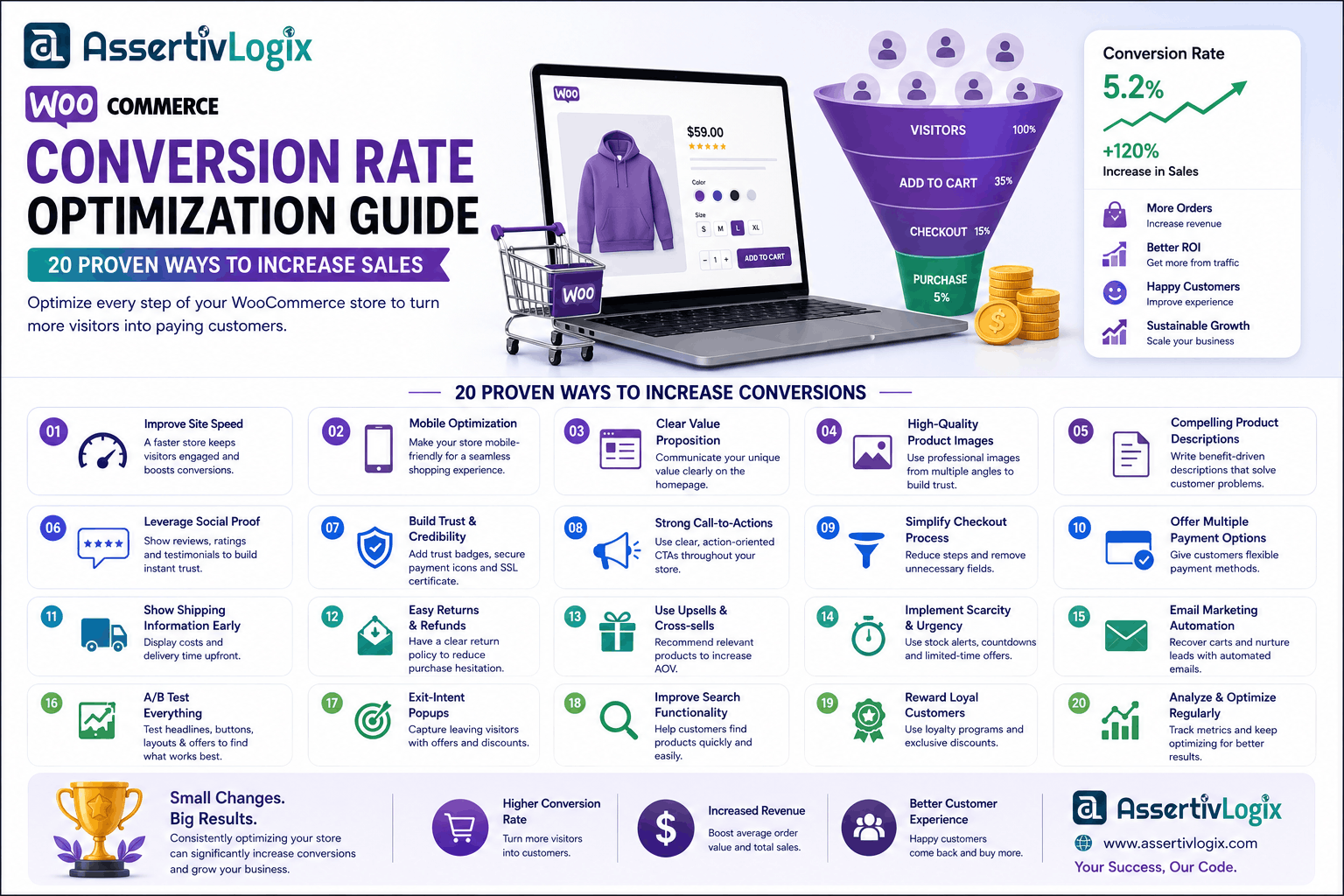
Getting visitors to your WooCommerce store is only half the battle. The real challenge is turning those visitors into paying customers. This is where Conversion Rate Optimization (CRO) plays a crucial role. By improving your store’s user experience, performance, and trust signals, you can increase sales without spending more on advertising.
Whether you own a small online shop or a large ecommerce business, optimizing your WooCommerce store can significantly improve revenue, customer satisfaction, and long-term growth. This guide explores practical strategies that help you increase conversions and create a better shopping experience.
What is WooCommerce Conversion Rate Optimization?
WooCommerce Conversion Rate Optimization (CRO) is the process of improving your online store to encourage more visitors to complete desired actions, such as purchasing products, signing up for newsletters, or contacting your business.
Rather than focusing solely on increasing website traffic, CRO helps maximize the value of your existing visitors.
Why Conversion Rate Optimization Matters
Even a small increase in conversion rate can generate substantial revenue growth. If your store receives 10,000 monthly visitors with a 2% conversion rate, improving it to 3% results in 50% more orders without additional marketing costs.
- Increase revenue
- Lower customer acquisition costs
- Improve return on advertising spend (ROAS)
- Enhance customer satisfaction
- Reduce bounce rates
- Build customer trust
1. Improve Website Speed
Fast-loading websites consistently achieve better conversion rates. Customers expect pages to load within seconds, especially on mobile devices.
Optimize your store by:
- Choosing fast WordPress hosting.
- Compressing images.
- Using browser caching.
- Implementing a Content Delivery Network (CDN).
- Minifying CSS and JavaScript files.
For more optimization techniques, read our guide on WooCommerce Performance Guide.
2. Optimize for Core Web Vitals
Google’s Core Web Vitals directly impact user experience and SEO. Improving loading speed, responsiveness, and visual stability creates a smoother shopping journey.
Learn more in our article on How to Optimize WordPress for Core Web Vitals.
3. Simplify Navigation
Customers should find products quickly. Use clear menus, logical categories, filters, breadcrumbs, and a powerful search function to improve product discovery.
4. Optimize Product Pages
Your product pages should provide everything customers need to make a purchasing decision.
- High-quality images
- Detailed descriptions
- Product videos
- Customer reviews
- Clear pricing
- Availability information
- Shipping details
5. Write Better Product Descriptions
Focus on benefits rather than features. Explain how the product solves problems and improves the customer’s life.
6. Use High-Quality Product Images
Professional product photography builds trust and reduces purchase hesitation. Include multiple images and zoom functionality where appropriate.
7. Display Customer Reviews
Social proof helps visitors feel confident about purchasing. Encourage verified buyers to leave reviews and ratings.
8. Create Trust Signals
Customers are more likely to purchase when they trust your website.
- SSL certificate
- Secure payment icons
- Money-back guarantee
- Contact information
- Return policy
- Privacy policy
Protect your store by following our WordPress Security Checklist.
9. Reduce Cart Abandonment
Many shoppers abandon their carts before completing checkout.
Reduce abandonment by:
- Offering guest checkout.
- Showing total costs early.
- Providing multiple payment methods.
- Sending abandoned cart reminders.
- Simplifying checkout steps.
10. Optimize Checkout Experience
Every unnecessary field increases friction. Keep checkout short, mobile-friendly, and easy to complete.
11. Offer Multiple Payment Options
Supporting various payment methods improves convenience and reduces failed transactions.
12. Personalize Product Recommendations
Recommend related, complementary, and frequently purchased products to increase average order value.
You can automate intelligent recommendations using the AI Ecommerce Growth Suite.
13. Improve Mobile Experience
Mobile commerce continues to grow rapidly. Ensure buttons, forms, menus, and checkout work flawlessly on smartphones and tablets.
14. Optimize Calls-to-Action
Your “Add to Cart” and “Buy Now” buttons should stand out with clear, action-oriented messaging.
15. Use Exit Intent Offers
Exit-intent popups offering discounts or free shipping can recover visitors before they leave your store.
16. Display Shipping Information Clearly
Unexpected shipping costs are one of the biggest causes of cart abandonment. Be transparent about shipping fees and delivery times.
17. Use AI to Improve Conversions
Artificial intelligence helps personalize shopping experiences, recommend products, automate marketing, and improve customer engagement.
Explore how AI can transform your WooCommerce store with the AI Ecommerce Growth Suite.
18. Improve Website Performance with Static Pages
Marketing pages, landing pages, and documentation can often be served as static HTML for exceptional performance.
Learn more about the WP Static HTML Pages plugin to improve loading speed.
19. A/B Test Important Pages
Test headlines, product images, CTA buttons, layouts, and pricing strategies to identify what converts best.
20. Monitor Analytics
Use analytics tools to understand customer behavior and continuously optimize your store based on real data.
Common Conversion Mistakes
- Slow website speed.
- Complicated checkout.
- Poor mobile experience.
- Weak product descriptions.
- No customer reviews.
- Hidden shipping costs.
- Too many distractions.
WooCommerce CRO Checklist
- Fast hosting
- Optimized Core Web Vitals
- Simple navigation
- Professional product images
- Clear product descriptions
- Customer reviews
- Guest checkout
- Multiple payment methods
- Mobile optimization
- Analytics tracking
Conclusion
WooCommerce Conversion Rate Optimization is an ongoing process that combines performance, usability, trust, and continuous testing. By implementing the strategies in this guide, you can increase conversions, improve customer satisfaction, and maximize revenue without increasing your advertising budget.
If you’re looking to build a high-performing WooCommerce store, the experts at Assertivlogix can help with WordPress Development, WooCommerce Development, performance optimization, custom plugin development, and AI-powered ecommerce solutions tailored to your business.