Choosing the right platform is one of the most important decisions when building a business website. The platform affects how your website looks, how easily your team can manage content, how well it performs, and how much flexibility you have as your business grows.
Two popular options are custom WordPress development and Webflow. Both can produce professional, responsive websites, but they approach website creation differently. WordPress offers an open-source content management system with extensive customization possibilities, while Webflow combines visual website design, content management, and hosting in a managed platform.
So, which one should you choose?
The answer depends on your requirements, technical resources, budget, content strategy, and long-term plans. In this guide, we compare custom WordPress vs Webflow across design flexibility, performance, SEO, pricing, scalability, security, integrations, and ownership.
What Is Custom WordPress Development?
Custom WordPress development involves building a website around your business requirements using WordPress as the content management system. Instead of relying entirely on a ready-made theme or page builder, developers can create custom themes, templates, plugins, post types, and integrations.
WordPress is open-source software. You can choose your hosting provider, modify your website’s code, connect external services, and extend its functionality using plugins or custom development.
A custom WordPress website can include:
- Custom-designed themes and page templates
- Business-specific functionality and workflows
- Custom post types and structured content
- WooCommerce online stores
- CRM, ERP, payment, and third-party API integrations
- Membership portals and customer dashboards
- Custom plugins and automation features
- Advanced SEO and performance configurations
This makes WordPress suitable for businesses that need more than a standard marketing website or expect their digital requirements to evolve over time.
What Is Webflow?
Webflow is a visual website development platform that allows designers and teams to create websites through a visual interface. It combines website design tools, a content management system, hosting, and publishing features within its platform.
Rather than building a traditional WordPress theme and managing separate hosting, users can design pages visually and publish them through Webflow’s hosting infrastructure.
Webflow provides features such as:
- Visual drag-and-drop-style website design
- Responsive layout controls
- CMS collections for structured content
- Reusable components and design systems
- Built-in hosting and publishing workflows
- Animations and interaction tools
- SEO settings for pages and CMS content
- Third-party integrations and custom code options
Webflow is particularly attractive to design-focused teams that want greater visual control without managing a traditional hosting and development environment.
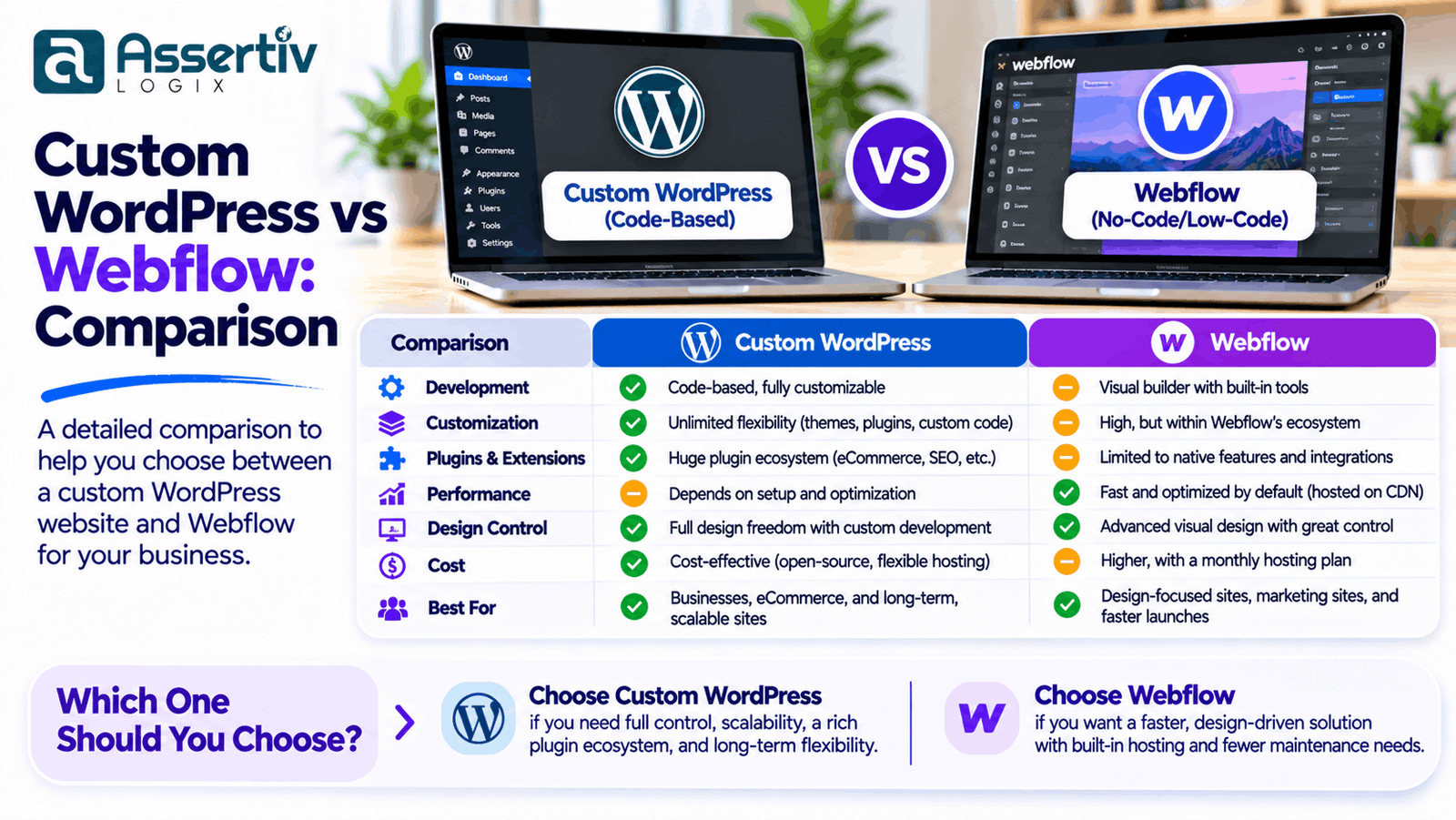
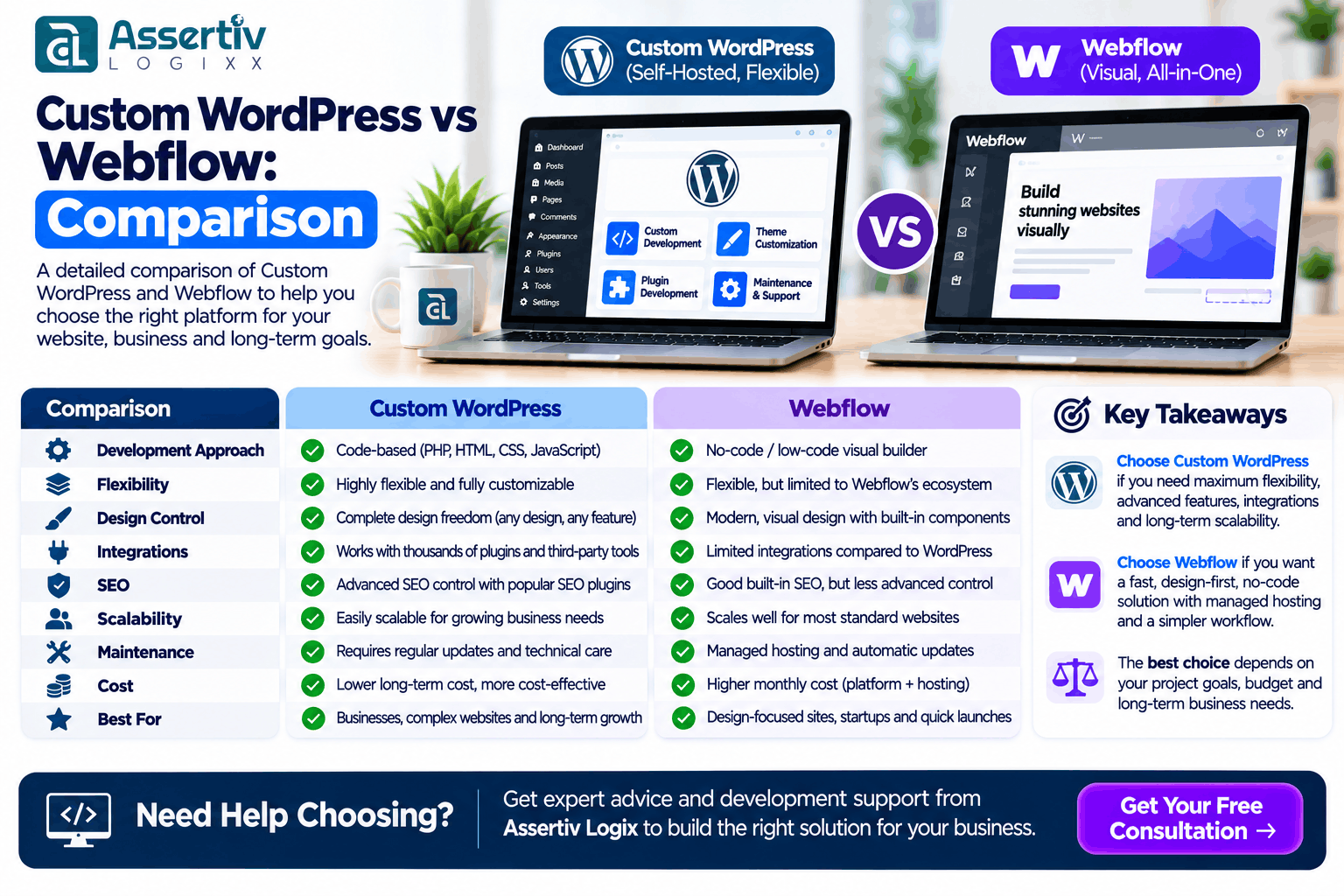
Custom WordPress vs Webflow: Quick Comparison
Both platforms can support professional business websites, but their strengths are different.
| Comparison Factor | Custom WordPress | Webflow |
|---|---|---|
| Platform model | Open-source CMS | Managed website platform |
| Design flexibility | Very high with custom development | High through visual design tools |
| Development approach | Code-based and visual tools | Primarily visual development |
| Hosting | Choose your own hosting provider | Managed Webflow hosting options |
| Plugins and extensions | Large plugin ecosystem and custom plugins | Native features, apps, integrations, and custom code |
| Content management | Flexible CMS and custom content structures | Visual CMS collections with plan-dependent limits |
| eCommerce | WooCommerce and custom commerce solutions | Webflow Ecommerce and external integrations |
| SEO | Extensive technical and plugin-level control | Built-in SEO controls for common requirements |
| Customization | Source-code-level customization | Visual customization with code extensions |
| Maintenance | Owner manages hosting, updates, backups, and security | Platform manages much of the infrastructure |
| Portability | Files and database can be moved between compatible hosts | Some exported code is available, but hosted CMS and platform features are not fully portable |
| Best suited for | Complex, scalable, integration-heavy websites | Design-led marketing and content websites |
1. Design Flexibility and Customization
Custom WordPress
Custom WordPress development provides extensive control over the website’s design and functionality. Developers can translate a Figma design into custom templates, create unique page layouts, and build components that match the business’s brand and workflow.
You are not limited to the features of a particular theme or visual editor. Developers can modify the front end, back end, database structure, and integrations when the project requires it.
For example, a company may need a custom service quotation system, location-based content, customer-specific dashboards, or a complex product catalogue. These features can be developed directly within WordPress or connected through external applications.
Webflow
Webflow offers strong visual design capabilities. Designers can control layouts, typography, spacing, responsive breakpoints, animations, and reusable components through its visual interface.
This can make it easier for design-focused teams to build polished marketing websites without writing every layout from scratch. However, highly specialized functionality may require custom code, integrations, or external services.
Which is better? Webflow is a strong choice for visual design workflows. Custom WordPress is generally more flexible when the website needs complex functionality, custom business logic, or deeper source-code control.
2. Performance and Website Speed
Website speed affects user experience, conversion opportunities, and search performance. However, neither WordPress nor Webflow is automatically faster in every situation.
Custom WordPress performance
WordPress performance depends on the quality of the hosting environment, theme, plugins, database queries, images, caching, and front-end implementation.
A carefully developed WordPress website can be optimized through:
- Lightweight custom themes and components
- Efficient database queries
- Image compression and modern image formats
- Page caching and object caching where appropriate
- Content delivery networks
- Reduced JavaScript and CSS payloads
- Optimized fonts and third-party scripts
- Regular performance testing
Webflow performance
Webflow manages much of the hosting infrastructure, which reduces the amount of server configuration required from the website owner. Its visual development environment can support efficient workflows, but the final site’s speed still depends on how it is designed and built.
Large images, excessive animations, unnecessary scripts, embedded third-party tools, and complex page structures can affect performance on any platform.
Which is better? Webflow offers a more managed hosting experience. WordPress offers more control over the hosting stack and optimization strategy. The actual performance winner depends on implementation and measured results.
3. SEO Capabilities
Search engine optimization is an important consideration for businesses that rely on organic traffic. Both WordPress and Webflow provide tools for managing important SEO elements, but their approaches differ.
SEO with custom WordPress
WordPress supports a broad SEO ecosystem. Website owners can configure metadata, XML sitemaps, canonical URLs, redirects, schema markup, breadcrumbs, robots directives, and other technical SEO elements using plugins or custom development.
Developers can also build structured content types, control templates, optimize internal linking, and implement technical changes according to the website’s needs.
Useful resources include Google’s SEO Starter Guide and the WordPress Developer Resources.
SEO with Webflow
Webflow includes SEO settings for page titles, meta descriptions, image alt text, canonical tags, redirects, and sitemap-related configuration. These features cover many common on-page SEO requirements.
For more advanced requirements, teams may need custom code, integrations, or a different content architecture. The available controls can also depend on the site’s configuration and Webflow plan.
Which is better? Both platforms can support effective SEO. WordPress is often preferable when a business needs extensive technical customization, structured content, custom schema implementation, or a large SEO-focused publishing operation. Webflow can be sufficient for many marketing websites with standard SEO needs.
4. Content Management and Blogging
Publishing and maintaining content should be straightforward for the people who manage the website. The best CMS depends on the size of your content operation and how your content is structured.
WordPress content management
WordPress was built as a content management system and has expanded into a platform for blogs, business websites, publications, and online stores.
It supports categories, tags, custom post types, custom taxonomies, user roles, editorial workflows, and extensive content-management extensions.
For example, a business could create separate content types for services, case studies, team members, locations, testimonials, and resources. Each content type can have its own fields and templates.
Webflow CMS
Webflow CMS uses collections to organize structured content. Teams can create collections for blog posts, projects, team members, and other content types, then design templates for displaying each item.
This visual approach can be convenient for design teams. However, collection limits, publishing needs, and other capabilities depend on the selected plan.
Which is better? WordPress is a strong option for large or complex content operations. Webflow is convenient for teams managing structured content through a visual design workflow.
5. eCommerce Capabilities
If your website needs to sell products or services online, evaluate the available commerce features carefully.
WordPress with WooCommerce
WordPress can be extended into an online store using WooCommerce. It supports product catalogues, payment gateways, shipping options, coupons, order management, taxes, and a large extension ecosystem.
Custom WooCommerce development can also support specialized business requirements, including:
- Custom checkout and payment workflows
- Subscription and membership functionality
- Wholesale and B2B pricing
- Product configurators
- ERP and CRM integrations
- Custom shipping and fulfilment logic
- Marketplace functionality
- Regional pricing and payment methods
Explore Assertivlogix WooCommerce Development Services for custom online store solutions.
Webflow Ecommerce
Webflow Ecommerce provides tools for creating product pages, managing products, designing shopping experiences, and handling online sales. It can work well for businesses with relatively straightforward product catalogues and supported checkout requirements.
Before choosing it, review the current plan limits, payment options, shipping requirements, tax workflows, integrations, and operational features against your business needs.
Which is better? WordPress with WooCommerce is generally more suitable for businesses that need extensive commerce customization, specialized workflows, or a broad extension ecosystem. Webflow can be appropriate for simpler stores where its available commerce features meet the requirements.
6. Integrations and Custom Functionality
Modern websites often need to communicate with external tools such as CRMs, email marketing platforms, payment gateways, inventory systems, analytics platforms, and business applications.
WordPress integrations
WordPress supports integrations through plugins, APIs, webhooks, custom PHP development, and its REST API. Developers can create custom connections between the website and external systems.
This is useful when a business needs to synchronize customer information, automate workflows, connect internal applications, or build functionality that is not available through a standard plugin.
Webflow integrations
Webflow supports integrations through its available apps, APIs, webhooks, embedded services, and custom code. These options can connect a website to many external tools.
However, complex workflows may require third-party automation platforms or custom development. The available integration approach should be checked against the technical requirements before committing to the platform.
Which is better? WordPress generally offers more flexibility for complex integrations and custom back-end functionality. Webflow can handle many common integrations, particularly for marketing and lead-generation websites.
7. Security and Maintenance
Website security is not determined by the platform alone. It also depends on configuration, access controls, updates, hosting, integrations, and ongoing maintenance.
WordPress security
With WordPress, the website owner is responsible for choosing reliable hosting and maintaining the WordPress installation, themes, and plugins. This provides control, but it also creates ongoing responsibilities.
Recommended practices include:
- Keep WordPress core, themes, and plugins updated
- Use reputable plugins and remove unused extensions
- Apply strong passwords and appropriate user permissions
- Enable HTTPS and secure administrative access
- Maintain regular off-site backups
- Use appropriate security monitoring and firewall protection
- Test updates before applying them to critical websites
Refer to the official WordPress security guidance for additional recommendations.
Webflow security
Webflow manages much of the underlying hosting infrastructure, which reduces the need for users to maintain a traditional web server. This can simplify routine infrastructure management.
Website owners still need to manage account security, user permissions, third-party integrations, custom code, and the security practices of connected services.
Which is better? Webflow reduces infrastructure maintenance responsibilities. WordPress provides more hosting and configuration control but requires a planned maintenance process.
8. Pricing and Long-Term Costs
Comparing WordPress and Webflow pricing requires looking beyond the initial website build. Hosting, subscriptions, extensions, integrations, maintenance, and future development can all affect the total cost of ownership.
Custom WordPress costs
WordPress software is open-source, but building and operating a professional website still involves costs. These may include:
- Website design and custom development
- Domain registration and hosting
- Premium themes or plugins, if required
- Custom plugin and integration development
- Maintenance, backups, and security
- Performance optimization
- Future enhancements and support
The cost depends on the complexity of the design, number of templates, content structure, integrations, custom functionality, and support requirements.
Webflow costs
Webflow uses subscription-based plans. Depending on the selected plan and project needs, costs may include site hosting, CMS capabilities, workspace features, Ecommerce functionality, and additional services.
Check the official Webflow pricing page for current plan features and limits before making a decision.
How should you compare the total cost?
Consider the following factors over the expected life of the website:
- Initial design and development cost
- Recurring hosting or platform subscription
- Paid plugins, apps, and integrations
- Maintenance and technical support
- Content management and publishing needs
- Future functionality and redesign costs
- Migration or platform-switching costs
Which is cheaper? There is no universal winner. A relatively simple Webflow site may have a predictable subscription cost, while a custom WordPress website may require more initial development. On the other hand, WordPress can offer greater flexibility in hosting and functionality choices. Compare the full cost over several years rather than only the launch price.
9. Scalability and Future Growth
A website should support the business not only at launch but also as its needs change.
Scaling with WordPress
WordPress can evolve from a basic business website into a complex digital platform. Developers can add custom content structures, integrations, ecommerce features, membership systems, user dashboards, and specialized workflows.
Because you can choose the hosting environment and modify the code, you have considerable control over the architecture. However, larger websites still require careful engineering, performance planning, and maintenance.
Scaling with Webflow
Webflow can support growing marketing websites and structured content projects. Its visual components and CMS features help teams maintain a consistent design system.
However, businesses should assess plan limits, CMS requirements, ecommerce capabilities, integration needs, and platform constraints as the project grows. A platform that works well for a small marketing website may not be the best fit for a complex application.
Which is better? Custom WordPress is generally more adaptable for businesses expecting complex functionality and changing technical requirements. Webflow is a good option when growth is primarily focused on design, marketing pages, and supported CMS workflows.
10. Website Ownership and Platform Flexibility
Ownership and portability are important when considering the long-term future of a website.
WordPress ownership
WordPress is open-source software. You can host your website with a provider of your choice and access its files and database. This gives you more freedom to change hosting providers, modify the code, or hire another development team.
Your actual portability still depends on the quality of the implementation and the use of third-party services, but the platform does not require you to use one specific hosting provider.
Webflow ownership
Webflow provides a managed platform experience. Some website code can be exported, but exported code does not reproduce the complete hosted Webflow experience. CMS functionality, Ecommerce features, forms, and other platform-dependent capabilities may require rebuilding or replacing when moving elsewhere.
Businesses should understand these limitations before choosing a platform, especially if they expect to migrate in the future.
Which is better? WordPress offers greater hosting independence and portability. Webflow prioritizes a managed experience, with some platform dependency to consider.
When Should You Choose Custom WordPress?
Custom WordPress development is a strong choice when your business needs control over functionality, integrations, hosting, and long-term development.
Consider WordPress if you:
- Need a fully customized business website
- Plan to build a large content-driven website
- Require advanced SEO or structured content capabilities
- Need a customized WooCommerce store
- Want to integrate CRM, ERP, payment, or internal systems
- Need membership portals or customer dashboards
- Want greater control over hosting and website code
- Expect your website to become a more complex digital platform
When Should You Choose Webflow?
Webflow can be a good fit when the main priority is visual design and a managed website-building experience.
Consider Webflow if you:
- Need a design-focused marketing website
- Want to build pages through a visual design interface
- Have a relatively straightforward content structure
- Prefer managed hosting over server administration
- Need standard lead-generation forms and integrations
- Have a team comfortable working with Webflow’s visual editor
- Do not require extensive custom back-end functionality
Can You Migrate from Webflow to WordPress?
Yes. Businesses can migrate from Webflow to WordPress when they need more control, additional functionality, or a different long-term website architecture.
A migration project may involve:
- Reviewing the existing website: Identify pages, CMS collections, assets, forms, redirects, integrations, and important functionality.
- Planning the WordPress structure: Define page templates, custom post types, taxonomies, user roles, and required plugins.
- Rebuilding the design: Recreate the website’s visual identity using a custom WordPress theme or an appropriate development approach.
- Moving content and assets: Export or transfer supported content and media, then check formatting and relationships.
- Rebuilding integrations: Reconnect forms, analytics, CRM systems, payment services, and other third-party tools.
- Preserving SEO: Map old URLs to new URLs, configure redirects, transfer metadata where appropriate, and check canonical tags and sitemaps.
- Testing before launch: Check mobile layouts, forms, navigation, performance, indexing directives, and important user journeys.
- Monitoring after launch: Review crawl errors, redirects, traffic, and search performance after the migration.
Do not assume that exporting a website automatically transfers its CMS, forms, ecommerce workflows, or dynamic functionality. These elements may need to be rebuilt.
Custom WordPress vs Webflow: Final Verdict
Both custom WordPress and Webflow can be excellent choices, but they solve different problems.
Webflow is attractive for design-focused websites where teams want visual control and managed hosting. It can be an efficient option for marketing websites, portfolios, landing pages, and relatively straightforward CMS projects.
Custom WordPress is a stronger choice when a business needs deeper customization, complex integrations, advanced content structures, ecommerce flexibility, or greater control over its hosting and code.
Before choosing, list your must-have features, expected content volume, integrations, budget, maintenance capacity, and future plans. The best platform is the one that supports those requirements without creating unnecessary complexity.
Build a Website That Supports Your Business Goals
Choosing between WordPress and Webflow is only the first step. The quality of the design, development, content structure, performance, and ongoing support will determine how effectively your website serves your business.
Assertivlogix provides custom WordPress website development, WooCommerce solutions, plugin development, API integrations, website redesign, and performance optimization. Our team can help you evaluate your requirements and build a website aligned with your business goals.
Discuss your project requirements with our WordPress development team and find the right approach for your business.
Frequently Asked Questions
1. Is WordPress better than Webflow?
WordPress is generally better for websites that need extensive customization, complex integrations, flexible hosting, or advanced ecommerce functionality. Webflow can be better for design-focused websites that benefit from visual development and managed hosting. The right choice depends on the project’s requirements.
2. Is Webflow easier to use than WordPress?
Webflow can be easier for designers who prefer building pages visually. WordPress offers a flexible content management experience, but managing hosting, plugins, themes, and updates may require additional technical knowledge.
3. Which platform is better for SEO, WordPress or Webflow?
Both platforms support important SEO practices, including page titles, meta descriptions, and search-friendly URLs. WordPress offers a broader range of plugins and custom development options for advanced technical SEO. Rankings depend on content quality, technical implementation, site performance, and other search factors.
4. Is WordPress faster than Webflow?
Neither platform is automatically faster. WordPress can be optimized through hosting choices, caching, lightweight themes, and efficient code. Webflow provides managed hosting, but page design, images, animations, and third-party scripts still affect performance.
5. Is Webflow good for ecommerce?
Webflow Ecommerce can work for businesses whose product, checkout, and operational requirements fit its available features. Businesses that need extensive customization, specialized payment workflows, or a broad commerce extension ecosystem may prefer WordPress with WooCommerce.
6. Can I migrate my Webflow website to WordPress?
Yes. You can move supported content and assets and rebuild the website in WordPress. CMS functionality, forms, ecommerce features, integrations, and other platform-dependent elements may need to be recreated. URL mapping and redirects should be planned to protect SEO.
7. Is WordPress more affordable than Webflow?
Not in every situation. WordPress software is free, but hosting, development, extensions, and maintenance can add costs. Webflow uses subscription-based pricing. Compare initial development, recurring platform or hosting costs, integrations, maintenance, and future changes over the expected life of the website.
8. Which platform is better for a growing business?
Custom WordPress is often a good choice for businesses expecting complex functionality, ecommerce growth, or custom integrations. Webflow can support growing marketing and content websites when its CMS and plan capabilities meet the business’s needs.