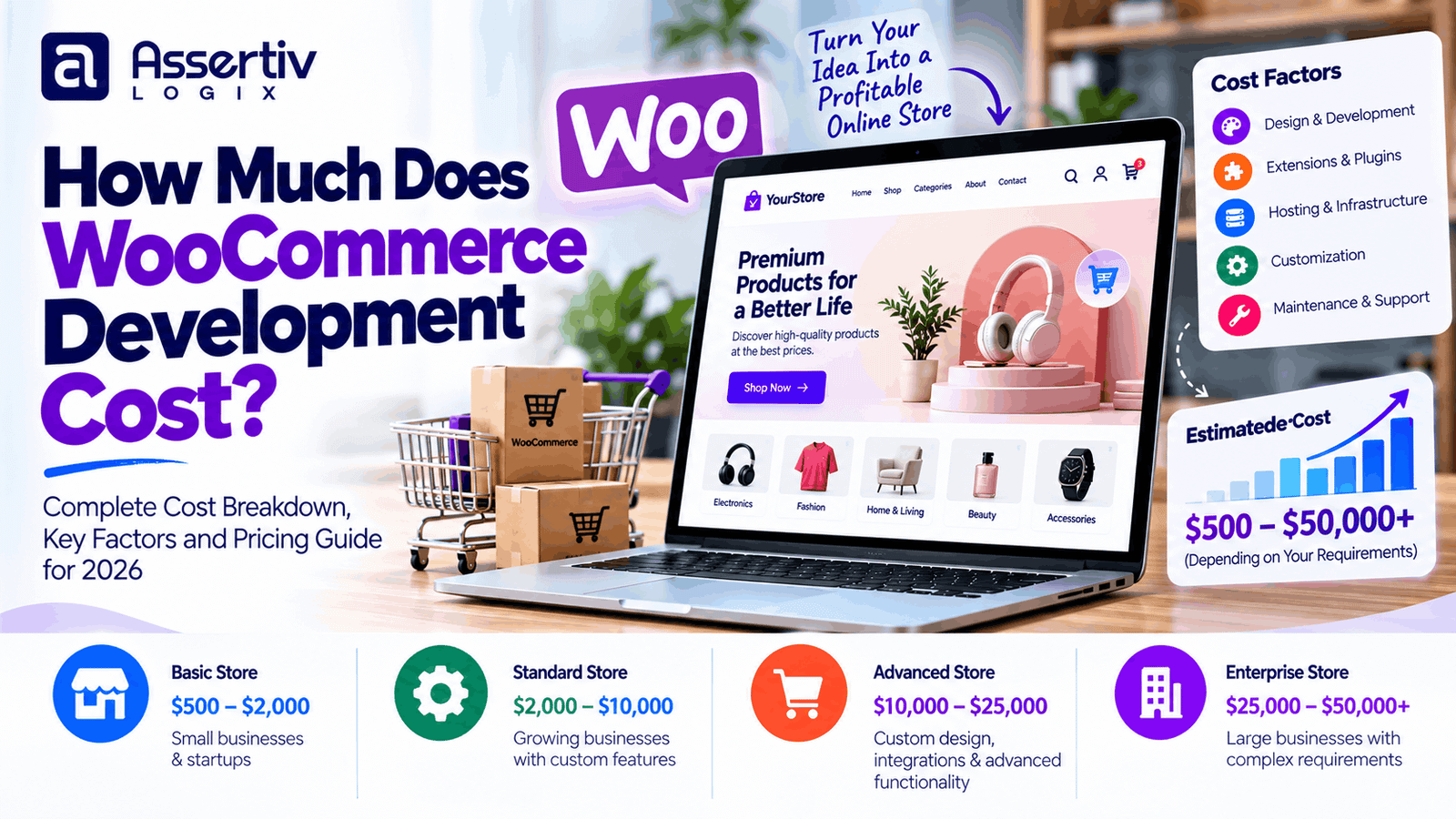
WooCommerce development cost in 2026 can range from around $500 for a simple store built with an existing theme to $25,000 or more for a highly customized eCommerce platform. The final price depends on your store’s design, product catalog, payment integrations, shipping requirements, custom functionality, and development team.
For businesses planning a new online store, understanding these expenses early helps prevent budget overruns and makes it easier to choose between a ready-made theme, a customized WooCommerce setup, and a fully custom solution.
This guide explains typical WooCommerce website development costs, what you get at each budget level, which factors affect pricing, and how to plan a store that can grow with your business.
WooCommerce Development Cost at a Glance
As a starting point, use the following estimates to plan your budget. These are broad project ranges in USD, not guaranteed quotes or official industry averages.
| Store type | Estimated development cost | Typical timeline |
|---|---|---|
| Basic WooCommerce store | $500–$2,000 | 1–3 weeks |
| Small business online store | $2,000–$5,000 | 2–5 weeks |
| Custom-designed WooCommerce store | $5,000–$12,000 | 4–8 weeks |
| Advanced WooCommerce store | $12,000–$25,000 | 6–12 weeks |
| Enterprise or complex eCommerce platform | $25,000–$75,000+ | 3–6+ months |
Timelines vary with product-data readiness, stakeholder approvals, integrations, testing requirements, and the number of revision rounds. A complex project may take longer even when the initial feature list appears short.
1. Basic WooCommerce Store: $500–$2,000
A basic WooCommerce store is suitable for startups, solo entrepreneurs, and small businesses that want to start selling online without investing in extensive custom functionality.
At this budget, developers generally configure WordPress and WooCommerce, customize an existing theme, set up essential store pages, and connect standard payment and shipping options.
What is usually included?
- WordPress and WooCommerce installation
- Existing theme setup and basic customization
- Homepage, shop, product, cart, and checkout pages
- Basic product categories and product setup
- Standard payment gateway configuration
- Basic shipping and tax settings
- Responsive layout adjustments
- Essential SEO and security configuration
- Basic testing before launch
Best for: Small catalogs, straightforward products, and businesses validating a new eCommerce idea.
Potential limitation: Extensive design changes, complex integrations, and unusual checkout workflows may fall outside this budget.
2. Small Business WooCommerce Store: $2,000–$5,000
A small business store usually needs more than a default setup. It may require stronger branding, a better shopping experience, improved product organization, and additional configuration for shipping, promotions, and analytics.
Typical features
- Brand-aligned theme customization
- Improved homepage and landing pages
- Product filters and category navigation
- Coupons, sale pricing, and related products
- Payment and shipping configuration
- Analytics and conversion tracking setup
- Basic performance optimization
- SEO-friendly page structure
- Quality assurance across common devices and browsers
Best for: Established local businesses and small retailers that need a professional store with a manageable level of customization.
This budget can work well when the business uses standard WooCommerce workflows and avoids unnecessary custom development.
3. Custom WooCommerce Store: $5,000–$12,000
A custom WooCommerce store is a better fit for businesses that need a distinctive storefront, more control over the buying journey, or features that cannot be delivered effectively through basic theme settings.
Common deliverables
- Custom UI/UX design or substantial theme customization
- Custom WordPress theme development where required
- Tailored product, category, and landing-page templates
- Custom checkout or product-selection workflows
- Third-party API integrations
- CRM, email marketing, or inventory integrations
- Advanced product filtering and search
- Performance and Core Web Vitals improvements
- Structured SEO implementation and analytics
- More extensive testing and launch support
Best for: Growing retailers, niche eCommerce brands, and businesses with specific customer-experience requirements.
The most important cost decision is whether a feature can be handled safely through configuration or requires custom code. Custom code may provide greater flexibility, but it also creates additional testing and ongoing maintenance responsibilities.
4. Advanced WooCommerce Store: $12,000–$25,000
Advanced stores often have more complicated business rules, multiple integrations, larger product catalogs, or specialized purchasing journeys.
Examples include stores with product bundles, configurable products, wholesale pricing, customer-specific pricing, subscription workflows, or advanced fulfillment requirements.
Potential functionality
- Custom plugins and business logic
- Advanced product configurators
- Wholesale or B2B purchasing features
- ERP, CRM, or warehouse integrations
- Subscriptions or recurring billing workflows
- Complex shipping rules
- Role-based pricing and account features
- Advanced reporting and automation
- Security reviews, load testing, and performance work
Best for: Established businesses whose sales processes require specialized functionality or integration with existing business systems.
Integration costs depend heavily on API quality, data mapping, error handling, synchronization frequency, and whether the external system supports the required workflows.
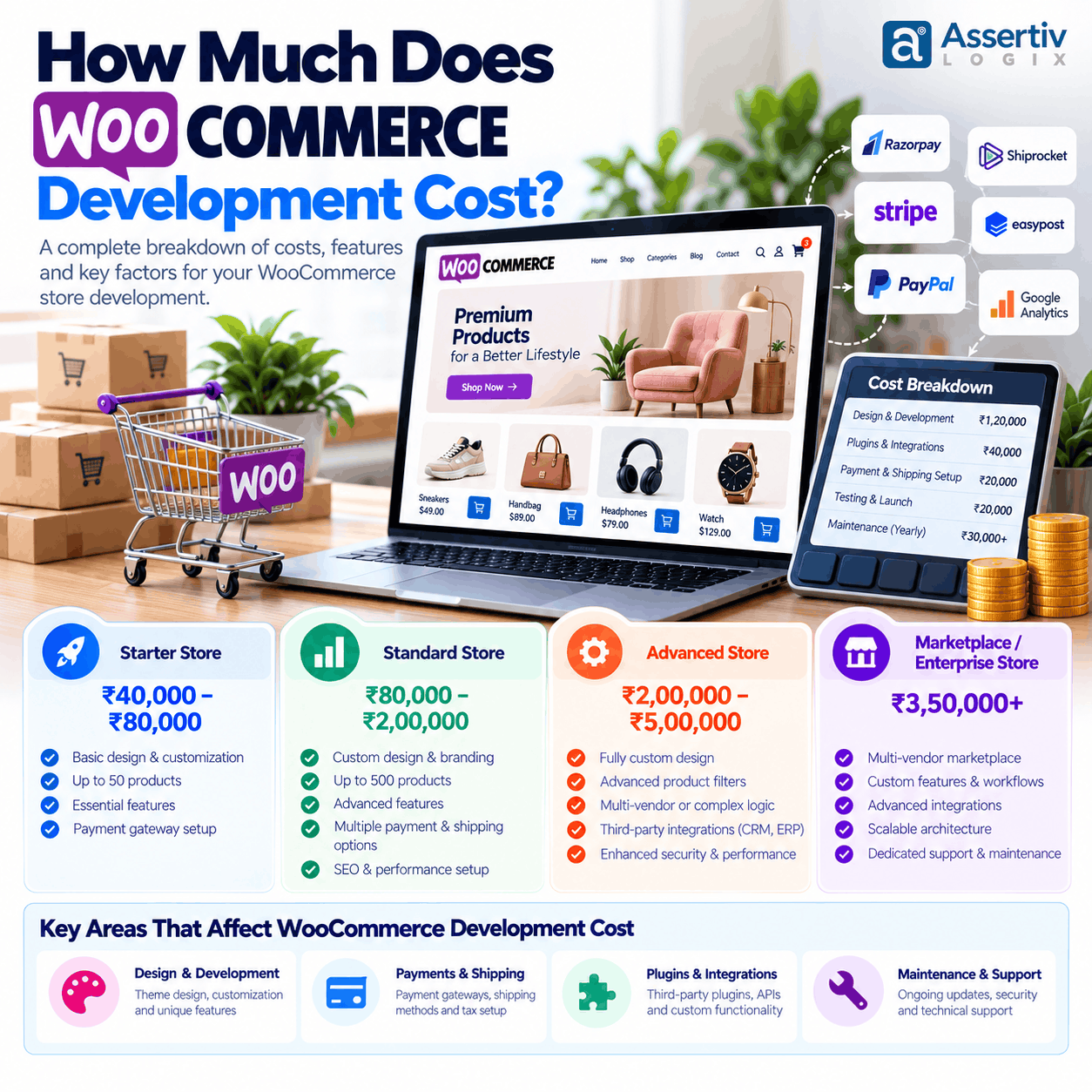
5. Enterprise WooCommerce Development: $25,000–$75,000+
Enterprise-level projects may involve multiple sales channels, complex catalog structures, high traffic, large-scale integrations, and strict operational requirements.
At this level, the project is not simply about designing an attractive store. Architecture, data quality, deployment procedures, monitoring, security, recovery planning, and long-term maintainability become equally important.
Enterprise project considerations
- Complex multi-system integrations
- Large or highly structured product catalogs
- Multi-region or multi-store requirements
- Advanced customer roles and pricing rules
- High-availability hosting architecture where appropriate
- Load and integration testing
- Deployment, staging, and rollback processes
- Security and access-control reviews
- Monitoring, backups, and disaster-recovery planning
Best for: Larger retailers, complex B2B businesses, and organizations with substantial operational or integration requirements.
Some enterprise projects exceed this range considerably. A realistic estimate requires discovery, technical planning, and agreement on measurable acceptance criteria.
What Factors Affect WooCommerce Development Cost?
Two WooCommerce stores can have similar product counts but very different development budgets. The following factors usually make the biggest difference.
1. Design and user experience
An existing theme with modest styling changes is generally less expensive than a complete design process involving research, wireframes, prototypes, custom layouts, and multiple approval rounds.
Budget more when the store needs a unique mobile shopping experience, sophisticated product pages, or extensive landing pages for marketing campaigns.
2. Product catalog and product complexity
Adding straightforward products is relatively simple. Products with multiple variations, custom pricing, personalization, bundles, downloadable files, or configuration rules require additional setup and testing.
Large catalogs may also require product-data cleanup, spreadsheet imports, attribute mapping, image preparation, and validation.
3. Payment gateway integration
Standard gateways can often be configured using established WooCommerce extensions. Custom payment flows, multiple gateways with specific routing rules, split payments, or specialized regional requirements may increase costs.
Review the gateway’s transaction fees, supported countries, refund process, and compatibility with the checkout setup before selecting it.
4. Shipping, tax, and fulfillment
A store using simple flat-rate shipping is less complicated than one that calculates rates by weight, dimensions, location, carrier, warehouse, or delivery service.
Tax configuration also depends on where the business operates and its legal obligations. Confirm applicable requirements with a qualified tax professional rather than assuming a plugin automatically makes a store compliant.
5. Custom plugins and integrations
Third-party plugins can reduce initial development time, but they may introduce recurring subscription fees, compatibility concerns, or limitations. A custom plugin may be justified when the business needs functionality that existing extensions cannot provide reliably.
Integrations with inventory systems, CRMs, accounting tools, marketplaces, or fulfillment providers should be scoped according to the actual data and workflows involved.
6. SEO, speed, and security
Technical SEO, clean URL structures, metadata, redirects, structured data, image optimization, caching, access controls, and backup configuration all need consideration. Some requirements can be covered during normal development, while a deeper audit or remediation project may cost extra.
For performance guidance, review Google’s PageSpeed Insights and its documentation on Core Web Vitals. For security fundamentals, consult the WordPress security guidance.
7. Developer location and engagement model
Rates vary by country, seniority, specialization, communication requirements, and whether you hire a freelancer, an agency, or a dedicated development team. Location alone does not guarantee quality or value.
Compare the actual deliverables, experience with similar stores, testing practices, availability for support, and clarity of the contract—not just the hourly rate.
WooCommerce Development Cost Breakdown
The following table illustrates how a mid-sized custom store budget might be allocated. Actual percentages depend on the scope, and some tasks may be combined into a fixed-price package.
| Work item | Illustrative share |
|---|---|
| Discovery and planning | 5–10% |
| UI/UX design | 10–15% |
| Theme and storefront development | 20–30% |
| WooCommerce configuration and product setup | 10–15% |
| Custom functionality and integrations | 15–25% |
| SEO, performance, and security setup | 5–10% |
| QA, launch, and handover | 10–15% |
These percentages are planning guidelines, not a formula that applies to every project. A store with many integrations may spend a much larger share on backend development, while a design-led store may allocate more to UX and storefront work.
WooCommerce Developer Rates in 2026
Hourly rates vary considerably by region, specialization, and engagement model. These broad ranges can help with initial budgeting, but they are not verified market averages.
| Hiring option | Illustrative hourly range | Considerations |
|---|---|---|
| Freelancer in a lower-cost market | $10–$35/hour | Can suit clearly scoped tasks; verify availability and delivery process. |
| Experienced independent specialist | $30–$80/hour | Useful for custom features and integrations. |
| Development agency | $50–$150+/hour | May include project management, design, QA, and broader support. |
| Enterprise specialist or consultancy | $100–$200+/hour | Often engaged for architecture, complex integrations, or specialist work. |
Rates overlap, and the cheapest option is not always the lowest-cost option overall. Inexperienced implementation, missed requirements, and insufficient testing can create expensive rework.
For a deeper comparison, read WordPress Developer Cost: Freelancer vs Agency and Freelance vs Agency: Who Should You Hire for WordPress?.
Additional Costs Beyond Development
The initial development quote is only one part of your store’s total cost of ownership. Plan for the following recurring and one-time expenses as well.
| Expense | Typical budgeting approach |
|---|---|
| Domain | Annual renewal; price depends on the extension and registrar. |
| Hosting | Choose based on traffic, resources, backups, support, and performance requirements. |
| Premium themes and plugins | Check annual renewals, site limits, and commercial licensing. |
| Payment processing | Review transaction and payment-method fees with your provider. |
| Maintenance and updates | Budget monthly or annually according to support scope. |
| Security and backups | Confirm what your host and existing tools already include. |
| Marketing and SEO | Budget separately for content, advertising, and ongoing optimization. |
WooCommerce itself is available as open-source software, but running a commercial store still involves hosting, payment processing, and potentially paid extensions or professional services. See the official WooCommerce documentation for setup and management information.
WooCommerce Maintenance Cost
After launch, your store needs updates, backups, monitoring, compatibility checks, and occasional troubleshooting. A simple store may need relatively little ongoing assistance, while a store with custom plugins and several external integrations may need a more comprehensive maintenance arrangement.
When comparing support plans, ask whether they cover:
- WordPress, WooCommerce, theme, and plugin updates
- Automated backups and restoration assistance
- Security monitoring and incident response
- Checkout and payment-flow testing
- Uptime and performance monitoring
- Bug fixes and a defined number of development hours
- Emergency support and response times
For more detail, read the WordPress Maintenance Cost: Monthly & Annual Pricing Guide.
Example WooCommerce Project Budgets
Consider three hypothetical projects. These examples show how scope affects price; they are not client case studies or guaranteed quotes.
Example A: Small fashion store
- Existing theme with brand customization
- Approximately 30–50 straightforward products
- One standard payment gateway
- Basic shipping configuration
- Responsive testing and launch
Planning budget: $1,500–$3,500.
Example B: Growing skincare brand
- Custom storefront design
- Product variations and category filters
- Email marketing and analytics integration
- Promotional landing pages
- Performance optimization and additional QA
Planning budget: $5,000–$10,000.
Example C: B2B wholesale store
- Customer accounts and business-specific pricing
- Bulk ordering workflows
- Inventory or ERP integration
- Custom permissions and business rules
- Integration testing and operational handover
Planning budget: $12,000–$30,000+.
The actual quote could fall outside these ranges depending on design complexity, data migration, external systems, and the quality of the existing infrastructure.
How to Reduce WooCommerce Development Cost Without Sacrificing Quality
- Define your must-have features. Separate launch-critical functionality from improvements that can be added later.
- Choose a suitable foundation. Use a well-supported theme or extension when it meets your needs instead of rebuilding standard functionality.
- Prepare product data early. Clean descriptions, images, categories, SKUs, and attributes before import.
- Limit unnecessary integrations. Every connection adds setup, testing, and maintenance work.
- Agree on acceptance criteria. Document what each feature must do and how it will be tested.
- Include QA in the budget. Test checkout, payment confirmation, refunds, shipping, mobile layouts, and key customer journeys.
- Plan for maintenance. Use supported extensions and maintain a clear update and backup process.
- Request an itemized proposal. Compare deliverables, exclusions, timelines, payment milestones, and post-launch support.
Follow the official WooCommerce developer resources when evaluating technical implementation and compatibility.
How to Get an Accurate WooCommerce Development Quote
Before requesting a quote, prepare a short project brief covering:
- What you sell and where you sell it.
- Approximate number of products and product variations.
- Required pages and design references.
- Payment methods, shipping rules, and tax requirements.
- Any required CRM, ERP, inventory, or marketing integrations.
- Expected traffic, performance needs, and security requirements.
- Launch deadline and available budget.
- Maintenance, training, and post-launch support expectations.
Ask each developer or agency to identify assumptions, exclusions, third-party subscription fees, and the process for handling scope changes. This makes proposals easier to compare and reduces the chance of unexpected charges.
Why Work With Assertivlogix for WooCommerce Development?
Choosing a WooCommerce development partner is about more than launching a store. You need a solution that is maintainable, secure, easy to manage, and aligned with your sales process.
Assertivlogix offers WordPress and WooCommerce development services for businesses that need storefront customization, custom functionality, integrations, and ongoing technical improvements.
Depending on your requirements, a project may include:
- WooCommerce store setup and customization
- Custom theme and plugin development
- Payment and third-party API integrations
- Store performance and technical SEO improvements
- Migration and redesign assistance
- Ongoing maintenance and development support
Every project should begin with a clear scope and a realistic estimate based on the features you actually need.
Tell us about your products, required features, and budget. The Assertivlogix team can help you identify the right development approach and prepare a project estimate.
Frequently Asked Questions
How much does WooCommerce development cost in 2026?
A basic WooCommerce store may cost around $500–$2,000, a small business store around $2,000–$5,000, and a custom store around $5,000–$12,000. Advanced and enterprise projects can cost $12,000–$75,000 or more. These are illustrative estimates; the actual price depends on scope and complexity.
Is WooCommerce free to use?
WooCommerce is open-source software, but operating a store can involve costs for hosting, a domain, premium extensions, payment processing, development, maintenance, and marketing.
How long does it take to develop a WooCommerce store?
A straightforward store may take one to three weeks. A customized store may require four to eight weeks, while complex or enterprise projects can take several months. Product readiness, approvals, integrations, and testing can affect the timeline.
What is the cost of hiring a WooCommerce developer?
Rates depend on location, expertise, and the engagement model. For initial budgeting, some freelancers may charge $10–$35 per hour, experienced specialists $30–$80, and agencies $50–$150 or more. These ranges are indicative rather than verified market averages.
What is included in a WooCommerce development quote?
A quote may include setup, design, theme customization, product configuration, payment and shipping setup, testing, and launch. Custom integrations, content entry, paid extensions, hosting, ongoing maintenance, and additional revisions may be charged separately, so check the proposal carefully.
How much should I budget for WooCommerce maintenance?
Maintenance costs depend on store complexity and the level of support required. Compare plans based on update management, backups, security, checkout testing, troubleshooting, response times, and included development hours rather than choosing solely by monthly price.
Can I reduce WooCommerce development costs?
Yes. Start with essential features, use reliable existing extensions where appropriate, prepare product data before development, avoid unnecessary integrations, and define acceptance criteria early. Do not remove essential security, payment testing, or backup procedures just to lower the initial quote.
Is WooCommerce suitable for a large online store?
WooCommerce can support many types of growing businesses, but suitability depends on hosting, architecture, product data, integrations, traffic patterns, and operational requirements. Larger stores should be properly planned and tested rather than relying on platform choice alone.
Conclusion
The WooCommerce development cost for your business depends on the store you need—not just the platform you choose. A simple store built with an existing theme can be affordable, while custom design, complex business rules, and third-party integrations require a larger investment.
Start by defining your essential features, product catalog, payment and shipping needs, and launch goals. Then compare itemized proposals that explain deliverables, exclusions, timelines, and ongoing support.
With a realistic scope and the right development partner, you can build a WooCommerce store that fits your budget today and gives your business room to grow.