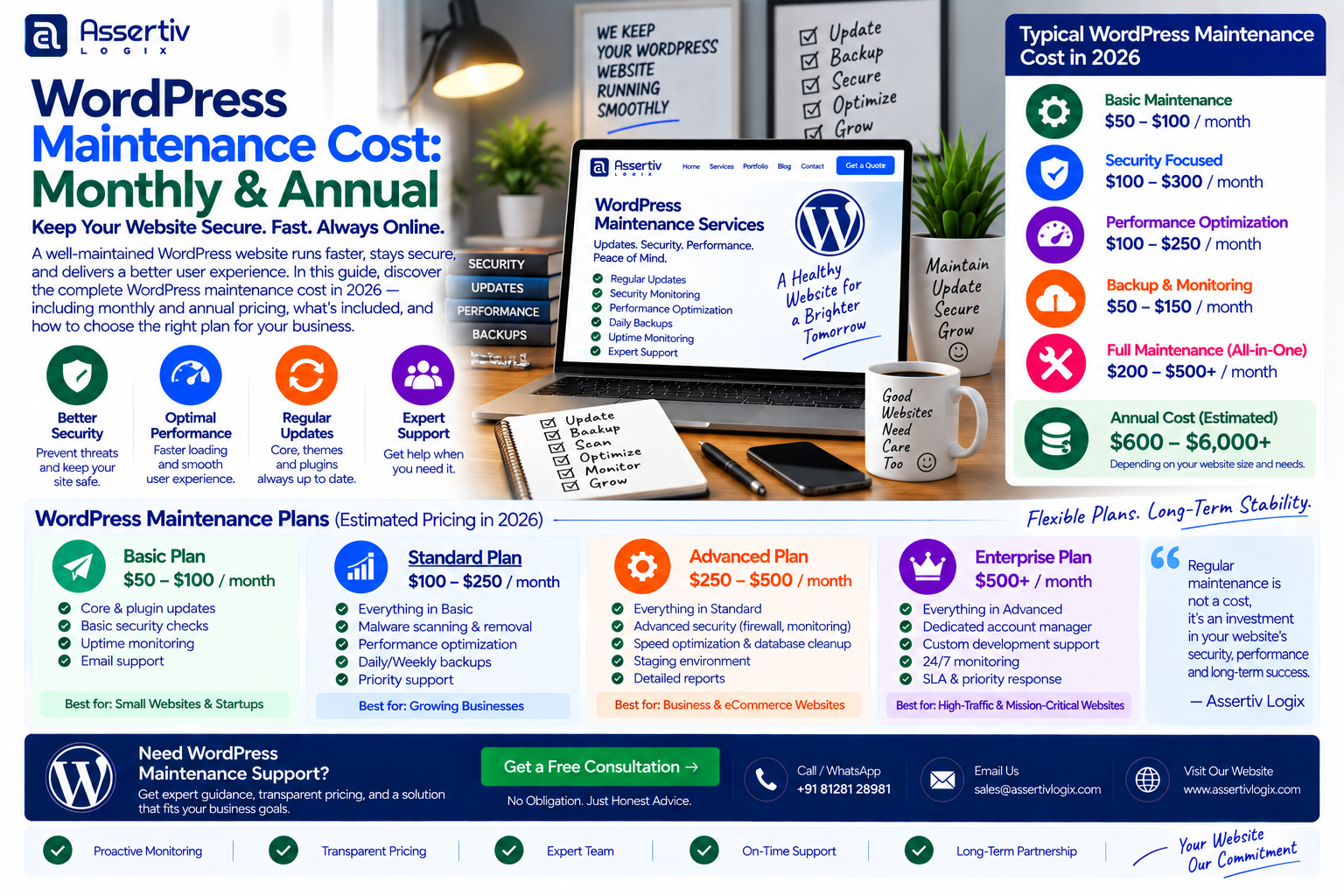
WordPress maintenance cost can range from around $50 per month for basic updates and backups to $500+ per month for websites that require regular development, security monitoring, performance optimization, and priority support. Larger WooCommerce stores and complex WordPress platforms can require even more ongoing support.
Building a WordPress website is only the beginning. WordPress core, plugins, themes, hosting environments, PHP versions, integrations, security configurations, and website content all need attention over time.
For that reason, businesses should consider WordPress maintenance cost as part of the total cost of owning a website rather than treating maintenance as an optional expense.
In this guide, we will break down WordPress maintenance pricing on a monthly and annual basis, explain what maintenance services normally include, compare DIY maintenance with professional services, and show how much businesses may need to budget for ongoing WordPress support in 2026.
How Much Does WordPress Maintenance Cost?
The average WordPress website maintenance cost depends on the size and complexity of the website and the level of support required.
| Maintenance Level | Typical Monthly Cost | Approximate Annual Cost | Suitable For |
|---|---|---|---|
| Basic | $50–$100 | $600–$1,200 | Simple business websites |
| Standard | $100–$250 | $1,200–$3,000 | Professional business websites |
| Advanced | $250–$500 | $3,000–$6,000 | Growing websites and WooCommerce |
| Premium | $500–$1,000+ | $6,000–$12,000+ | Complex or high-value websites |
| Enterprise | $1,000+ | $12,000+ | Large platforms and critical websites |
These are broad budgeting ranges rather than fixed industry prices. A website requiring only routine updates will cost much less to maintain than a WooCommerce store with custom integrations and frequent development work.
What Is WordPress Website Maintenance?
WordPress maintenance is the ongoing work required to keep a website secure, updated, functional, backed up, and performing properly.
Depending on the maintenance plan, services may include:
- WordPress core updates
- Plugin updates
- Theme updates
- Security monitoring
- Website backups
- Backup verification
- Uptime monitoring
- Broken-link checks
- Performance monitoring
- Database optimization
- Malware checks
- Bug fixes
- Content updates
- Technical support
- Emergency troubleshooting
The exact scope should be clearly defined before subscribing to a maintenance service.
Why Does WordPress Need Ongoing Maintenance?
WordPress is a dynamic software platform. A website can contain WordPress core, plugins, themes, third-party integrations, hosting software, and other components that change over time.
Regular maintenance helps businesses:
- Keep software updated
- Reduce avoidable security risks
- Maintain website functionality
- Protect website data through backups
- Identify performance problems
- Resolve compatibility issues
- Keep forms and integrations working
- Maintain a better user experience
The official WordPress security documentation provides recommendations for securing WordPress installations.
WordPress Maintenance Cost Per Month
For many small and medium-sized businesses, monthly maintenance is easier to budget for than paying separately whenever something breaks.
| Monthly Plan | Typical Cost | Common Services |
|---|---|---|
| Basic | $50–$100/month | Updates, backups, basic monitoring |
| Standard | $100–$250/month | Updates, backups, security, small fixes |
| Advanced | $250–$500/month | Performance, security, development support |
| Premium | $500–$1,000+/month | Priority support and ongoing development |
The monthly WordPress maintenance cost can be lower when the website is simple and stable. Websites with custom code, WooCommerce, memberships, APIs, or frequent content changes generally require more attention.
WordPress Maintenance Cost Per Year
Annual maintenance costs can be estimated by multiplying the monthly plan by twelve, although some providers offer discounted annual packages.
| Maintenance Level | Monthly Budget | Annual Budget |
|---|---|---|
| Basic | $50–$100 | $600–$1,200 |
| Standard | $100–$250 | $1,200–$3,000 |
| Advanced | $250–$500 | $3,000–$6,000 |
| Premium | $500–$1,000 | $6,000–$12,000 |
| Enterprise | $1,000+ | $12,000+ |
When comparing annual plans, check whether the quoted price includes development hours, premium licenses, emergency support, backups, security monitoring, and hosting.
WordPress Maintenance Cost Breakdown
The total maintenance budget usually consists of several different services and recurring expenses.
| Service | Potential Cost Range | Frequency |
|---|---|---|
| WordPress Updates | $20–$100+ | Monthly |
| Plugin/Theme Updates | $20–$100+ | Monthly |
| Backups | $0–$100+ | Daily/Weekly |
| Security Monitoring | $20–$150+ | Monthly |
| Performance Optimization | $50–$300+ | As Required |
| Content Updates | $30–$200+ | As Required |
| Emergency Fixes | $50–$200+/hour | As Required |
These numbers are examples for budgeting. Providers may bundle several services together rather than charging separately.
1. WordPress Core Updates
Keeping WordPress core updated is one of the most basic maintenance tasks.
Updates may contain security improvements, bug fixes, compatibility changes, and new functionality.
However, updates should not always be performed blindly. A professional maintenance process may include:
- Website backup
- Update preparation
- WordPress core update
- Plugin updates
- Theme updates
- Compatibility testing
- Frontend testing
The WordPress documentation provides additional information about managing WordPress websites.
2. Plugin and Theme Updates
Plugins and themes are another important part of WordPress maintenance.
A maintenance provider may check for:
- Available updates
- Compatibility problems
- Deprecated functionality
- PHP compatibility
- Plugin conflicts
- Security vulnerabilities
Updating everything without checking the website can sometimes cause unexpected problems. A reliable maintenance process should include backups and post-update testing.
3. Website Backups
Backups are one of the most important parts of WordPress maintenance cost.
A backup strategy may include:
- Database backups
- File backups
- Full website backups
- Off-site backups
- Automated backups
- Backup retention
- Restore testing
A backup that has never been tested is not the same as a verified recovery process. Businesses should understand where backups are stored and how quickly the website can be restored if necessary.
4. WordPress Security Monitoring
Security monitoring helps identify suspicious activity and potential vulnerabilities.
Security maintenance can include:
- Malware scanning
- Login monitoring
- Firewall configuration
- Brute-force protection
- File-change monitoring
- User-account review
- Security updates
Businesses should also follow fundamental security practices such as using strong passwords, limiting administrator access, keeping software updated, and maintaining reliable backups.
5. WordPress Performance Maintenance
Website performance can change over time as content, plugins, scripts, databases, and traffic increase.
Performance maintenance may include:
- Database optimization
- Image optimization
- Cache configuration
- CSS optimization
- JavaScript optimization
- Plugin review
- Server configuration
- CDN configuration
Website owners can use Google PageSpeed Insights to monitor performance measurements.
6. Content Updates
Some maintenance plans include a limited number of content updates each month.
Examples include:
- Updating business information
- Changing images
- Adding blog posts
- Updating service descriptions
- Changing contact information
- Updating banners
Content work can be included in a maintenance package or billed separately depending on the provider.
7. Technical Support and Bug Fixes
Websites occasionally experience issues after updates or changes.
Maintenance support may cover small issues such as:
- Broken layouts
- Form problems
- Plugin conflicts
- Broken links
- CSS issues
- Minor PHP errors
- Admin configuration problems
Major feature development should generally be treated as a separate project or billed according to the maintenance agreement.
WooCommerce Maintenance Cost
WooCommerce stores generally require more ongoing maintenance than simple informational websites because they involve products, customers, orders, payments, shipping, inventory, and transactional functionality.
| WooCommerce Maintenance Level | Typical Monthly Cost |
|---|---|
| Basic Store | $100–$200 |
| Growing Store | $200–$500 |
| Advanced Store | $500–$1,000+ |
| Complex/High-Traffic Store | $1,000+ |
WooCommerce maintenance may include payment testing, order-flow testing, inventory functionality, shipping integrations, product updates, plugin compatibility, and performance monitoring.
The official WooCommerce documentation is a useful reference for store owners and developers.
WordPress Maintenance Cost for Small Businesses
Small businesses usually do not need the same maintenance budget as large eCommerce companies.
| Business Type | Potential Monthly Maintenance Budget |
|---|---|
| Local Business | $50–$150 |
| Professional Services | $75–$200 |
| Marketing Website | $100–$250 |
| Small WooCommerce Store | $100–$300 |
| Growing eCommerce Business | $250–$750+ |
A small business website with five to ten pages and limited functionality may need only routine updates, backups, security checks, and occasional support.
WordPress Maintenance Cost for Large Websites
Larger websites can require more frequent maintenance because they may contain thousands of pages, complex integrations, custom plugins, multiple user roles, large databases, or high traffic volumes.
Maintenance requirements may include:
- Advanced monitoring
- Database optimization
- Server monitoring
- Security management
- Performance engineering
- Custom development
- API monitoring
- Deployment management
- Disaster recovery
For these websites, a dedicated developer or technical team may be more appropriate than a basic maintenance package.
DIY WordPress Maintenance Cost
It is possible to maintain a WordPress website yourself.
The direct financial cost may be relatively low if you use free tools and your existing hosting environment. However, the real cost includes your time.
DIY maintenance may involve:
- Checking updates
- Creating backups
- Testing changes
- Monitoring security
- Fixing conflicts
- Monitoring uptime
- Optimizing performance
- Troubleshooting errors
For a simple personal or small business website, DIY maintenance may be manageable. For a website that generates significant revenue or leads, businesses should consider the cost of downtime and technical problems when deciding whether to outsource maintenance.
Freelancer vs Agency WordPress Maintenance Cost
| Factor | Freelancer | Agency |
|---|---|---|
| Typical Cost | Often lower | Often higher |
| Direct Communication | Usually | Depends on process |
| Multiple Specialists | Limited | Usually available |
| Emergency Coverage | Depends on agreement | May have structured support |
| Design Resources | Depends on provider | May be available |
| Development Capacity | Depends on availability | Can allocate multiple developers |
| Long-Term Support | Depends on agreement | Often offered |
When comparing providers, review the exact services, response times, included development hours, backup policy, security coverage, and exclusions.
WordPress Maintenance Retainer Cost
A monthly retainer can be useful when a business expects recurring development work in addition to routine maintenance.
For example, a retainer might include:
- WordPress updates
- Plugin updates
- Backups
- Security monitoring
- Performance monitoring
- 5–10 hours of development
- Content updates
- Technical support
Retainer pricing depends heavily on the number of development hours and level of support included.
| Retainer Type | Example Monthly Budget |
|---|---|
| Maintenance Only | $50–$150 |
| Maintenance + Small Fixes | $150–$300 |
| Maintenance + Development | $300–$750+ |
| Dedicated Development Support | $750–$2,000+ |
Hidden WordPress Maintenance Costs
The advertised maintenance fee may not include every expense.
Before purchasing a plan, check whether you will separately pay for:
- Hosting
- Domain renewal
- Premium plugins
- Premium themes
- SSL services
- CDN services
- Premium security software
- Emergency development
- Major website changes
- SEO services
- Content writing
- Third-party API fees
These expenses can make the real annual WordPress maintenance cost different from the advertised monthly package.
What Should a WordPress Maintenance Plan Include?
A useful maintenance agreement should clearly state what is included and what is not.
Look for:
- WordPress core updates
- Plugin updates
- Theme updates
- Backup frequency
- Backup storage location
- Security monitoring
- Uptime monitoring
- Performance monitoring
- Bug-fix allowance
- Content update allowance
- Response times
- Emergency support
- Reporting
- Excluded services
Clear documentation helps prevent misunderstandings about the scope of your maintenance plan.
How to Choose the Right WordPress Maintenance Plan
Step 1: Identify Your Website Type
Start by determining whether you have a basic business website, content website, membership platform, WooCommerce store, or complex application.
Step 2: Review Your Current Website
Check the WordPress version, plugins, themes, PHP environment, hosting, backups, security, and existing technical issues.
Step 3: Determine Required Support
Decide whether you only need updates and backups or whether you also need development, SEO, performance, security, and emergency support.
Step 4: Compare Maintenance Plans
Compare providers based on included services, response times, development hours, backup policy, security coverage, and exclusions.
Step 5: Calculate Annual Ownership Cost
Add maintenance, hosting, domain, plugin licenses, themes, security tools, and other recurring expenses to calculate your realistic annual website budget.
How to Reduce WordPress Maintenance Cost
You can control ongoing expenses without neglecting important maintenance work.
Keep the Plugin Stack Clean
Remove plugins that are no longer required and avoid installing unnecessary functionality.
Use Reliable Hosting
Good hosting can reduce some performance and reliability issues and provide useful tools for backups and monitoring.
Automate Backups
Automated backups reduce the amount of manual work required and provide a recovery option when something goes wrong.
Plan Updates
Regularly scheduled maintenance is easier to manage than allowing updates to accumulate for months.
Separate Maintenance From New Development
Routine maintenance and major feature development are different types of work. Keeping them separate can make your maintenance budget easier to understand.
WordPress Maintenance Checklist
| Task | Recommended Frequency |
|---|---|
| WordPress Core Updates | As updates become available |
| Plugin Updates | Regularly |
| Theme Updates | Regularly |
| Website Backups | Daily/Weekly depending on site |
| Security Scans | Regularly |
| Uptime Monitoring | Continuous |
| Broken Link Checks | Monthly/Quarterly |
| Performance Review | Monthly/Quarterly |
| Database Cleanup | Periodically |
| User Account Review | Periodically |
How Assertivlogix Can Help With WordPress Maintenance
Assertivlogix provides WordPress development and maintenance support for businesses that need ongoing technical assistance.
Depending on your website and requirements, maintenance can include:
- WordPress core updates
- Plugin and theme updates
- Website backups
- Security monitoring
- Performance optimization
- Bug fixing
- Content updates
- WooCommerce maintenance
- Custom WordPress development
- Plugin customization
- Theme customization
- WordPress migration support
For businesses that need more than routine maintenance, ongoing development support can also be structured around a monthly retainer or dedicated development arrangement.
Keep your website updated, secure, backed up, and ready for your customers with a maintenance plan built around your actual requirements.
WordPress Maintenance Cost: Quick Pricing Summary
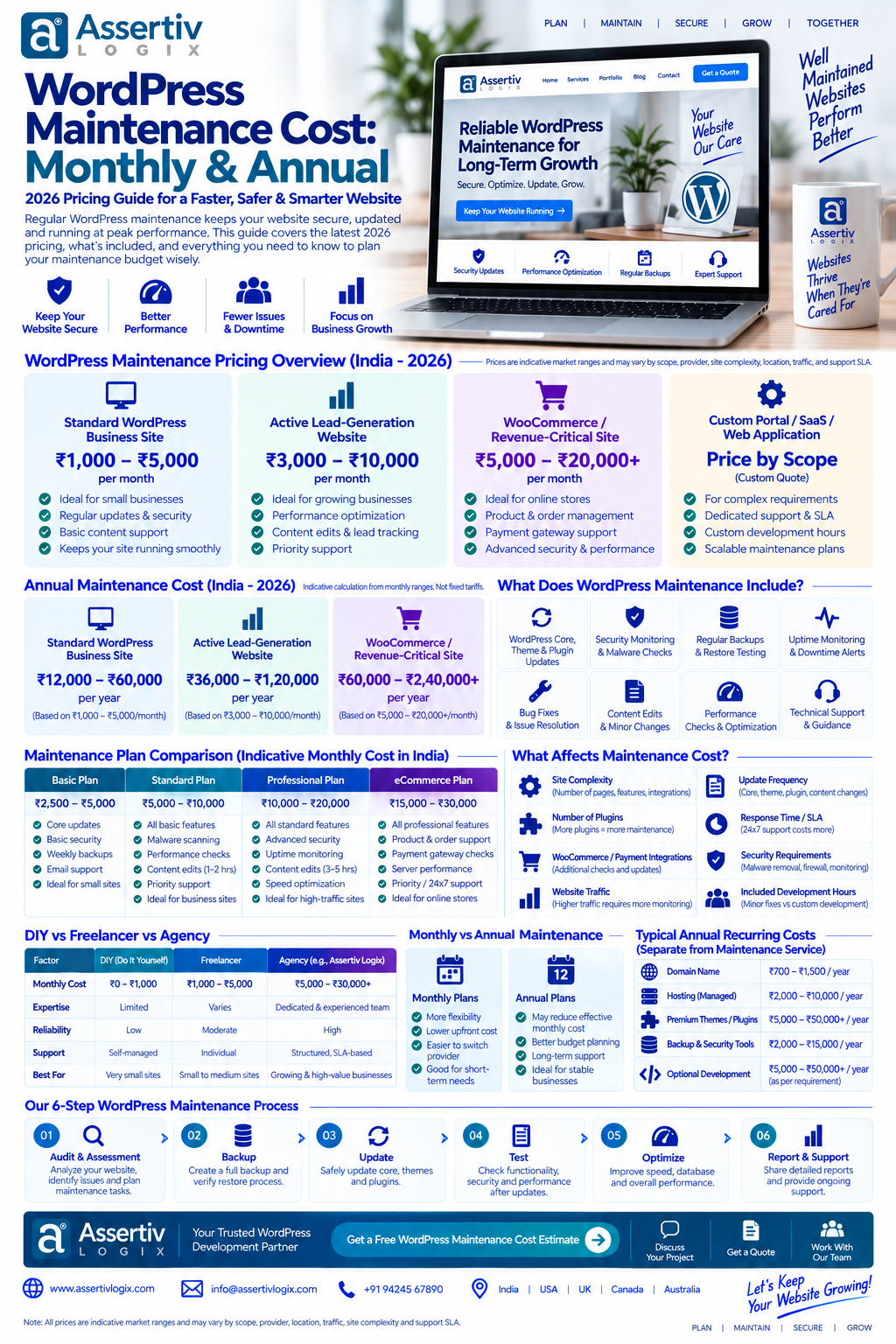
| Website Type | Potential Monthly Cost | Potential Annual Cost |
|---|---|---|
| Basic Business Website | $50–$100 | $600–$1,200 |
| Professional Website | $100–$250 | $1,200–$3,000 |
| Growing Website | $250–$500 | $3,000–$6,000 |
| WooCommerce Website | $200–$750+ | $2,400–$9,000+ |
| Complex WordPress Platform | $500–$1,500+ | $6,000–$18,000+ |
Frequently Asked Questions
How much does WordPress maintenance cost per month?
Basic WordPress maintenance can cost around $50–$100 per month, while standard and advanced maintenance plans can range from $100 to $500+ per month depending on the services included.
How much does WordPress maintenance cost per year?
Basic WordPress maintenance may cost approximately $600–$1,200 per year. More comprehensive maintenance can cost $1,200–$6,000 or more annually depending on the website and support requirements.
What is included in WordPress maintenance?
Maintenance may include WordPress, plugin and theme updates, backups, security monitoring, uptime monitoring, performance checks, bug fixes, content updates, and technical support.
Is WordPress maintenance necessary?
Regular maintenance is recommended because WordPress websites depend on software components that need updates, backups, security checks, compatibility testing, and occasional troubleshooting.
How much does WooCommerce maintenance cost?
WooCommerce maintenance can range from approximately $100 to $1,000+ per month depending on store complexity, order volume, integrations, security requirements, performance needs, and development support.
Can I maintain WordPress myself?
Yes. Website owners can perform many maintenance tasks themselves, including updates, backups, and basic monitoring. However, technical websites may require professional support for security, troubleshooting, performance, and custom development.
Does WordPress maintenance include hosting?
Not always. Some maintenance providers include hosting while others charge for hosting separately. Check the maintenance agreement to determine what is included.
What is the difference between WordPress maintenance and WordPress development?
Maintenance generally focuses on keeping an existing website secure, updated, backed up, and functional. Development involves building new features, custom functionality, integrations, redesigns, or major changes.
Final Thoughts on WordPress Maintenance Cost
WordPress maintenance cost depends on your website’s size, complexity, traffic, integrations, security requirements, and the level of support you need.
A simple business website may only require a basic maintenance plan covering updates, backups, security checks, and occasional fixes. A WooCommerce store or complex WordPress platform may require regular development, performance optimization, security monitoring, and more proactive technical support.
When comparing maintenance providers, do not look only at the monthly price. Check exactly what is included, how backups are handled, whether emergency support is available, how updates are tested, and what happens when you need development work.
Planning your maintenance budget in advance can help prevent unexpected technical expenses and keep your website reliable as your business grows.
If you need ongoing WordPress maintenance, security, performance optimization, WooCommerce support, or development assistance, contact Assertivlogix to discuss your website requirements.