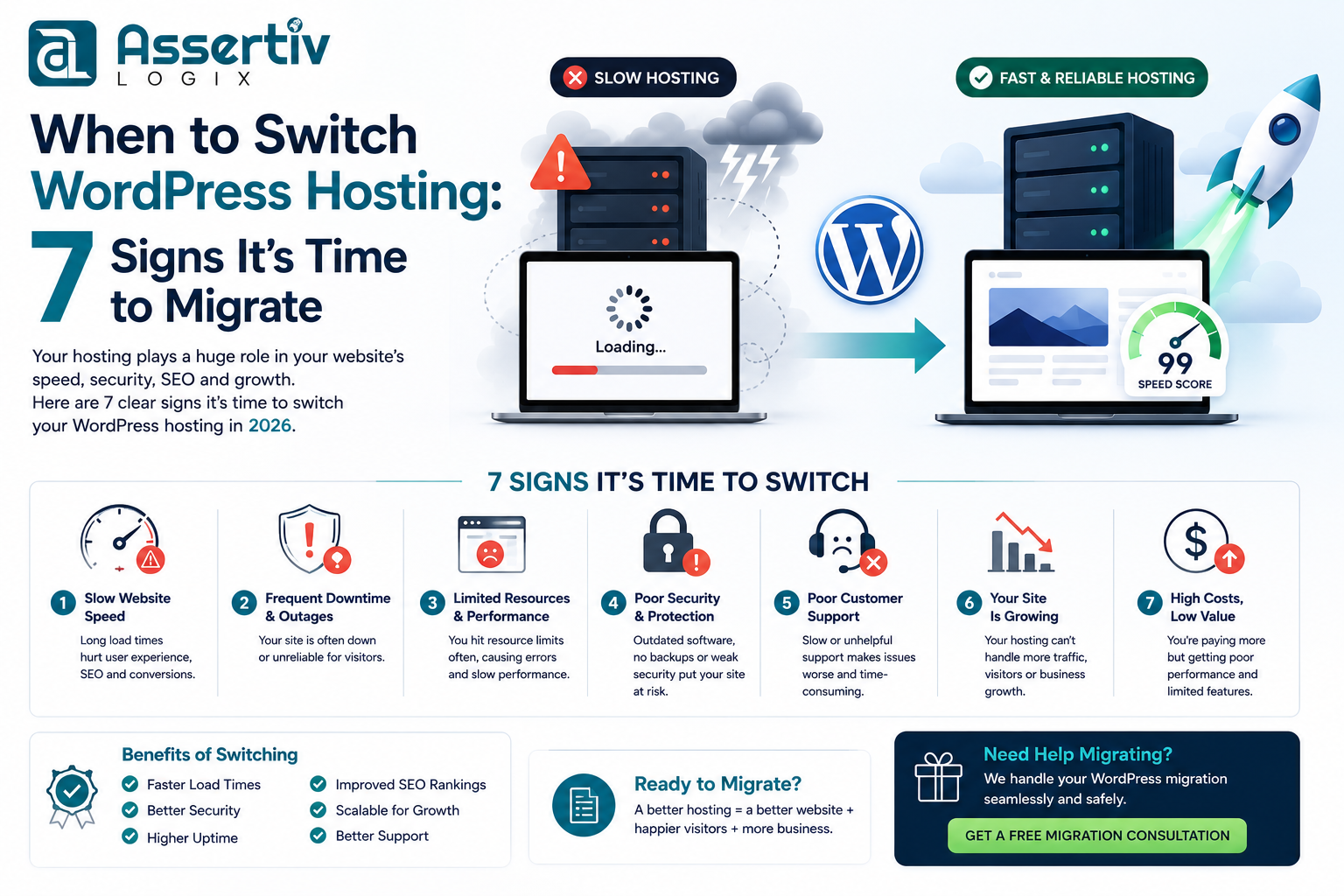
If you’re wondering when to switch WordPress hosting, you’re not alone. Many website owners continue using slow or outdated hosting without realizing it’s affecting their website’s speed, SEO, security, and customer experience. Your hosting provider is the foundation of your WordPress website, and choosing the wrong one can cost you visitors, leads, and revenue.
Whether you’re running a business website, WooCommerce store, blog, or membership platform, knowing when it’s time to migrate can help improve performance and support your long-term growth. In this guide, we’ll explore the seven warning signs that indicate it’s time to switch WordPress hosting and explain how to migrate safely without downtime.
Why Your WordPress Hosting Matters
Your hosting provider impacts almost every aspect of your website. Even a beautifully designed website with optimized code can perform poorly if it’s hosted on slow or overloaded servers.
A quality WordPress hosting provider delivers:
- Fast page loading speeds
- High uptime and reliability
- Better Core Web Vitals
- Improved website security
- Automatic backups
- Scalable infrastructure
- Expert WordPress support
If your current host isn’t delivering these essentials, it may be time to consider an upgrade.
1. Your Website Is Loading Slowly
Website speed is one of the biggest ranking factors for Google and one of the most important elements of user experience. If your website consistently loads slowly despite image optimization, caching, and plugin cleanup, your hosting environment could be the problem.
Common symptoms include:
- High Time to First Byte (TTFB)
- Slow dashboard performance
- Poor Google PageSpeed scores
- Low Core Web Vitals scores
- Long page loading times during peak traffic
To improve website performance, read our How to Optimize WordPress for Core Web Vitals guide.
2. Frequent Downtime
Every minute your website is offline, you risk losing potential customers and damaging your reputation. Reliable hosting providers typically offer uptime guarantees of 99.9% or higher.
If your website regularly becomes unavailable without explanation, your hosting infrastructure may no longer meet your business needs.
3. Poor Customer Support
Technical issues can happen at any time. When they do, responsive and knowledgeable support is invaluable.
Consider switching hosts if:
- Support tickets take hours or days to receive a response.
- Support representatives lack WordPress expertise.
- Problems remain unresolved after multiple contacts.
- You receive generic responses instead of practical solutions.
4. Your Website Has Outgrown Shared Hosting
Shared hosting works well for small websites, but as traffic grows, limited server resources can become a bottleneck.
Signs you’ve outgrown your hosting include:
- Traffic spikes causing slow performance.
- Resource limit warnings.
- Frequent server errors.
- Database timeouts.
- Slow WooCommerce checkout.
5. Security Features Are Limited
Modern hosting providers should include robust security features to protect your website from malware, brute-force attacks, and data loss.
Look for hosting that offers:
- Free SSL certificates
- Daily backups
- Malware scanning
- Web Application Firewall (WAF)
- DDoS protection
- Automatic updates
For additional protection, follow our WordPress Security Checklist.
6. Your Host Uses Outdated Technology
Technology evolves quickly. If your hosting provider still relies on outdated infrastructure, your website will struggle to compete.
Modern hosting should support:
- Latest PHP versions
- HTTP/3
- SSD or NVMe storage
- Server-side caching
- Object caching
- Cloud infrastructure
7. You’re Planning to Grow Your Business
If you’re planning to launch a WooCommerce store, expand internationally, add new services, or expect significant traffic growth, your hosting should be ready to scale with your business.
Growing websites require reliable infrastructure that can handle increasing demand without compromising performance.
For ecommerce websites, check out our WooCommerce Conversion Rate Optimization Guide.
Benefits of Upgrading Your WordPress Hosting
- Faster page loading times
- Better search engine rankings
- Improved Core Web Vitals
- Higher uptime
- Enhanced website security
- Better user experience
- Greater scalability
- Reduced maintenance headaches
How to Migrate WordPress Without Downtime
Changing hosting providers doesn’t have to be stressful. With proper planning, your website can be migrated with little or no downtime.
Follow these best practices:
- Create a complete backup of your website.
- Prepare the new hosting environment.
- Transfer files and database.
- Update the wp-config.php file.
- Test the website on the new server.
- Update DNS records.
- Verify SSL certificates.
- Monitor performance after migration.
Need a detailed guide? Read our WordPress Migration Checklist.
How to Choose the Right WordPress Hosting
When comparing hosting providers, evaluate them based on:
- Performance and uptime
- WordPress optimization
- Security features
- Customer support
- Scalability
- Backup and recovery options
- Pricing and value
You can also compare hosting providers in our Best WordPress Hosting Guide.
Frequently Asked Questions
How do I know if my hosting is slowing down my website?
If your website remains slow even after optimizing images, enabling caching, and reducing plugins, your hosting provider may be the primary bottleneck.
Will changing hosting affect my SEO?
A properly planned migration should have minimal impact on SEO. In fact, faster hosting often improves Core Web Vitals and overall search performance.
How long does a WordPress hosting migration take?
Most standard websites can be migrated within a few hours, while larger WooCommerce or enterprise websites may require additional planning and testing.
Not sure if it’s the right time to migrate? Our WordPress experts will review your current hosting, identify performance bottlenecks, and recommend the best hosting solution for your website. Get a free migration assessment with no obligation.
Conclusion
Knowing when to switch WordPress hosting can make a significant difference to your website’s performance, security, and long-term success. If you’re experiencing slow loading times, frequent downtime, limited scalability, or poor support, upgrading your hosting may be one of the most valuable investments you can make.
At Assertivlogix, we help businesses migrate WordPress websites safely with minimal downtime. From WordPress Development and WooCommerce Development to website migrations, performance optimization, and ongoing maintenance, our team is ready to help your website perform at its best.