Let’s start with the question we hear all the time:
“How much does a WordPress website actually cost?”
The frustrating answer is: it depends.
But that’s not particularly helpful when you’re trying to set a budget, compare proposals, or decide whether that $800 quote and that $8,000 quote are actually offering the same thing.
They’re probably not.
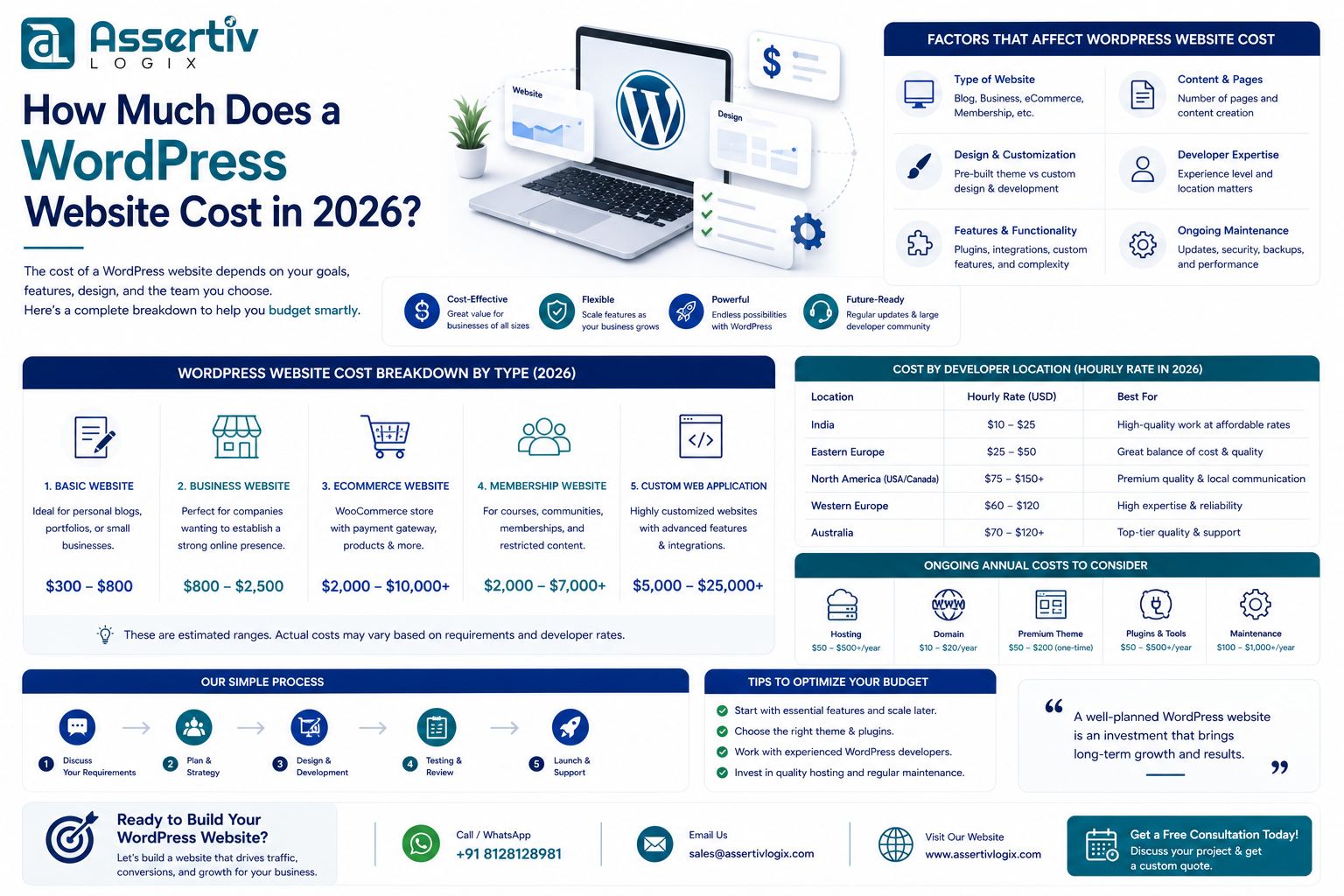
In 2026, the WordPress website cost can range from a few hundred dollars for a basic template-based website to tens of thousands of dollars for a custom ecommerce or business platform.
And WordPress itself isn’t really what you’re paying for. WordPress is free and open source. You’re paying for the people, design, development, functionality, infrastructure, testing, optimization, and ongoing support required to turn WordPress into a website that actually works for your business.
So rather than throwing a single number at you, let’s break down where the money actually goes.
The Short Answer: How Much Does a WordPress Website Cost?
If you just need a ballpark figure before reading the full guide, here’s a realistic way to think about WordPress budgets:
| Website Type | Typical Budget | Best For |
|---|---|---|
| DIY WordPress Website | $100 – $500+ | Personal projects and very small businesses |
| Basic Professional Website | $500 – $1,500+ | Freelancers and small businesses |
| Professional Business Website | $1,500 – $5,000+ | Growing companies |
| Custom WordPress Website | $3,000 – $10,000+ | Established businesses |
| WooCommerce Store | $2,500 – $15,000+ | Online retailers |
| Complex / Enterprise Website | $10,000 – $50,000+ | Large organizations and complex platforms |
These aren’t fixed prices. A five-page business website can cost more than a 30-page website if those five pages require custom design, integrations, animations, calculators, or advanced functionality.
That’s why page count alone isn’t a particularly useful way to price a website.
Why Can One Developer Quote $1,000 and Another Quote $10,000?
This is where WordPress pricing gets confusing.
Imagine asking two builders:
“How much does it cost to build a house?”
One might be thinking about a small two-bedroom home using standard materials. The other might be imagining a custom-designed house with premium finishes, smart-home technology, landscaping, and a garage.
They’re both houses, but they’re not the same product.
WordPress websites work the same way.
A $1,000 website might use:
- A pre-built theme
- A page builder
- Standard plugins
- Minimal customization
- Client-provided content
A $10,000 website might include:
- Custom UI/UX design
- Custom WordPress development
- Unique functionality
- CRM or API integrations
- Performance optimization
- Technical SEO
- Accessibility work
- Quality assurance and testing
- Staging and deployment workflows
So when you’re comparing proposals, don’t compare the final number first.
Compare what’s actually included.
WordPress Is Free. So What Are You Paying For?
You don’t have to buy WordPress itself.
But a professional website normally requires:
- A domain
- Hosting
- Design
- Development
- Plugins
- Security
- Backups
- SEO setup
- Performance optimization
- Testing
- Maintenance
Some of these are one-time costs. Others continue every month or year.
Let’s look at them individually.
1. Domain Name: Around $10–$30 Per Year
Your domain is your website address.
For example:
yourbusiness.com
A standard domain usually isn’t expensive. Depending on the extension and registrar, expect to spend roughly $10–$30 per year.
Premium domains are different. If someone already owns the domain you want, purchasing it could cost hundreds or thousands of dollars.
One small tip: always make sure the domain is registered in an account your business controls.
2. Hosting: Don’t Automatically Choose the Cheapest Option
You can find WordPress hosting advertised for only a few dollars per month.
That doesn’t necessarily mean it’s the right hosting for your business.
| Hosting Type | Typical Monthly Cost |
|---|---|
| Shared Hosting | $3 – $15 |
| Managed WordPress Hosting | $20 – $100+ |
| VPS / Cloud Hosting | $20 – $200+ |
| Enterprise Hosting | $200 – $1,000+ |
For a small brochure website receiving modest traffic, inexpensive hosting may be perfectly adequate.
For a WooCommerce store processing thousands of dollars in orders every day, saving $20 per month on hosting while losing sales because checkout pages are slow doesn’t make much business sense.
Your hosting should match the importance of your website.
If you’re already dealing with hosting problems, read our guide on when to switch WordPress hosting.
3. Design: Template or Something Built Specifically for You?
This decision can significantly change the project budget.
Using a Pre-Built Theme
A template-based website is usually the least expensive professional option.
There’s nothing inherently wrong with using a good theme. For many small businesses, it makes perfect sense.
The trade-off is that your website needs to work within the structure provided by that theme.
Using a Page Builder
Tools such as Elementor make it possible to create much more customized layouts without building everything from scratch.
For marketing websites and smaller businesses, this can offer a good balance between cost, flexibility, and ease of editing.
Custom Design
With custom UI/UX design, the process starts with your business rather than a template.
The designer considers:
- Your audience
- Your brand
- Your competitors
- Your conversion goals
- Your content
- Your customer journey
That takes more time, so naturally it costs more.
But for businesses where the website plays an important role in sales or lead generation, that additional investment can make sense.
If you’re deciding between these approaches, our Custom WordPress vs Page Builder comparison goes into more detail.
4. Development: Usually the Biggest Part of the Budget
Development is where the approved design becomes a working website.
A developer may need to handle:
- WordPress configuration
- Responsive development
- Custom themes
- Custom post types
- Custom fields
- Forms
- Search functionality
- API integrations
- Third-party services
- Performance optimization
- Security
This is also where two websites that look similar on the surface can have completely different costs.
A contact form using a standard plugin might take minutes to configure.
A form that sends customer data to a CRM, assigns leads to different salespeople based on location, triggers automated emails, and synchronizes information with another platform is a development project of its own.
That’s why functionality matters more than page count.
5. What Does a Custom WordPress Website Cost?
A professionally developed custom WordPress website often starts somewhere around $3,000–$5,000 and can easily exceed $10,000 depending on requirements.
Why?
Because you’re no longer buying a modified template. You’re paying for a solution designed around your business.
Custom development can include:
- Custom theme architecture
- Unique layouts
- Reusable content components
- Custom functionality
- Third-party integrations
- Performance-focused code
- Custom WordPress admin experience
Does every business need this?
No.
If you run a small local business and simply need a professional five-page website, spending $15,000 on custom development may be unnecessary.
But if your website generates a meaningful percentage of your leads or revenue, investing in something built around your business can be justified.
6. How Much Does a WooCommerce Website Cost?
Ecommerce changes the equation.
A WooCommerce website isn’t simply a normal website with products added to it. You’re creating a system that needs to handle customers, orders, payments, taxes, shipping, inventory, emails, and potentially refunds or subscriptions.
| WooCommerce Project | Typical Budget |
|---|---|
| Small Online Store | $2,500 – $5,000+ |
| Custom WooCommerce Store | $5,000 – $15,000+ |
| Complex Ecommerce Platform | $15,000 – $50,000+ |
Complexity increases when you need things like:
- Custom checkout flows
- Multiple currencies
- Subscriptions
- Wholesale pricing
- Custom shipping rules
- ERP integration
- CRM integration
- Product configurators
- Advanced filtering
And because ecommerce websites directly handle revenue, testing and performance become even more important.
7. Premium Plugins: The Small Costs That Add Up
You can build a lot with free WordPress plugins.
But professional websites often use premium tools for things such as:
- Forms
- SEO
- Backups
- Security
- Performance
- Bookings
- Memberships
- Subscriptions
- WooCommerce functionality
One $50 annual subscription isn’t a big deal.
Ten or fifteen premium plugins can become a meaningful recurring expense.
Before launching your website, ask which plugin licenses you’ll need to renew yourself.
8. SEO: Building the Website Doesn’t Automatically Bring Traffic
This is an important distinction.
Website development and SEO are not the same service.
A developer can create a technically SEO-friendly website, but that doesn’t mean you’ll automatically rank for competitive keywords.
SEO may require:
- Keyword research
- Content strategy
- On-page optimization
- Technical SEO
- Schema
- Internal linking
- Content creation
- Ongoing analysis
When requesting a quote, ask exactly what “SEO included” means.
9. Speed Optimization
Here’s something we see regularly: a website looks great, but nobody considered performance while building it.
Then six months later, the owner is paying someone else to make it faster.
Performance should ideally be considered from the beginning.
That includes:
- Image optimization
- Efficient code
- Caching
- Database optimization
- CDN configuration
- JavaScript optimization
- Core Web Vitals
If your current website already feels sluggish, see our guide on why WordPress websites become slow.
10. Maintenance: Your Costs Don’t End on Launch Day
A website isn’t something you build once and forget about for five years.
WordPress itself changes. Plugins change. PHP changes. Browsers change. Security vulnerabilities are discovered.
Someone needs to keep an eye on things.
Ongoing maintenance normally includes:
- WordPress updates
- Plugin updates
- Backups
- Security monitoring
- Uptime monitoring
- Bug fixes
- Performance monitoring
You can handle these tasks internally or pay a developer or agency to manage them.
Our WordPress Maintenance Checklist explains what should actually be checked.
The Hidden Cost Nobody Talks About: Rebuilding a Cheap Website
This deserves its own section.
Sometimes the cheapest website becomes the most expensive one.
We’ve seen businesses end up with websites that depend on dozens of plugins, contain poorly structured code, are difficult to update, or break whenever something changes.
The owner then has two choices:
Keep paying developers to patch the problems or rebuild the website properly.
This doesn’t mean you should automatically choose the most expensive proposal.
It means you should evaluate value rather than price alone.
What Should a $500, $2,000, $5,000 and $10,000 WordPress Website Look Like?
Around $500–$1,000
Expect something relatively simple:
- Pre-built theme
- A few pages
- Basic contact form
- Responsive layout
- Limited customization
Around $1,500–$3,000
You may start seeing:
- More customized layouts
- Better design attention
- SEO-friendly structure
- Performance optimization
- Professional development workflow
Around $3,000–$7,500
This range can support a stronger business website with:
- Custom design
- Custom WordPress development
- Advanced functionality
- Better performance
- Professional testing
- Technical SEO
$10,000+
At this level, projects typically involve requirements beyond a standard marketing website:
- Advanced ecommerce
- Custom integrations
- Membership systems
- Large content platforms
- Custom business workflows
- Enterprise requirements
Freelancer or WordPress Agency?
Neither is automatically better.
A talented freelancer can be perfect for a smaller project. An agency makes more sense when you need several disciplines working together.
| Option | Usually Best For |
|---|---|
| DIY | Personal projects and very limited budgets |
| Freelancer | Small to medium projects |
| Agency | Business-critical and complex projects |
| Dedicated Developer | Continuous development requirements |
If you’re considering offshore development, we’ve also created a detailed guide on how to hire a WordPress developer in India.
How Can You Keep Your WordPress Budget Under Control?
Know What You Actually Need
A clear project scope makes estimating much easier.
Before contacting a developer, write down:
- What the website needs to achieve
- Pages you need
- Functionality you need
- Websites you like
- Integrations required
- Your target launch date
Separate “Need Now” From “Nice to Have”
You don’t need to build every idea into version one.
Launch the important features first. Add secondary functionality when there is a business reason to do so.
Don’t Overpay for Features Nobody Will Use
More features don’t automatically create a better website.
Sometimes the best development decision is removing functionality rather than adding it.
Don’t Underinvest in the Things Customers Actually Notice
Speed, mobile usability, navigation, content clarity, and an easy enquiry or checkout process usually matter far more than flashy features.
So, What Should Your Budget Actually Be?
If you’re building a serious business website in 2026, we’d suggest thinking in terms of outcomes rather than asking:
“What’s the cheapest WordPress website I can get?”
Instead, ask:
“What does this website need to accomplish for my business?”
If you simply need an online presence, a $1,000–$2,000 website might be enough.
If your website is expected to generate leads, support marketing campaigns, integrate with business systems, or process online sales, investing $3,000–$10,000+ can be perfectly reasonable.
And if the website is central to a larger digital business, the budget can go much higher.
The right amount isn’t the lowest or highest number.
It’s the amount required to solve the actual business problem.
Tell us what you’re planning to build. Our WordPress specialists will review your requirements, functionality, design goals, and budget, then recommend a practical development approach with a clear project estimate.
Frequently Asked Questions
How much does a WordPress website cost in 2026?
A professionally developed WordPress website can range from around $500 for a simple site to $10,000 or more for custom business websites. Ecommerce, membership, enterprise, and highly customized websites can cost significantly more.
Can I build a WordPress website for free?
You can use the WordPress software for free, but you’ll normally need a domain and hosting. Depending on your requirements, you may also need premium themes, plugins, development, security, and maintenance.
How much should a small business spend on a WordPress website?
For many small businesses, approximately $1,500–$5,000 is a reasonable planning range for a professionally developed website. The actual amount depends on design, functionality, content, and integrations.
Why are some WordPress developers so cheap?
Rates vary by location, experience, business model, and what is included. A lower price isn’t automatically bad, just as a higher price doesn’t guarantee quality. Compare scope, portfolio, technical expertise, communication, testing, and ongoing support.
How much does WordPress cost per month?
After development, recurring expenses can include hosting, plugin licenses, maintenance, security, backups, and other services. A simple website may have relatively low monthly costs, while ecommerce or high-traffic websites require larger operating budgets.
Is WordPress still worth using in 2026?
For many businesses, yes. WordPress offers flexibility, content ownership, a mature ecosystem, and the ability to build everything from simple business websites to custom ecommerce and content platforms. Whether it’s the right choice depends on your requirements.
Final Thoughts
There’s no honest one-size-fits-all answer to WordPress website cost.
A small local business, a growing ecommerce company, and an international enterprise can all use WordPress—but they shouldn’t expect to pay the same amount.
Start with what your business needs the website to accomplish. Then decide what level of design, functionality, performance, and support is justified by that goal.
And when you’re comparing quotes, don’t just look at the number at the bottom.
Look at what’s included, who’s building it, how it will be maintained, and whether the finished website is capable of doing the job you’re paying it to do.
At Assertivlogix, we build WordPress websites ranging from professional business sites to custom WordPress and WooCommerce solutions. If you’re planning a project and aren’t sure what a realistic budget looks like, talk to our WordPress team. We’ll help you understand your options before you commit to anything.