
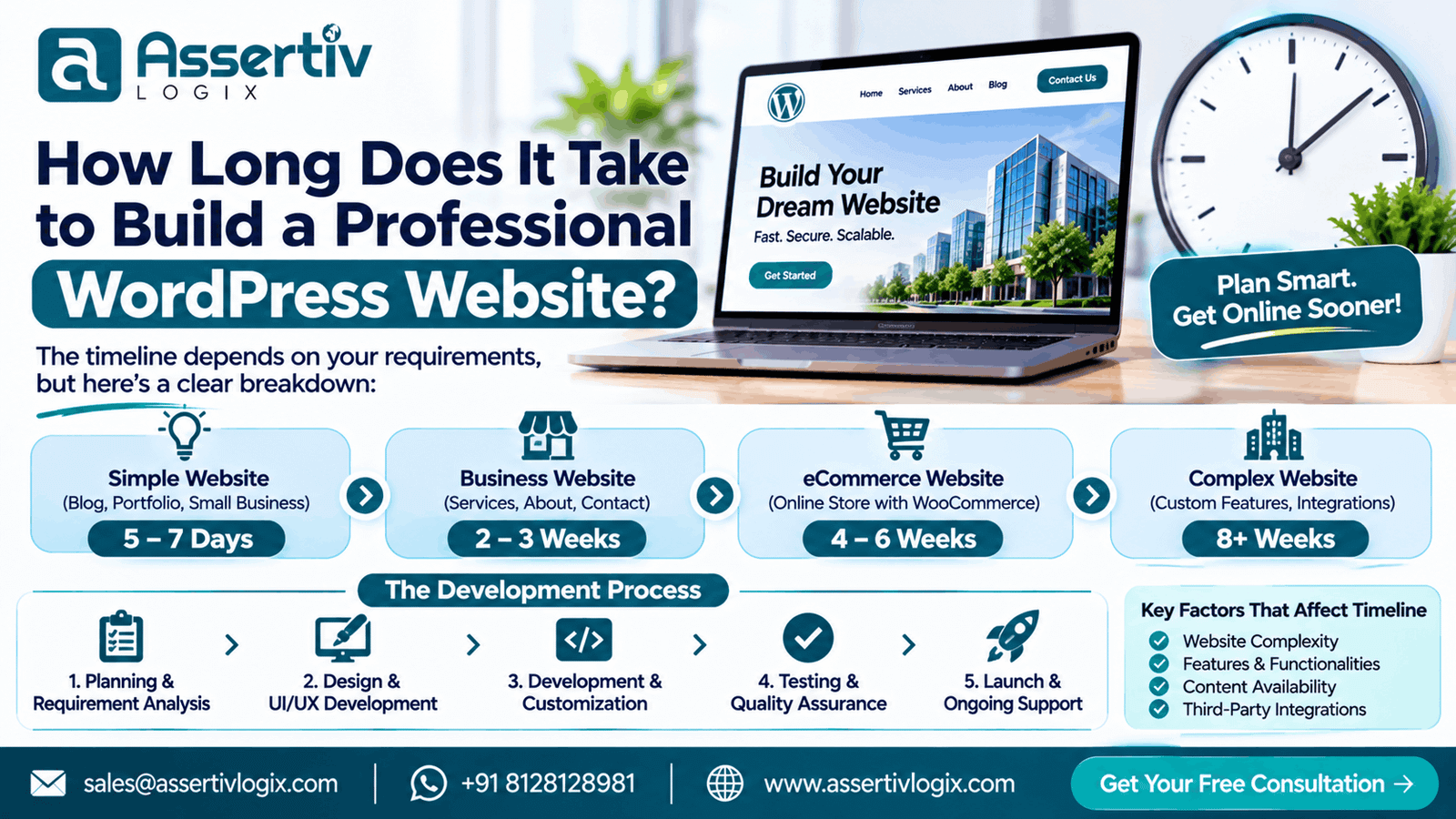
Building a professional WordPress website takes anywhere from a few days to several weeks or even months, depending on the website’s size, design complexity, functionality, content requirements, integrations, and development approach.
A simple business website with a few pages may be completed within one to two weeks, while a custom business website can take three to six weeks. Complex WooCommerce stores, membership platforms, or enterprise websites may require several months of planning, development, testing, and deployment.
Understanding the WordPress website development timeline helps businesses plan their launches, allocate budgets, prepare content, and select the right development partner. It also helps prevent unrealistic expectations about how quickly a website can be designed and launched without compromising quality.
In this guide, we explain how long it takes to build different types of WordPress websites, the development stages involved, factors that affect timelines, and how you can speed up the process without sacrificing quality.
How Long Does It Take to Build a WordPress Website?
The time required to build a WordPress website depends on the project’s scope, design requirements, features, content, and approval process.
The following timelines are illustrative estimates for typical projects. Actual timelines may vary based on requirements, content readiness, revisions, integrations, and the development team’s workflow.
| Website Type | Estimated Development Time |
|---|---|
| Simple personal or portfolio website | 3–7 business days |
| Basic business website | 1–2 weeks |
| Professional business website | 2–4 weeks |
| Custom WordPress website | 3–6 weeks |
| Corporate website | 4–8 weeks |
| WooCommerce online store | 4–8 weeks |
| Complex eCommerce website | 8–12+ weeks |
| Membership or LMS website | 4–10+ weeks |
| Enterprise WordPress website | 8–16+ weeks |
These estimates generally assume that project requirements are reasonably defined, the client provides content and feedback on time, and the development team has the resources needed to complete the work.
WordPress Website Development Timeline by Website Type
Different websites require different development approaches. A five-page business website is not comparable to a custom eCommerce platform with product integrations, payment workflows, and advanced functionality.
1. Simple WordPress Website: 3–7 Business Days
A simple WordPress website is usually suitable for individuals, freelancers, consultants, or small businesses that need a basic online presence.
Typical pages include:
- Home
- About
- Services
- Portfolio or gallery
- Contact
These projects generally use a lightweight theme, an existing design framework, or a customized starter template.
Typical development tasks include:
- WordPress installation and configuration
- Theme setup
- Basic page creation
- Contact form configuration
- Responsive layout adjustments
- Basic SEO setup
- Testing and launch
When content and design requirements are ready, a simple website can be launched relatively quickly.
2. Professional Business Website: 2–4 Weeks
A professional business website requires more planning, design customization, content organization, and functionality than a basic website.
It may include:
- Custom homepage design
- Service pages
- About and company information
- Portfolio or case studies
- Testimonials
- Blog functionality
- Lead generation forms
- SEO-friendly page structures
- Responsive design
The development process may include design approval, custom theme or page-builder development, content integration, mobile optimization, and quality assurance.
This is a common timeline for businesses that want a professional website designed around their brand and marketing goals.
3. Custom WordPress Website: 3–6 Weeks
A custom WordPress website requires more extensive design and development work. Instead of relying primarily on an existing template, the development team creates layouts, components, functionality, and user experiences based on the business requirements.
Custom WordPress websites may include:
- Custom UI/UX design
- Custom WordPress theme development
- Reusable content blocks
- Custom post types and taxonomies
- Advanced forms
- API integrations
- Custom dashboards
- Performance optimization
Because custom development involves design decisions, coding, testing, and revisions, it generally requires more time than template-based website development.
4. WooCommerce eCommerce Website: 4–8 Weeks
WooCommerce websites require additional planning because they include shopping functionality, product management, payment processing, shipping configuration, and order management.
Typical features include:
- Product catalog setup
- Product categories and attributes
- Product search and filtering
- Shopping cart
- Checkout functionality
- Payment gateway integration
- Shipping configuration
- Customer accounts
- Order management
- Email notifications
A small online store with a limited catalog and standard checkout may be completed faster. A store with complex pricing, multiple shipping rules, product customization, ERP integrations, or advanced checkout workflows will take longer.
Explore our WooCommerce Development Services for custom online store solutions.
5. Membership or LMS Website: 4–10+ Weeks
Membership websites and learning management systems require user accounts, access control, subscriptions, restricted content, course structures, and sometimes payment integrations.
Features may include:
- User registration and login
- Membership plans
- Subscription management
- Restricted content
- Course modules and lessons
- Progress tracking
- Quizzes and assessments
- Certificates
- Member dashboards
The timeline depends on the number of features, content structure, integrations, user roles, and whether existing plugins can satisfy the requirements or custom development is needed.
6. Enterprise WordPress Website: 8–16+ Weeks
Enterprise WordPress websites often involve multiple stakeholders, large content libraries, complex integrations, custom workflows, advanced security requirements, and scalable infrastructure.
Enterprise projects may require:
- Technical architecture planning
- Custom design systems
- Advanced content management
- Multi-site or multi-brand functionality
- CRM and ERP integrations
- Custom APIs
- Complex user permissions
- Security reviews
- Performance and load testing
- Migration of existing content
- Extensive QA and stakeholder approval
Depending on complexity, enterprise projects may extend beyond 16 weeks. Large digital platforms with extensive integration or migration requirements can require longer delivery schedules.
WordPress Website Development Timeline: Step-by-Step
Understanding each development stage helps explain where project time is spent. The following example represents a typical professional business website rather than a fixed schedule for every project.
Stage 1: Discovery and Requirement Gathering – 1–3 Days
The first step is understanding the business, target audience, objectives, website structure, functionality, and design expectations.
During discovery, the development team identifies:
- Business goals and target audience
- Required pages and website structure
- Design preferences and branding
- Required features and functionality
- Third-party integrations
- Content and media requirements
- SEO requirements
- Timeline and budget expectations
Clear requirements reduce confusion during development and help avoid unnecessary revisions.
Stage 2: Website Planning and Sitemap – 1–3 Days
Once requirements are understood, the team creates a website structure and plans how visitors will navigate the website.
Planning may include:
- Page hierarchy
- Navigation structure
- URL planning
- Content organization
- User journeys
- Functional requirements
A clear sitemap helps ensure that important pages are included before design and development begin.
Stage 3: UI/UX Design – 3–7 Business Days
The design stage focuses on creating a website that looks professional, communicates the brand, and provides a user-friendly experience.
Design work may include:
- Homepage layout
- Inner page templates
- Typography and color selection
- Navigation design
- Responsive layouts
- CTA placement
- Conversion-focused sections
Custom designs generally require more time than theme-based or pre-approved template designs.
Client feedback and design approval can also affect the schedule. Multiple design revisions may extend this stage.
Stage 4: WordPress Setup and Development – 5–15 Business Days
Once the design is approved, developers begin building the website in WordPress.
Development tasks may include:
- WordPress installation and configuration
- Theme setup or custom theme development
- Page template creation
- Custom post types and taxonomies
- Plugin configuration
- Custom functionality development
- Responsive front-end implementation
- Forms and integrations
Development time depends heavily on the number of templates, functionality, custom code, and complexity of the project.
Stage 5: Content Integration – 2–5 Business Days
Content integration involves adding text, images, videos, documents, products, and other information to the website.
This stage may include:
- Adding page content
- Uploading images
- Formatting headings and paragraphs
- Adding internal links
- Configuring SEO metadata
- Adding blog posts
- Uploading product information
When the client provides finalized content in advance, this stage becomes significantly faster.
Stage 6: Testing and Quality Assurance – 2–5 Business Days
Testing ensures that the website works correctly before it is launched.
QA testing may include:
- Desktop and mobile testing
- Tablet responsiveness
- Browser compatibility
- Navigation testing
- Contact form testing
- Functional testing
- Broken link checking
- Image and media testing
- Performance checks
- SEO checks
- Security checks
Testing is especially important for eCommerce, membership, and custom websites where functionality directly affects business operations.
Stage 7: Revisions and Final Approval – 1–5 Business Days
After the client reviews the website, the development team addresses agreed-upon revisions and final adjustments.
This may include:
- Design refinements
- Content corrections
- Spacing and typography adjustments
- Image changes
- Functional improvements
- Minor bug fixes
Having one consolidated feedback document helps avoid delays caused by scattered requests or repeated revision cycles.
Stage 8: Website Launch – 1 Day
Once final approval is received, the website can be deployed to the production environment.
Launch tasks may include:
- Final backup
- Production deployment
- Domain and DNS verification where required
- SSL verification
- Redirect testing
- Analytics setup verification
- Search engine indexing configuration
- Final form testing
- Website monitoring
A planned launch helps reduce downtime and ensures the website is ready for visitors.
Sample Timeline for a Professional Business Website
Below is an example of how a professional business website project may be organized across four weeks. This is a planning example, and stages may overlap depending on the team and project scope.
| Week | Activities |
|---|---|
| Week 1 | Discovery, requirements, sitemap, wireframes, design direction |
| Week 2 | UI design approval, WordPress setup, theme development |
| Week 3 | Page development, functionality, content integration, responsive work |
| Week 4 | Testing, revisions, performance checks, SEO configuration, launch |
Projects with approved designs, ready content, and limited functionality may be completed sooner. Projects requiring extensive design revisions, integrations, or custom development may take longer.
What Factors Affect WordPress Website Development Time?
Several factors determine how long it takes to develop a professional WordPress website.
1. Number of Pages
A five-page website is generally faster to develop than a website containing 50 pages with different layouts, functionality, and content requirements.
However, page count alone does not determine the timeline. A smaller website with complex functionality may take longer than a larger website using reusable templates.
2. Custom Design Requirements
Custom UI/UX design requires research, wireframing, design creation, feedback, and implementation. Websites built using approved templates or design systems may require less time.
3. Custom Functionality
Features such as calculators, booking systems, user dashboards, custom search, advanced filters, and interactive applications increase development time.
Each custom feature needs development, integration, testing, and sometimes additional security considerations.
4. Content Readiness
Content delays are one of the common reasons website projects take longer than expected.
If text, images, videos, product data, and branding materials are not ready, the development team may need to wait or use temporary content before completing the website.
5. Third-Party Integrations
Integrating WordPress with external systems such as CRMs, payment gateways, APIs, email platforms, booking systems, and ERP software requires additional development and testing.
Integration timelines also depend on the availability of API documentation, credentials, access, and support from third-party providers.
6. Revision and Approval Process
Frequent design changes, new feature requests, or delayed approvals can extend the development timeline.
Defining project scope, revision limits, responsibilities, and approval processes in advance helps maintain predictable delivery.
7. Developer Experience
Experienced WordPress developers can generally plan architecture, identify technical risks, implement functionality, and troubleshoot issues more efficiently.
However, development speed should not come at the expense of security, code quality, performance, or testing.
8. Website Migration Requirements
Migrating an existing website can add time depending on the content volume, database structure, URLs, custom functionality, media assets, and SEO requirements.
Migration projects may require content mapping, redirect planning, data cleanup, and extensive validation.
9. SEO and Performance Requirements
Websites requiring advanced SEO implementation, structured data, technical optimization, Core Web Vitals improvements, accessibility testing, and performance tuning may require additional time.
10. Stakeholder Involvement
Projects involving multiple departments, managers, legal teams, marketing teams, or leadership approvals may have longer review cycles.
Clear communication and consolidated feedback help keep the project moving.
How to Build a WordPress Website Faster
If you want to launch your website quickly, there are several practical ways to reduce development time without compromising quality.
1. Prepare Website Content Before Development
Prepare page content, images, logos, testimonials, service descriptions, contact details, and other materials before the project starts.
Content readiness allows developers to build actual page layouts instead of waiting for missing information.
2. Define Website Requirements Clearly
Identify the pages, features, integrations, design preferences, and business goals before development begins.
Clear requirements reduce scope changes and prevent unnecessary rework.
3. Use a Pre-Approved Design
If your project does not require a completely unique design, using a suitable theme, design system, or approved template can reduce design and development time.
For projects that require a distinctive brand experience, custom design may still be the better long-term investment.
4. Choose the Right Development Partner
Working with experienced WordPress developers can help improve planning, reduce technical issues, and streamline implementation.
Choose a team that understands your requirements and has experience with similar website projects.
5. Avoid Unnecessary Features
Focus on the features required for launch. Additional functionality can be introduced in later phases after the website is live and business priorities become clearer.
A phased approach can reduce initial complexity and help launch the most important functionality first.
6. Provide Consolidated Feedback
Instead of sending revisions one at a time, collect feedback from stakeholders and provide it in one organized document.
This reduces repeated development cycles and makes it easier for developers to complete revisions efficiently.
7. Use Staging Environments
A staging website allows clients and developers to review the website before launch without affecting the live website.
Staging environments help identify issues earlier and make final approvals easier.
WordPress Website Development: Freelancer vs Agency Timeline
The development timeline also depends on whether you hire a freelancer, an in-house developer, or a WordPress development agency.
| Factor | Freelancer | Development Agency |
|---|---|---|
| Project management | Usually managed directly by the freelancer | May include dedicated project management |
| Team resources | Primarily one developer | May involve designers, developers, QA, and project managers |
| Development capacity | Depends on individual availability | May support parallel workstreams |
| Design | May be handled by the developer or outsourced | May include dedicated UI/UX resources |
| Testing | Often handled by the freelancer | May have a structured QA process |
| Complex projects | Depends on specialist experience and availability | Can be suitable for multi-disciplinary projects |
A freelancer can be a good choice for a simple website or a clearly defined project. An agency may be more suitable for complex websites that require design, custom development, integrations, testing, and ongoing support.
The actual delivery time depends on the scope and resources allocated, not simply whether you hire a freelancer or agency.
Read our guide on Freelance vs Agency WordPress Development to understand the differences in more detail.
How Much Does WordPress Website Development Cost?
Website development time and cost are closely connected, but the total price depends on more than the number of development days.
Common factors that affect website pricing include:
- Website size and page count
- Design requirements
- Custom theme development
- Plugin development
- eCommerce functionality
- Third-party integrations
- Content creation
- SEO requirements
- Performance optimization
- Maintenance and support
Projects with clear requirements and limited functionality are generally more predictable. Complex websites require detailed estimation and planning.
Read our complete WordPress Website Cost Guide to understand website development pricing and the factors that influence project budgets.
Why You Should Not Rush WordPress Website Development
Launching a website quickly is important, but rushing development can create problems that affect your business long after launch.
Skipping essential development and testing may lead to:
- Broken layouts on mobile devices
- Slow page loading times
- Forms that do not work correctly
- Security vulnerabilities
- Broken links and redirects
- SEO implementation issues
- Plugin compatibility problems
- Unreliable user experiences
- Errors during checkout or conversion workflows
A realistic timeline gives developers enough time to build, test, optimize, and validate the website before it goes live.
Website Launch Checklist
Before launching a professional WordPress website, make sure the essential tasks are completed.
- Website pages and content are finalized.
- Navigation and internal links work correctly.
- Website is responsive across mobile, tablet, and desktop.
- Contact forms are tested.
- All important images have appropriate alt text.
- SEO titles and meta descriptions are configured.
- Canonical URLs are correct.
- XML sitemap is available.
- Robots settings allow intended indexing.
- SSL certificate is active.
- Website backups are configured.
- Security settings are reviewed.
- Performance has been tested.
- Analytics and tracking are configured where required.
- Redirects are tested where applicable.
- Website has been checked for broken links.
- Admin access and ownership are confirmed.
Professional WordPress Website Development by Assertivlogix
At Assertivlogix, we help businesses build professional WordPress websites that are responsive, SEO-friendly, scalable, and designed around their business goals.
Our WordPress development process focuses on clear requirements, efficient development, quality assurance, and reliable delivery. Whether you need a small business website, custom corporate website, WooCommerce store, or a complex WordPress platform, we can help you plan and execute the project.
Our services include:
- Custom WordPress website development
- Business and corporate website development
- Custom WordPress theme development
- Custom plugin development
- WooCommerce development
- Website redesign and migration
- WordPress performance optimization
- API and third-party integrations
- Website maintenance and support
We work with businesses to define realistic project timelines, prioritize functionality, and build websites that support long-term growth.
Let’s discuss your website requirements, estimated development timeline, and the best approach to build a high-quality WordPress website for your business.
Frequently Asked Questions
1. How long does it take to build a WordPress website from scratch?
A basic WordPress website may take one to two weeks, while a professional custom website generally takes three to six weeks. Complex eCommerce or enterprise websites can take eight weeks or longer, depending on functionality and integrations.
2. Can I build a WordPress website in one day?
Yes, a very basic website can be created in one day using a ready-made theme and prepared content. However, a professional website with custom design, functionality, responsive testing, SEO setup, and quality assurance usually requires more time.
3. How long does it take to build a 5-page WordPress website?
A five-page WordPress website may take approximately one to two weeks when requirements, content, and design direction are ready. The timeline can increase if custom design, functionality, integrations, or revisions are required.
4. How long does it take to build a 10-page WordPress website?
A 10-page professional WordPress website may take approximately two to four weeks. The timeline depends on whether pages use reusable templates or require unique designs and functionality.
5. How long does WooCommerce website development take?
A standard WooCommerce website may take four to eight weeks. Stores with complex product configurations, custom checkout, advanced pricing, ERP integrations, or extensive catalog requirements may take eight to twelve weeks or longer.
6. What takes the longest when building a WordPress website?
Custom design, functionality development, integrations, content preparation, stakeholder approvals, revisions, and testing are often the most time-consuming stages. The exact bottleneck depends on the project.
7. Can I speed up WordPress website development?
Yes. You can reduce development time by preparing content in advance, defining requirements clearly, approving designs quickly, limiting unnecessary features, providing consolidated feedback, and working with experienced developers.
8. Does custom WordPress development take longer?
Generally, yes. Custom WordPress development requires additional planning, design, coding, testing, and refinement compared with using a ready-made theme. However, custom development can provide a better fit for specific business requirements.
9. How long does WordPress website testing take?
Testing for a basic website may take one to two business days, while a professional website may require two to five business days or more. Complex eCommerce and enterprise websites may require extensive testing cycles.
10. How long after development does a website take to rank on Google?
Website launch and search engine ranking are separate processes. Google may discover and index pages after launch, but achieving meaningful organic rankings can take weeks or months depending on competition, content quality, website authority, technical SEO, and search intent.