WooCommerce Store Development Cost: Complete Breakdown for 2026
Understanding the WooCommerce store development cost before starting an online business helps you plan your budget, choose the right features, and avoid unexpected expenses. A simple store with a standard theme has very different requirements from a custom eCommerce website with advanced product filters, subscription billing, multiple payment options, and third-party integrations.
WooCommerce is a flexible eCommerce platform built on WordPress. The core software is free, but creating a successful online store involves more than installing a plugin. You may need design, development, hosting, payment gateway setup, security, product migration, performance optimization, and ongoing maintenance.
In this guide, we break down the estimated cost of building a WooCommerce store in 2026, explain the features that influence pricing, and show you how to budget for launch and long-term operations.
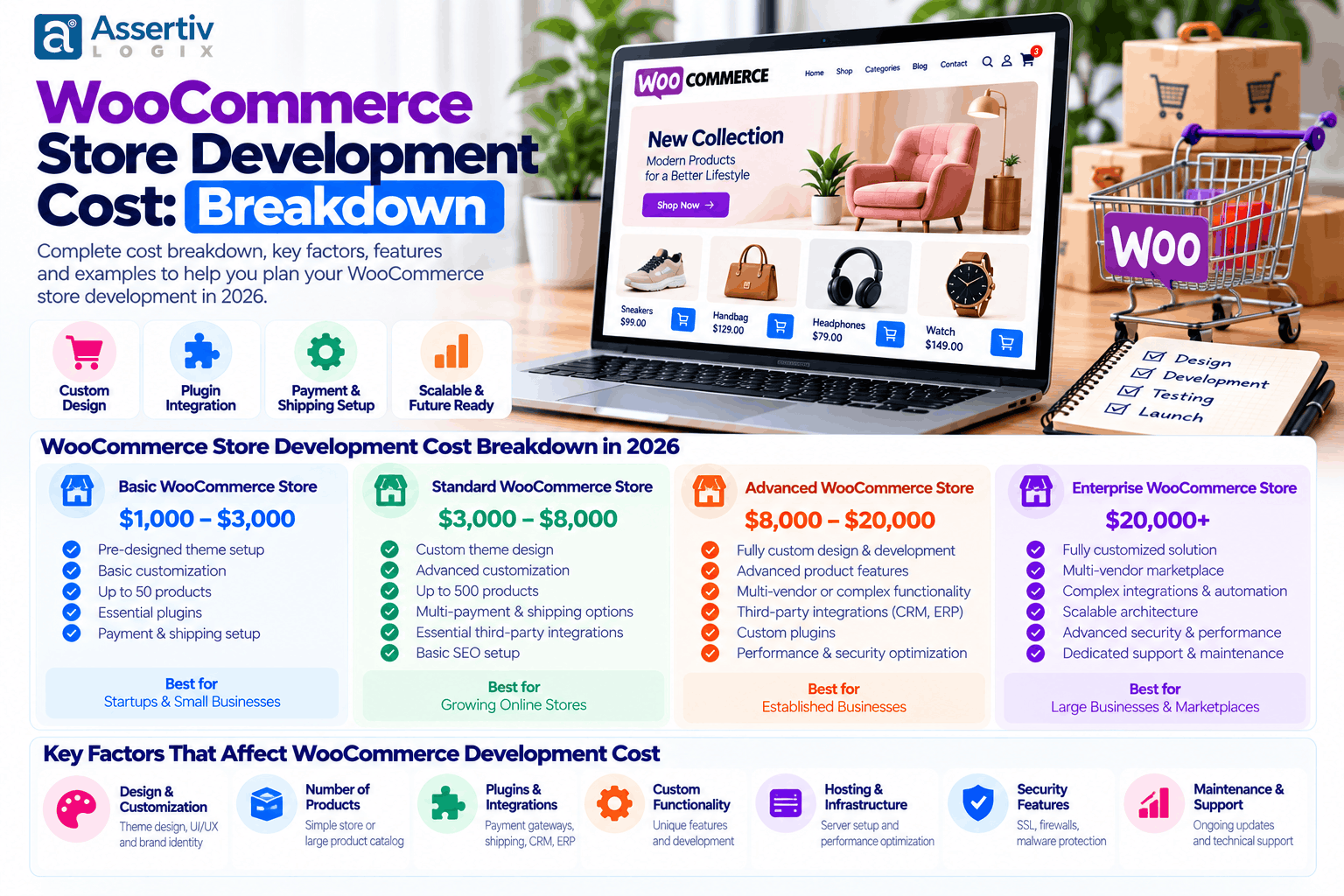
How Much Does WooCommerce Store Development Cost in 2026?
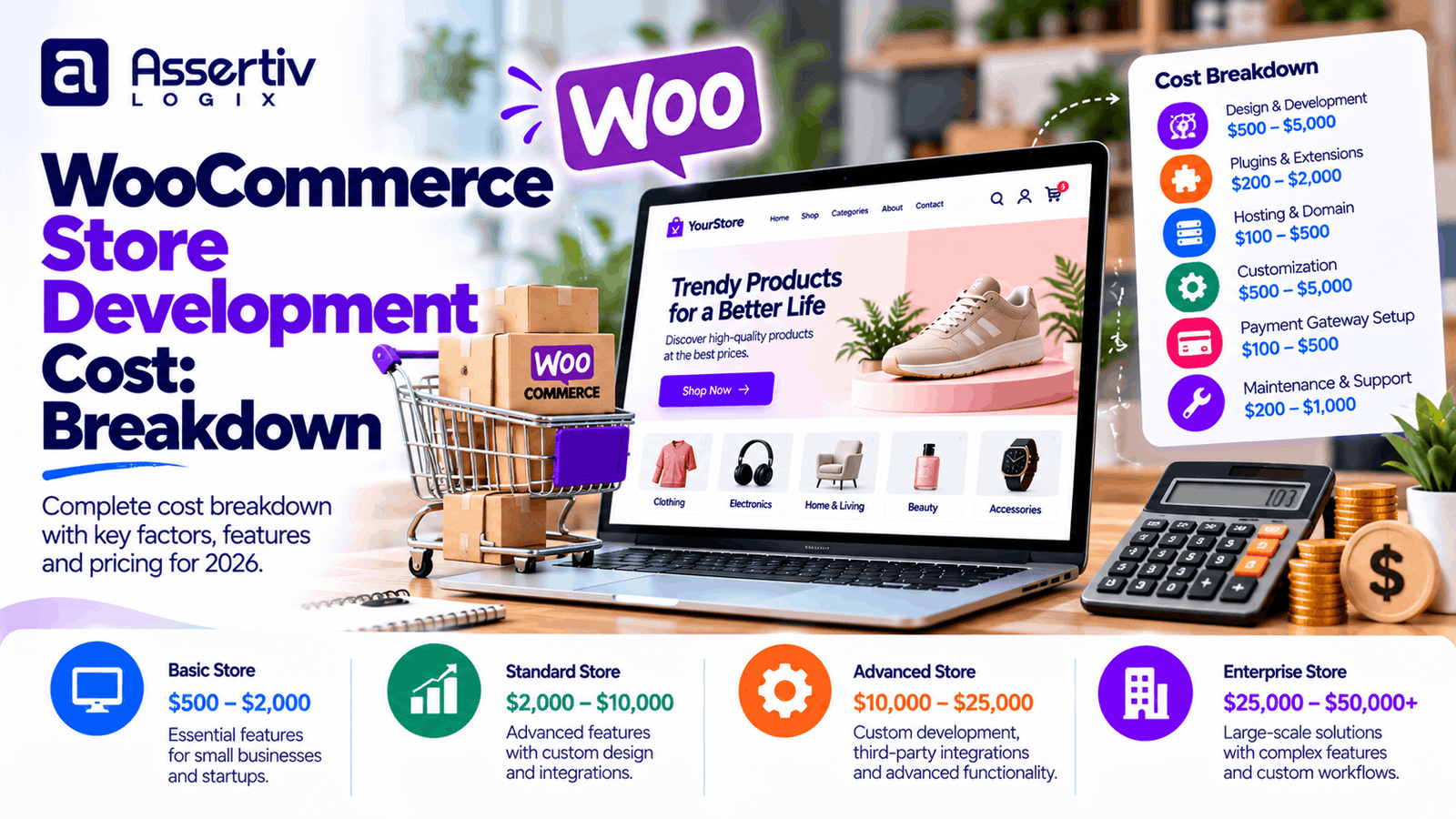
The cost of developing a WooCommerce store depends on the number of products, design complexity, required functionality, integrations, and the development team you choose. The following ranges are illustrative budgeting estimates in USD, not fixed quotations or independently verified market averages.
| Store type | Estimated development cost | Typical scope |
|---|---|---|
| Basic WooCommerce store | $500–$1,500 | Standard theme, core pages, basic checkout, limited customization |
| Small business store | $1,500–$4,000 | Branded design, product categories, shipping and payment setup |
| Growing eCommerce store | $4,000–$10,000 | Custom layouts, advanced product features, marketing integrations |
| Custom WooCommerce store | $10,000–$25,000+ | Custom functionality, complex workflows, API integrations and tailored UX |
| Enterprise eCommerce solution | $25,000–$75,000+ | Complex integrations, high-volume operations, custom architecture and testing |
These ranges describe possible project budgets, not universal prices. A store with 100 products and a standard checkout may cost less than a store with 20 products that needs product configurators, ERP integration, subscription logic, or custom pricing rules.
For a related pricing comparison, read our eCommerce WordPress website cost guide and WordPress development cost breakdown.
WooCommerce Store Development Cost Breakdown
A project estimate becomes easier to evaluate when the budget is divided into individual components. Some expenses are one-time development costs, while others recur monthly or annually.
| Cost component | Illustrative budget | Payment type |
|---|---|---|
| Domain name | $10–$30 per year | Recurring |
| Web hosting | $10–$150+ per month | Recurring |
| Theme and design assets | $0–$300+ | Usually one-time or annual |
| Store design and development | $500–$25,000+ | Project-based |
| Premium plugins and extensions | $0–$1,000+ per year | Free, one-time or recurring |
| Payment gateway fees | Depends on provider and transactions | Transaction-based |
| Security, backups and maintenance | $30–$500+ per month | Recurring or service-based |
| Marketing and SEO | $100–$2,000+ per month | Optional recurring |
Actual costs vary by country, provider, traffic, license terms, and service scope. Some developers include hosting configuration, plugin setup, and initial SEO in the project price; others quote them separately. Ask for an itemized proposal before comparing estimates.
1. Domain and Hosting Costs
Your domain is the address customers use to reach your store. Hosting stores the website files, database, product information, and order data. Although these expenses are relatively small compared with development, choosing the wrong hosting plan can affect performance and reliability.
- Domain: Budget approximately $10–$30 per year for many standard domain registrations. Premium domains can cost considerably more.
- Entry-level hosting: Often suitable for a small store with modest traffic and a limited catalog.
- Managed WordPress or WooCommerce hosting: May offer easier maintenance, backups, staging, and performance features at a higher price.
- Higher-capacity hosting: May be needed as traffic, product complexity, and order volume grow.
Look for reliable backups, SSL support, current PHP and database versions, adequate resources, and a clear recovery process. You can compare performance improvements using Google PageSpeed Insights after launch.
2. Theme and Store Design Costs
Your store’s visual design influences how customers navigate products, evaluate trust, and complete purchases. WooCommerce can work with free themes, premium themes, or a custom-designed WordPress theme.
- Free theme: Useful when the available layouts already meet your needs.
- Premium theme: May provide ready-made layouts, styling controls, and extra components. Check compatibility and licensing before purchasing.
- Custom design: Makes sense when your brand requires a distinctive experience, tailored product pages, or a specific conversion-focused user journey.
Custom design often increases the initial budget, but it can give you more control over product discovery, mobile usability, accessibility, and checkout flow. A theme should be selected based on functionality and maintainability rather than appearance alone.
3. Product Catalog and Data Entry
Adding products can be a significant part of the project, especially when the catalog contains hundreds of variations, product attributes, images, and detailed descriptions.
A simple product may need only a name, price, image, and description. A variable product can require sizes, colors, stock rules, individual variation prices, and separate images. Existing stores may also need product, customer, and order data migrated from another platform.
To keep costs under control, prepare clean product data in a spreadsheet, standardize image sizes, and confirm which products need manual setup versus bulk import. Product photography and copywriting may be separate services, so clarify whether they are included in the estimate.
4. Payment Gateway and Checkout Integration
Payment configuration helps customers complete purchases securely and gives store owners a reliable way to receive funds. WooCommerce supports different gateway integrations, but the right option depends on your market, currency, business model, and provider requirements.
Depending on the project, the development work may include:
- Credit and debit card payments
- Regional payment methods and supported wallets
- Cash on delivery or bank transfer
- Refund and order-status handling
- Webhook configuration and payment error testing
- Checkout field customization and tax settings
Payment providers may charge transaction fees, currency-conversion fees, or other service charges. These are separate from developer fees. Review the provider’s current terms and applicable PCI Security Standards Council guidance for payment security responsibilities.
5. Shipping, Tax and Order Management
Shipping and tax requirements vary widely by business. A local store with a few delivery zones may need only standard WooCommerce settings. An international business may require carrier rates, shipping rules, tax configuration, customs information, or fulfillment integrations.
More advanced functionality can include:
- Shipping rates based on weight, location, or cart value
- Free-shipping thresholds and local pickup
- Carrier label generation and tracking updates
- Inventory synchronization across sales channels
- Automated order notifications and fulfillment workflows
Before development begins, document the countries you serve, shipping zones, tax responsibilities, returns process, and warehouse workflow. This reduces rework and helps the developer estimate the correct scope.
6. Plugins and Custom Functionality
Plugins add functionality without requiring every feature to be developed from scratch. However, premium extensions, annual renewals, compatibility checks, and custom integrations can increase the overall budget.
Common examples include:
- Product filters, search and wishlists
- Subscriptions, memberships and recurring billing
- Bookings, appointments and product bundles
- Multi-vendor marketplace functionality
- CRM, email marketing, accounting and ERP integrations
- Custom checkout, wholesale pricing and customer-specific rules
Use established extensions where they meet your requirements. Custom development is more appropriate when a business rule is not supported reliably by available tools or when several plugins create conflicts and unnecessary complexity.
Our WooCommerce development services cover store customization, integrations, and tailored eCommerce functionality. For plugin-specific work, explore our WordPress plugin development services.
7. Security, Performance and Quality Assurance
A store should be tested before customers start placing orders. Cutting testing from the budget can lead to broken checkout flows, stock errors, mobile layout issues, and unexpected conflicts after launch.
Allow time for:
- SSL and secure account configuration
- Role and permission checks
- Backup and restore verification
- Plugin and theme updates
- Mobile, browser and accessibility checks
- Cart, coupon, shipping, tax and payment testing
- Page-speed and Core Web Vitals review
Use the official WordPress security guidance as a starting point. For performance, review the Core Web Vitals documentation and test important product, category, cart, and checkout pages.
Example WooCommerce Store Budget
Consider a small business launching a branded store with a product catalog, responsive design, standard payment and shipping setup, and basic analytics. The following is an illustrative first-year budget, not a quote for a specific project.
| Item | Illustrative cost |
|---|---|
| Domain for one year | $20 |
| Hosting for one year | $360 |
| Theme and required licenses | $200 |
| Design and development | $2,500 |
| Initial product setup and testing | $400 |
| Maintenance allowance for one year | $600 |
| Illustrative first-year total | $4,080 |
This example excludes payment transaction fees, advertising, professional product photography, extensive copywriting, and major custom integrations. Your total may be lower or higher depending on what the project actually requires.
What Factors Increase WooCommerce Development Cost?
Several project decisions have a direct effect on the final quote:
- Custom design: Unique page layouts and interaction patterns require additional design and development time.
- Catalog size: Large catalogs and complex product variations require more setup, import work, and testing.
- Business logic: Wholesale pricing, subscriptions, product configurators, and custom checkout rules add complexity.
- External integrations: Connecting accounting software, ERP systems, CRMs, or warehouses may require API development and ongoing maintenance.
- Migration: Moving products, customers, orders, URLs, and SEO metadata from another platform adds planning and verification work.
- Performance and scale: High traffic, complex queries, and large catalogs may need additional infrastructure and optimization.
- Delivery timeline: An accelerated launch may require more resources and tighter coordination.
A clear scope is the most reliable way to keep the budget predictable. Separate must-have launch features from enhancements that can be introduced after the store begins generating sales.
How to Reduce WooCommerce Store Development Cost
Reducing cost does not mean choosing the cheapest hosting plan or installing a plugin for every requirement. It means investing in the features that matter now and avoiding unnecessary complexity.
- Define the minimum viable store. List the pages, product types, payment methods, shipping rules, and integrations required for launch.
- Use a suitable theme. Start with a maintained theme if it can meet your design and performance needs without extensive modification.
- Audit plugin requirements. Prefer reliable, maintained extensions and avoid overlapping plugins that add the same features.
- Prepare product data early. Clean spreadsheets and consistent images reduce manual entry and import corrections.
- Choose the right pricing model. Fixed-price projects can work for well-defined scopes, while hourly engagements may suit ongoing or evolving requirements.
- Plan for maintenance. Regular updates, backups, and testing can reduce the likelihood of expensive emergency fixes.
- Launch in phases. Add advanced automation and integrations once you have validated customer needs and operational requirements.
WooCommerce Store Development: Step-by-Step Process
- Discovery and requirements: Document products, customers, workflows, shipping, payment methods, and business goals.
- Scope and estimate: Prioritize features, confirm exclusions, and agree on deliverables, milestones, and acceptance criteria.
- Design and development: Build the store layout, product pages, catalog, checkout, and agreed integrations.
- Data setup and configuration: Import products, configure taxes and shipping, connect payment providers, and set up notifications.
- Testing: Verify purchases, refunds, inventory, coupons, responsive layouts, security settings, and performance.
- Launch and support: Deploy the store, monitor orders and errors, and follow an agreed maintenance plan.
The timeline depends on project complexity, content readiness, third-party approvals, and the speed of feedback. A basic store may take a few weeks, while a complex custom store can take several months.
WooCommerce Development Cost: Freelancer vs Agency
The right partner depends on the complexity of your project and the level of support you need. A freelancer can be a good fit for a clearly defined store with limited customization. An agency may be better suited to projects that require design, development, integrations, quality assurance, and ongoing coordination across multiple specialists.
| Consideration | Freelancer | Development agency |
|---|---|---|
| Best fit | Smaller, focused projects | Multi-part or complex projects |
| Team structure | Usually one primary developer | May include design, development and QA roles |
| Communication | Direct with the developer | Often coordinated through a project lead |
| Support capacity | Depends on individual availability | May offer structured maintenance options |
| Cost comparison | Depends on experience and scope | Depends on team size and included services |
Do not compare proposals by price alone. Check relevant portfolio work, WooCommerce experience, communication practices, code ownership, documentation, testing scope, and post-launch support. You can also read our guide to freelancer vs agency WordPress development.
How to Choose a WooCommerce Development Partner
Before signing a contract, ask the development partner to explain what is included in the estimate and how the project will be delivered. Useful questions include:
- Have you built stores with similar products and workflows?
- Which theme, plugins, and custom components do you recommend, and why?
- Are hosting, licenses, product entry, migration, and SEO setup included?
- How will payment, shipping, refunds, and inventory be tested?
- Who owns the source code, website accounts, and purchased licenses?
- What is covered by the warranty or post-launch support agreement?
- How are change requests and additional costs approved?
Ask for an itemized proposal with assumptions, exclusions, milestones, and payment terms. This makes it easier to compare vendors fairly and avoid scope misunderstandings.
Is WooCommerce Worth the Development Investment?
WooCommerce can be a strong choice for businesses that want control over their storefront, content, product catalog, and integrations within the WordPress ecosystem. Its flexibility can support everything from a small catalog to a sophisticated store, but the platform still needs suitable hosting, careful extension selection, maintenance, and sound development practices.
Evaluate the investment against your business goals: the checkout experience you need, the time saved through automation, the cost of maintaining your current platform, and the ability to improve the store as your business grows. The lowest upfront quote is not always the least expensive option over time.
Frequently Asked Questions
How much does it cost to build a WooCommerce store in 2026?
A basic store may fit an illustrative budget of $500–$1,500 for development, while a growing or custom store may require several thousand dollars or more. Enterprise-level projects can exceed $25,000. The final price depends on scope, design, integrations, catalog complexity, and support requirements.
Is WooCommerce free to use?
The core WooCommerce plugin is free, but running a store can involve domain registration, hosting, paid themes or extensions, payment processing fees, development, security, and maintenance.
How much does WooCommerce hosting cost?
Hosting may cost around $10–$150 or more per month for many small and growing stores, depending on provider, resources, support, and traffic. High-demand stores may require more capable infrastructure.
How long does WooCommerce store development take?
A straightforward store may take a few weeks. A custom store with extensive design work, product migration, advanced business logic, or third-party integrations can take several months. Content readiness and feedback speed also affect delivery.
What ongoing costs should I budget for?
Plan for hosting, domain renewal, premium extension licenses, maintenance, backups, security, payment processing, and optional SEO or marketing. The amount depends on the size and complexity of your store.
Can I reduce development costs by using a ready-made theme?
Yes. A suitable, maintained theme can reduce design and development effort. However, if extensive modifications are needed, a custom design or a different theme may provide better long-term value.
Should I hire a freelancer or a WooCommerce development agency?
A freelancer can be a good fit for a small, well-defined project. An agency may suit projects requiring several disciplines, complex integrations, structured QA, or ongoing support. Compare scope, relevant experience, communication, ownership, and support—not just the headline price.
Are payment gateway fees included in development costs?
Usually, development and payment processing are separate expenses. Gateway charges depend on the provider, transaction volume, payment method, and currency. Confirm both the integration fee and the provider’s ongoing charges.
Plan Your WooCommerce Store Budget with Assertivlogix
The right WooCommerce budget starts with your business requirements—not a generic package. Whether you need a straightforward online store, a custom shopping experience, product and inventory integrations, or performance improvements, a clearly defined scope helps you understand the investment before development begins.
Assertivlogix provides WordPress and WooCommerce development services for businesses that need tailored eCommerce functionality, responsive design, integrations, and ongoing technical support.
Share your product catalog, required features, integrations, and launch goals to discuss a practical development scope and estimate.