Website speed has become one of the most important ranking factors for search engines and a key contributor to user satisfaction. Google introduced Core Web Vitals to measure real-world user experience, focusing on loading performance, responsiveness, and visual stability. Whether you run a business website, blog, portfolio, or WooCommerce store, optimizing your WordPress site for Core Web Vitals can improve SEO, increase conversions, and reduce bounce rates.
Many WordPress websites struggle with slow loading pages, heavy themes, oversized images, and unoptimized scripts. The good news is that most performance issues can be resolved with the right optimization strategies. In this guide, you’ll learn what Core Web Vitals are, why they matter, and the practical steps you can take to improve your scores.
What Are Core Web Vitals?
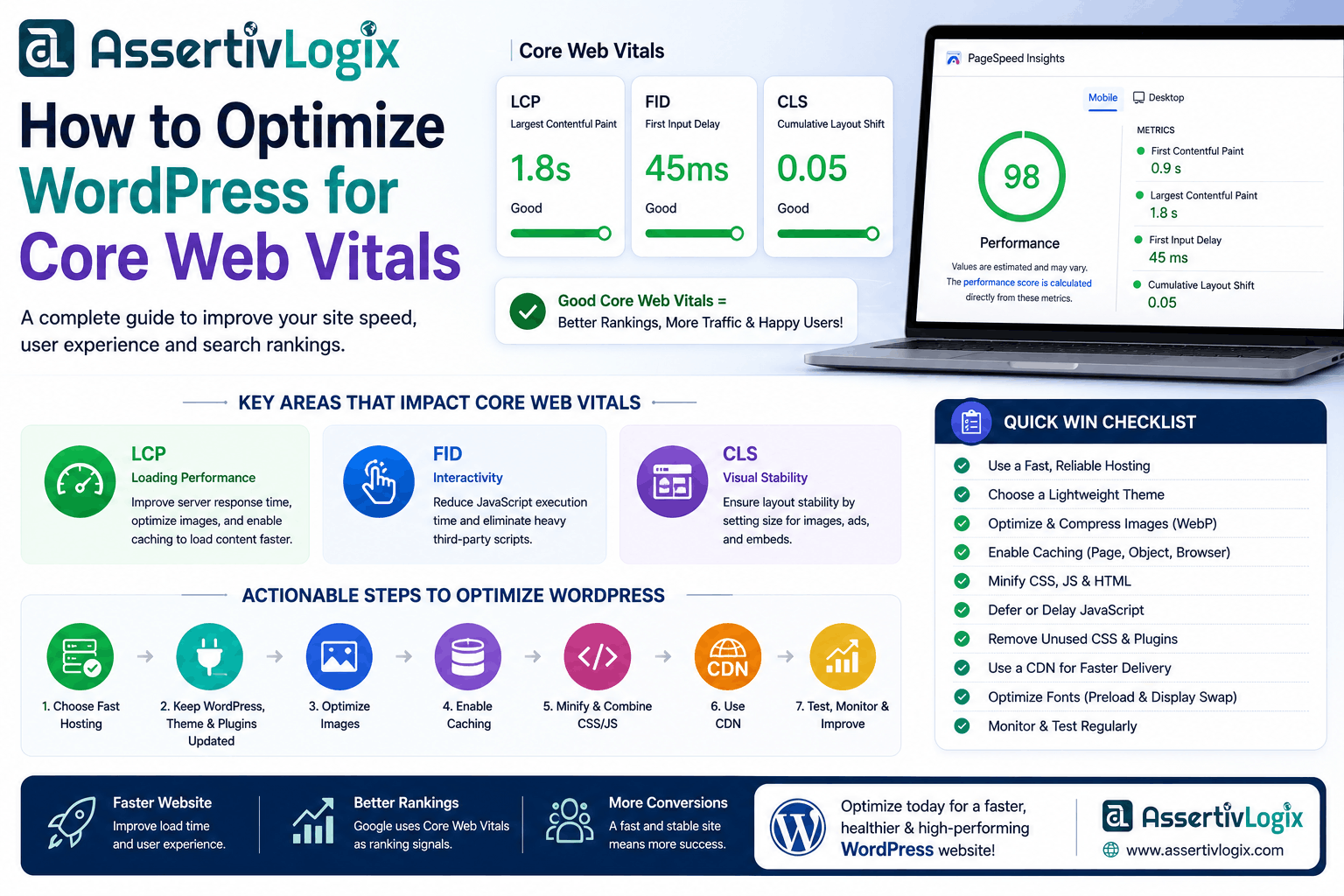
Core Web Vitals are a set of user experience metrics developed by Google to evaluate how quickly and smoothly a webpage performs. These metrics are part of Google’s Page Experience signals and influence search rankings.
The three Core Web Vitals metrics are:
- Largest Contentful Paint (LCP) – Measures how quickly the largest visible element on a page loads.
- Interaction to Next Paint (INP) – Measures how responsive a page is when users interact with it.
- Cumulative Layout Shift (CLS) – Measures visual stability by tracking unexpected layout shifts.
Why Core Web Vitals Matter
Improving Core Web Vitals benefits both search engines and website visitors. Faster websites create a better browsing experience, encourage visitors to stay longer, and often lead to higher conversion rates.
- Improve Google search rankings
- Enhance user experience
- Reduce bounce rates
- Increase conversions and sales
- Improve mobile performance
- Support better accessibility
Understanding Largest Contentful Paint (LCP)
LCP measures how long it takes for the largest visible element—often a hero image, banner, or heading—to appear on the screen. Google recommends an LCP of 2.5 seconds or less.
How to Improve LCP
- Choose fast WordPress hosting with SSD or NVMe storage.
- Use a Content Delivery Network (CDN).
- Compress and resize images before uploading.
- Serve images in modern formats such as WebP or AVIF.
- Enable page caching.
- Reduce server response time.
- Preload important fonts and hero images.
Optimizing Interaction to Next Paint (INP)
INP measures how quickly your website responds when users click a button, open a menu, or submit a form. Slow JavaScript execution is one of the biggest causes of poor responsiveness.
Ways to Improve INP
- Reduce unnecessary JavaScript.
- Delay non-critical scripts.
- Minify JavaScript files.
- Remove unused plugins that load excessive scripts.
- Use lightweight themes.
- Limit third-party tracking scripts.
Reducing Cumulative Layout Shift (CLS)
CLS measures unexpected layout movement while a page loads. A visitor should never accidentally click the wrong button because page elements shifted unexpectedly.
How to Reduce CLS
- Always define image width and height.
- Reserve space for advertisements and embedded content.
- Use optimized fonts with font-display settings.
- Avoid inserting content above existing elements after page load.
- Preload important fonts.
Choose a Performance-Optimized Theme
The WordPress theme you choose has a significant impact on performance. Lightweight themes generate cleaner code, load fewer assets, and help improve Core Web Vitals.
When selecting a theme, look for:
- Clean code structure
- Minimal dependencies
- Responsive design
- Regular updates
- Compatibility with popular optimization plugins
Optimize Images
Images often account for the largest portion of a webpage’s size. Proper optimization can dramatically improve loading performance.
- Compress images before uploading.
- Use WebP or AVIF image formats.
- Enable lazy loading for below-the-fold images.
- Avoid uploading oversized images.
- Use responsive image sizes.
Enable Caching
Caching stores pre-generated versions of your pages, reducing server processing and delivering content faster to visitors.
Useful caching techniques include:
- Page caching
- Browser caching
- Object caching
- Opcode caching
Use a Content Delivery Network (CDN)
A CDN stores copies of your website’s static assets on servers worldwide, reducing latency and improving loading speeds for global visitors.
Minify CSS and JavaScript
Removing unnecessary spaces, comments, and unused code decreases file sizes and speeds up page loading.
Also consider combining files where appropriate to reduce HTTP requests.
Keep WordPress Updated
Regular updates improve security, compatibility, and performance. Update WordPress core, themes, plugins, and PHP to the latest stable versions.
Reduce Plugin Bloat
Too many plugins can increase database queries and load unnecessary assets.
Review installed plugins regularly and remove those you no longer use.
Optimize Your Database
A clean database helps WordPress respond more efficiently.
- Delete spam comments.
- Remove post revisions.
- Clean expired transients.
- Optimize database tables.
Optimize Fonts
Web fonts can affect both LCP and CLS if not loaded efficiently.
- Limit font families and weights.
- Host fonts locally when possible.
- Preload important fonts.
- Use
font-display: swap.
Limit Third-Party Scripts
Analytics tools, chat widgets, advertising networks, and social media embeds can significantly slow your website.
Only install third-party services that provide real business value.
Monitor Performance Regularly
Performance optimization is an ongoing process. Test your website after major updates or design changes.
Recommended tools include:
- Google PageSpeed Insights
- Google Lighthouse
- GTmetrix
- Chrome DevTools
Core Web Vitals Optimization Checklist
- Use high-performance hosting.
- Enable page caching.
- Use a CDN.
- Compress and optimize images.
- Minify CSS and JavaScript.
- Reduce unused plugins.
- Optimize fonts.
- Improve server response time.
- Keep WordPress updated.
- Monitor Core Web Vitals regularly.
Frequently Asked Questions
Do Core Web Vitals affect SEO?
Yes. Core Web Vitals are part of Google’s Page Experience signals and can influence search rankings, especially when comparing pages with similar content quality.
How often should I test my website?
It’s a good practice to test after significant updates, theme changes, plugin installations, or server migrations. Monthly performance audits are also recommended.
Can plugins alone fix Core Web Vitals?
No. While optimization plugins help, achieving excellent Core Web Vitals requires a combination of quality hosting, efficient themes, optimized images, caching, clean code, and regular maintenance.
Conclusion
Optimizing your WordPress website for Core Web Vitals is one of the most effective ways to improve search rankings, enhance user experience, and increase conversions. By focusing on faster loading times, responsive interactions, and stable page layouts, you create a website that performs well for both visitors and search engines.
Start by addressing the biggest performance bottlenecks, monitor your progress regularly, and continue refining your website as new optimization techniques become available. A fast, reliable WordPress site not only delivers better SEO results but also builds trust with your audience and supports long-term business growth.