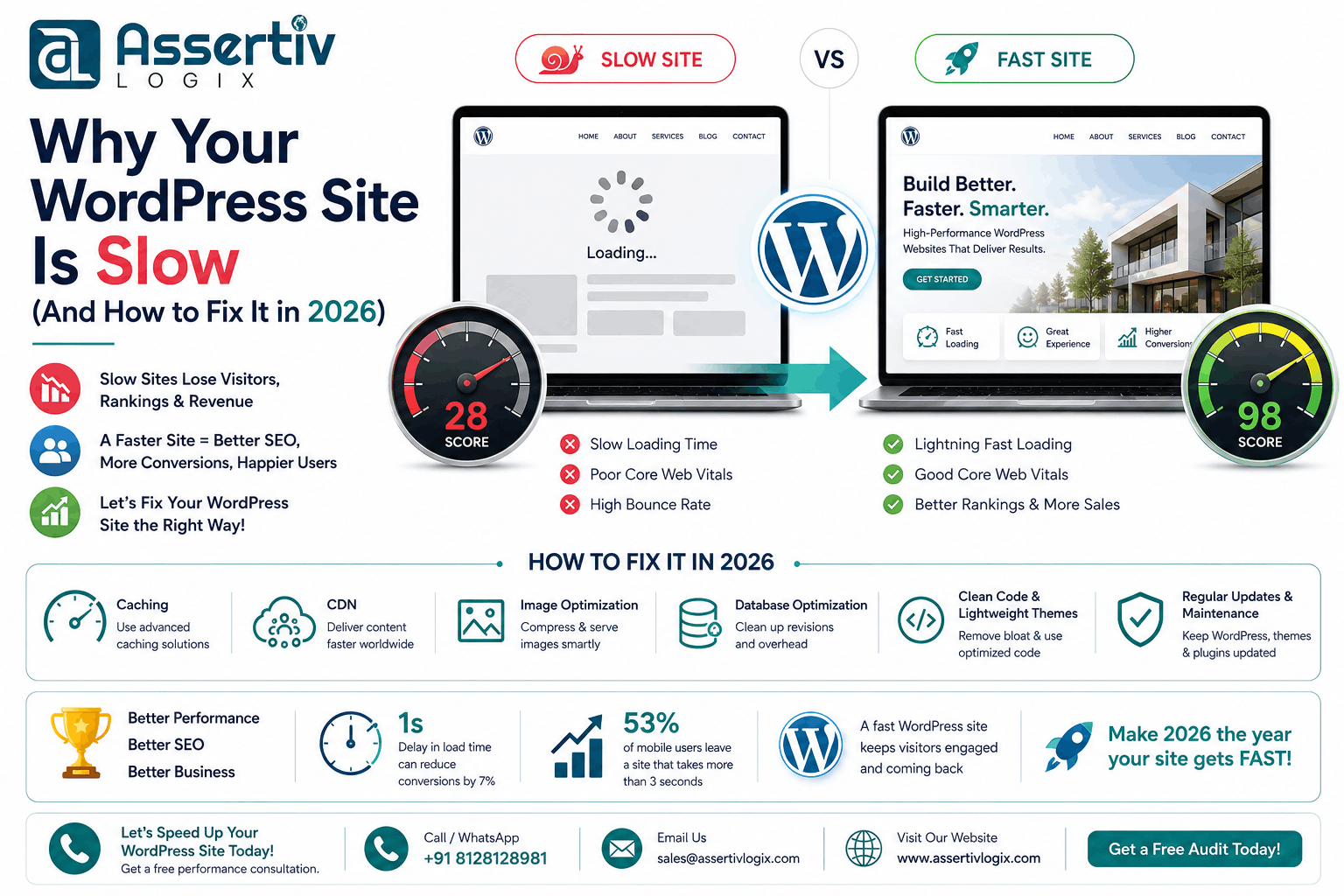
Few things are more frustrating than a slow website. Visitors expect pages to load almost instantly, and if your WordPress site takes too long, they’ll often leave before seeing your content. A slow website doesn’t just affect user experience—it also impacts search engine rankings, lead generation, conversions, and revenue.
If you’ve been searching for a WordPress site slow fix, you’re not alone. Slow loading times are one of the most common issues WordPress website owners face. The good news is that most performance problems can be identified and fixed with the right approach.
In this guide, we’ll explore the most common reasons why WordPress websites become slow and provide practical solutions to improve performance in 2026.
Why Website Speed Matters
Website performance affects nearly every aspect of your online business. Google uses page experience and Core Web Vitals as ranking signals, while visitors expect a smooth browsing experience on both desktop and mobile devices.
- Improve search engine rankings
- Increase conversion rates
- Reduce bounce rates
- Improve customer satisfaction
- Increase revenue
- Support better Core Web Vitals scores
How Slow Is Too Slow?
While every website is different, most users expect a page to load in under three seconds. As load times increase, so does the likelihood that visitors will leave before interacting with your content.
If your homepage, product pages, or blog posts consistently take several seconds to load, it’s time to investigate the underlying causes.
1. Poor Web Hosting
Your hosting provider is the foundation of your website’s performance. Shared hosting plans with limited resources can struggle during traffic spikes, leading to slow response times and inconsistent performance.
Look for hosting that offers:
- SSD or NVMe storage
- Modern PHP versions
- Server-side caching
- HTTP/3 support
- Automatic backups
- Scalable infrastructure
If you’re considering a hosting upgrade, read our Best WordPress Hosting Guide.
2. Heavy Themes
Feature-rich themes often load unnecessary CSS, JavaScript, fonts, and animations that can slow down every page of your website.
Choose lightweight, well-coded themes that prioritize performance without sacrificing design flexibility.
3. Too Many Plugins
Plugins add functionality, but every active plugin consumes server resources. Poorly coded or unnecessary plugins can significantly increase loading times.
Regularly review your installed plugins and remove any that are no longer needed.
4. Unoptimized Images
Large image files are one of the biggest contributors to slow websites.
Best practices include:
- Compress images before uploading.
- Use WebP or AVIF formats.
- Resize images appropriately.
- Enable lazy loading.
5. No Caching
Without caching, WordPress generates each page dynamically for every visitor, increasing server load and slowing down response times.
Implement:
- Page caching
- Browser caching
- Object caching
- Opcode caching
6. Poor Core Web Vitals
Google’s Core Web Vitals measure loading speed, responsiveness, and visual stability. Poor scores often indicate deeper performance issues.
Learn how to improve them in our Core Web Vitals Optimization Guide.
7. Database Bloat
Over time, your WordPress database accumulates revisions, spam comments, expired transients, and unnecessary data.
Regular optimization helps improve query performance and reduces server workload.
8. Too Many External Scripts
Analytics tools, live chat widgets, advertising scripts, social media embeds, and third-party tracking codes can slow down your website.
Only keep scripts that provide measurable business value.
9. Unoptimized WooCommerce Store
WooCommerce adds dynamic functionality such as carts, customer accounts, product filtering, and checkout processes. Without optimization, ecommerce stores can become noticeably slower.
Explore our WooCommerce Performance Guide for optimization strategies.
10. Outdated PHP Version
Running an outdated PHP version reduces both performance and security. Updating to a supported PHP version can provide significant speed improvements.
11. No Content Delivery Network (CDN)
A CDN delivers static assets from servers closer to your visitors, reducing latency and improving loading times for global audiences.
12. Poorly Optimized Code
Custom themes, plugins, and scripts may contain inefficient code that increases server processing time.
Code reviews and performance profiling can identify bottlenecks.
How to Measure Website Speed
Before making changes, benchmark your website using tools such as:
- Google PageSpeed Insights
- Google Lighthouse
- GTmetrix
- WebPageTest
Focus on metrics including LCP, INP, CLS, Time to First Byte (TTFB), and fully loaded time.
WordPress Speed Optimization Checklist
- Upgrade to high-performance hosting.
- Use a lightweight theme.
- Remove unnecessary plugins.
- Compress and optimize images.
- Enable caching.
- Use a CDN.
- Optimize your database.
- Update WordPress, themes, plugins, and PHP.
- Reduce third-party scripts.
- Monitor Core Web Vitals regularly.
Bonus Tip: Convert Static Pages
If your website contains marketing pages, documentation, or informational content that rarely changes, consider converting those pages into static HTML. Serving static pages can significantly reduce server load and improve page speed.
Learn more about our WP Static HTML Pages plugin.
Get a Free WordPress Speed Audit
Not sure what’s slowing down your website? Every WordPress installation is different, and performance issues can stem from hosting, plugins, themes, custom code, or server configuration.
Assertivlogix offers a Free WordPress Speed Audit where our experts analyze your website and identify performance bottlenecks. You’ll receive actionable recommendations to improve loading times, Core Web Vitals, SEO, and overall user experience.
Request your free speed audit today:
https://www.assertivlogix.com/contact/
Conclusion
A slow WordPress website is rarely caused by a single issue. In most cases, it’s the result of multiple factors such as poor hosting, heavy themes, oversized images, unnecessary plugins, and inefficient code. The good news is that these issues can be identified and resolved with the right optimization strategy.
By following the recommendations in this guide, you’ll improve website speed, strengthen SEO performance, enhance user experience, and increase conversions. Whether you manage a business website, blog, or WooCommerce store, investing in performance optimization is one of the highest-return improvements you can make.
If you’d like professional assistance, Assertivlogix specializes in WordPress Development, WooCommerce Development, website optimization, security, migrations, and ongoing maintenance to help your website perform at its best.