Professional WordPress vs DIY builders is a common decision for businesses planning a new website. DIY website builders can make it possible to launch a website quickly, but professional WordPress development offers much greater control when a business needs custom functionality, technical SEO, integrations, performance optimization, security, and long-term scalability.
The right choice depends on your goals. A freelancer, startup, local business, creator, or small organization may be perfectly comfortable starting with a DIY builder. A growing company, ecommerce business, agency, or organization with complex requirements may benefit significantly from professional WordPress development.
The important question is not simply which option is cheaper. You should also consider the time required, design flexibility, SEO control, performance, security, integrations, maintenance, scalability, and total cost of ownership.
In this guide, we compare professional WordPress vs DIY builders across the factors that matter most when building a business website in 2026.
Discuss your requirements with a WordPress development expert and find out whether custom WordPress development or a DIY solution makes more sense.
What Is Professional WordPress Development?
Professional WordPress development means having an experienced developer or development team design, build, customize, test, optimize, and maintain a WordPress website.
Instead of relying only on pre-built templates and drag-and-drop components, professional development can involve custom themes, custom plugins, API integrations, advanced functionality, performance optimization, security improvements, and technical SEO implementation.
A professional WordPress website can be built around the specific requirements of the business.
For example, a business may require:
- Custom website design
- Custom WordPress theme development
- Custom plugin development
- WooCommerce functionality
- CRM integration
- ERP integration
- Advanced forms
- Membership functionality
- Customer dashboards
- API integrations
- Performance optimization
- Technical SEO
Developers can use the official WordPress Developer Resources when extending the platform and developing custom functionality.
What Are DIY Website Builders?
DIY website builders allow users to create websites without needing extensive coding knowledge.
These platforms typically provide:
- Drag-and-drop editors
- Pre-designed templates
- Hosted infrastructure
- Visual page builders
- Basic SEO settings
- Contact forms
- Analytics integrations
- Basic ecommerce functionality
The biggest advantage is simplicity. Someone with limited technical experience can often create a basic website without hiring a developer.
However, simplicity can also create limitations when a website needs functionality outside the builder’s standard capabilities.
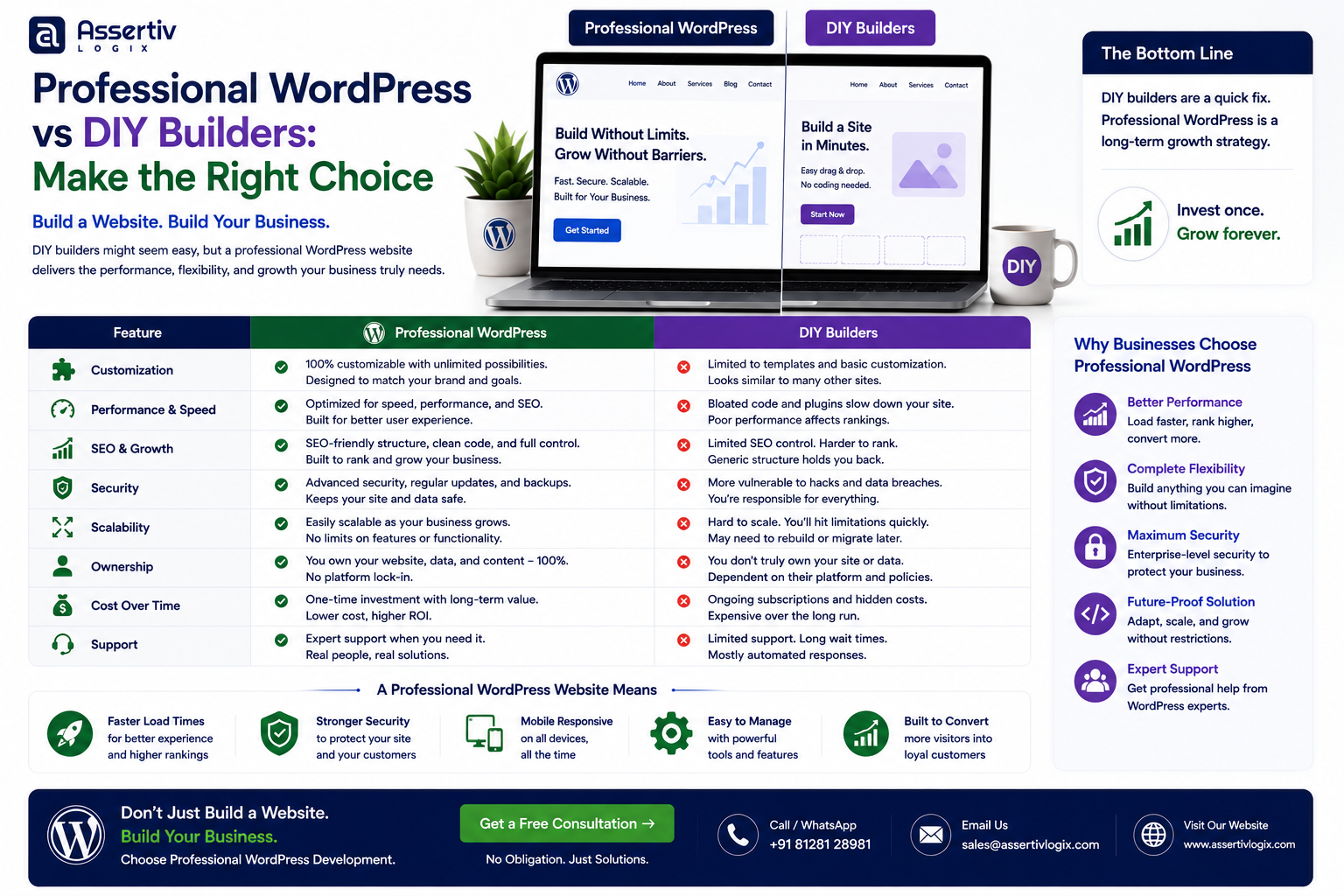
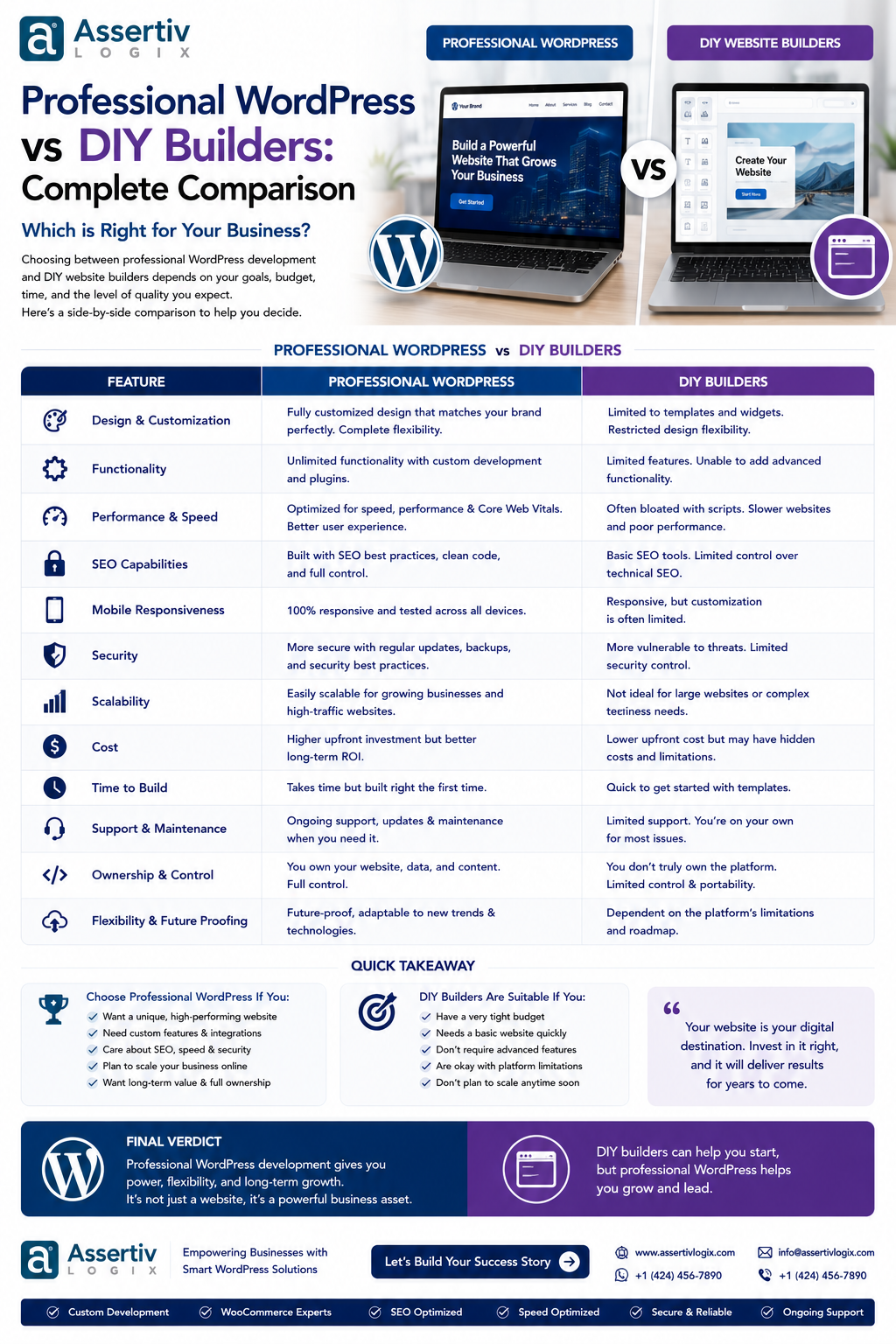
Professional WordPress vs DIY Builders: Quick Comparison
| Factor | Professional WordPress | DIY Builder |
|---|---|---|
| Initial Setup | Requires planning and development | Usually quick |
| Technical Knowledge | Developer recommended | Low technical knowledge required |
| Design Flexibility | Very high | Usually template-based |
| Custom Functionality | Very high | Limited by platform |
| SEO Control | Extensive | Usually basic to moderate |
| Performance Optimization | Advanced control | Platform-dependent |
| Integrations | Highly customizable | Depends on available integrations |
| Scalability | High with proper architecture | Depends on builder |
| Maintenance | Requires active management | Often handled by platform |
| Launch Speed | Depends on project scope | Usually faster |
| Long-Term Flexibility | High | Platform-dependent |
1. Cost: Professional WordPress vs DIY Builders
Cost is often the first factor businesses consider when comparing professional WordPress vs DIY builders.
A DIY builder may appear cheaper initially because you can create the website yourself. However, the total cost should include subscriptions, premium templates, plugins, transaction fees, maintenance, your own time, and future customization.
Professional WordPress development generally has a higher initial cost because you are paying for design, development, testing, and technical expertise.
However, a professionally developed website can be customized around your business requirements and may avoid the need to rebuild the website when your requirements become more complex.
DIY Can Make Sense When:
- Your budget is extremely limited.
- You need a simple informational website.
- You have enough time to build the website yourself.
- You do not need complex integrations.
Professional Development Can Make Sense When:
- The website directly supports revenue.
- You need custom functionality.
- SEO is an important acquisition channel.
- You need advanced integrations.
- The website needs to scale.
- You want a unique brand experience.
2. Design Flexibility
DIY builders usually provide templates and visual components that help users create attractive websites quickly.
For many simple projects, this is enough.
Professional WordPress development provides considerably more control. A developer can build custom page templates, reusable components, interactive sections, custom layouts, responsive behavior, and functionality around an existing brand system.
This matters when your website needs to look substantially different from competitors.
3. Custom Functionality
This is one of the biggest differences between professional WordPress vs DIY builders.
DIY platforms work best when your requirements match the functionality they already provide.
Professional WordPress development becomes more valuable when you need functionality such as:
- Custom calculators
- Customer portals
- Advanced search
- Membership systems
- Custom dashboards
- Booking systems
- Custom ecommerce workflows
- Third-party API integrations
- CRM synchronization
- ERP integration
Custom WordPress plugins can be developed specifically for these requirements.
4. SEO Control
SEO is another important consideration when choosing between a DIY builder and professional WordPress development.
DIY builders generally provide basic SEO functionality such as:
- Page titles
- Meta descriptions
- Image alt text
- Basic URL settings
- Sitemaps
Professional WordPress development can provide greater control over technical SEO architecture, including:
- Custom URL structures
- Canonical implementation
- Structured data
- Internal linking architecture
- Redirect management
- Custom XML sitemap behavior
- Page templates
- Performance optimization
- Indexation controls
Businesses that depend heavily on organic search may benefit from having greater technical control over the website.
Google provides extensive guidance through Google Search Central, which is useful when planning a search-friendly website architecture.
5. Performance
Website performance depends on many factors, including hosting, images, code, JavaScript, CSS, third-party services, caching, database queries, and page architecture.
A DIY builder manages much of the infrastructure for you, which is convenient. However, this can also limit how much technical optimization you can perform.
With professional WordPress development, developers can optimize:
- Theme code
- Database queries
- Images
- JavaScript
- CSS
- Caching
- Third-party scripts
- Server configuration
- Core Web Vitals
Tools such as Google PageSpeed Insights can help identify performance opportunities.
6. Security
Security is important for every website, regardless of how it is built.
Hosted DIY platforms generally manage much of the underlying infrastructure. This reduces the amount of technical maintenance required from the website owner.
With WordPress, the website owner or development partner needs to manage WordPress, themes, plugins, hosting, backups, access controls, and security updates.
Professional WordPress development can help implement security practices such as:
- Secure administrator accounts
- Role-based permissions
- Secure coding practices
- Input validation
- Output escaping
- HTTPS
- Regular backups
- Plugin and theme updates
- Vulnerability monitoring
- Security reviews
The official WordPress security documentation provides additional guidance for securing WordPress installations.
7. Scalability
A website may start small but become much more important to the business over time.
For example, a company might initially need a five-page website. Two years later, it may require:
- Hundreds of pages
- Multiple landing pages
- Customer accounts
- Online payments
- CRM integration
- Advanced analytics
- Multiple languages
- Custom business workflows
Professional WordPress development can provide an architecture designed around future requirements.
DIY builders can also scale for many business websites, but businesses should check the platform’s feature limits, integration options, pricing model, and migration options before committing.
8. Website Ownership and Flexibility
One important consideration when comparing professional WordPress vs DIY builders is how much control you have over the underlying website.
WordPress is an open-source platform, which gives businesses significant control over their website code, hosting environment, database, themes, plugins, and content.
The WordPress licensing information explains the platform’s open-source licensing model.
With a hosted DIY builder, your website is generally tied more closely to the provider’s ecosystem. The exact ownership, export, hosting, and migration options depend on the specific platform.
9. Integrations
Modern business websites rarely operate independently.
You may need to connect your website with:
- CRM software
- ERP systems
- Email marketing tools
- Payment gateways
- Accounting systems
- Shipping providers
- Customer support platforms
- Analytics tools
- Marketing automation
- Internal APIs
DIY builders generally provide integrations for popular services. Professional WordPress development can create custom API connections when an existing integration is not sufficient.
10. Ecommerce Capabilities
If you are building an online store, the comparison becomes even more important.
DIY builders can be useful for small stores with straightforward requirements.
Professional WordPress and WooCommerce development becomes more valuable when the business needs:
- Large product catalogs
- Custom checkout
- Customer-specific pricing
- Wholesale functionality
- Subscription products
- ERP integrations
- Inventory synchronization
- Custom shipping rules
- Advanced product filtering
WooCommerce provides extensive documentation and developer resources through its official documentation portal.
11. Time to Launch
DIY builders have a clear advantage when speed is the primary objective.
You can select a template, add your content, configure basic settings, and publish the website relatively quickly.
Professional WordPress development generally takes longer because the process may include discovery, UX design, development, testing, revisions, optimization, and deployment.
However, faster initial launch does not necessarily mean lower total project time. If a DIY website later requires significant customization, rebuilding or migrating it can introduce additional work.
12. Maintenance
DIY builders typically handle much of the platform maintenance behind the scenes.
WordPress requires more active management. This can include:
- Core updates
- Plugin updates
- Theme updates
- Backups
- Security monitoring
- Performance monitoring
- Compatibility testing
This is not necessarily a disadvantage. Businesses can outsource maintenance to a WordPress development partner and maintain much greater control over the website.
DIY Website Builder: Pros and Cons
| Advantages | Disadvantages |
|---|---|
| Quick setup | Limited customization |
| Easy for beginners | Platform dependency |
| Lower initial cost | Advanced functionality may be difficult |
| Managed infrastructure | Less technical control |
| Pre-built templates | Design may look similar to competitors |
| Simple maintenance | Migration options may be limited |
Professional WordPress Development: Pros and Cons
| Advantages | Disadvantages |
|---|---|
| High customization | Higher initial investment |
| Greater technical control | Requires development expertise |
| Advanced integrations | Ongoing maintenance is required |
| Strong scalability potential | Development takes longer |
| Custom SEO architecture | Requires careful technical planning |
| Custom user experiences | Quality depends on the development partner |
When Should You Choose a DIY Website Builder?
A DIY builder can be a sensible option if your website requirements are relatively simple.
Consider a DIY platform if:
- You need a simple business website.
- You want to launch quickly.
- Your budget is limited.
- You do not require custom integrations.
- You are comfortable managing the website yourself.
- The website is not central to a complex business process.
For a simple portfolio, personal website, landing page, or early-stage project, hiring a developer may not provide enough additional value to justify the cost.
When Should You Choose Professional WordPress Development?
Professional development becomes more attractive as the website becomes more important to your business.
Consider professional WordPress development if:
- Your website generates leads or sales.
- You need custom functionality.
- You require complex integrations.
- SEO is a major acquisition channel.
- You need a unique customer experience.
- You operate an ecommerce store.
- You need advanced performance optimization.
- You expect significant growth.
- You need ongoing technical support.
Professional WordPress vs DIY Builders: Total Cost of Ownership
Looking only at the initial price can produce the wrong conclusion.
Instead, consider the total cost of ownership over several years.
| Cost Area | DIY Builder | Professional WordPress |
|---|---|---|
| Initial Development | Low | Medium to High |
| Subscription/Hosting | Usually recurring | Hosting + maintenance |
| Your Own Time | Higher | Lower |
| Customization | Limited or additional cost | Highly flexible |
| Maintenance | Often simpler | Requires management |
| Future Expansion | Platform-dependent | Highly customizable |
| Migration Flexibility | Depends on provider | Greater control |
Can You Start With DIY and Move to WordPress Later?
Yes, but migration should be considered before choosing the initial platform.
Businesses sometimes start with a DIY builder to validate an idea and later move to WordPress when they need more flexibility.
A migration may involve:
- Content migration
- Image migration
- URL mapping
- 301 redirects
- SEO metadata
- Design recreation
- Database migration
- Third-party integrations
Planning the migration path early can reduce SEO and technical problems later.
How to Decide Between Professional WordPress and DIY
Use the following process to make the decision.
Step 1: Define Your Business Goals
Determine whether the website is primarily informational or whether it will generate leads, sales, subscriptions, bookings, or customer interactions.
Step 2: List Required Features
Write down the functionality you need now and the functionality you expect to need within the next two to three years.
Step 3: Evaluate Your Technical Skills
Consider how comfortable you are with website design, SEO, hosting, security, updates, troubleshooting, and technical configuration.
Step 4: Calculate Your Time
Your own time has a cost. If you spend dozens of hours building and troubleshooting a website, include that time in your comparison.
Step 5: Consider Future Growth
If the website is expected to become a major business asset, flexibility and scalability should have greater weight in your decision.
Step 6: Compare Total Costs
Compare development, subscriptions, hosting, maintenance, integrations, future changes, and potential migration costs.
Why Choose Assertivlogix for Professional WordPress Development?
Assertivlogix provides professional WordPress development services for businesses that need greater control than a standard website builder can provide.
Our capabilities include custom WordPress development, custom theme development, custom plugin development, WooCommerce development, API integrations, website redesign, migration, performance optimization, security improvements, and ongoing maintenance.
We focus on building websites around business requirements rather than forcing every project into the same template.
If your website is becoming an important part of your sales, marketing, ecommerce, or customer experience strategy, professional WordPress development can provide the flexibility needed to support that growth.
Tell us about your website requirements, goals, integrations, and growth plans.
Frequently Asked Questions
What is the difference between professional WordPress and a DIY builder?
Professional WordPress development involves an experienced developer or team creating and customizing a website around specific business requirements. A DIY builder generally provides templates and visual tools that allow the website owner to build the site without extensive coding knowledge.
Is professional WordPress better than a DIY website builder?
Neither option is universally better. DIY builders can be excellent for simple websites that need to launch quickly, while professional WordPress development is generally more suitable for businesses requiring customization, integrations, advanced SEO, performance optimization, or scalability.
Is WordPress more expensive than a DIY website builder?
Professional WordPress development usually requires a higher initial investment. However, the total cost depends on development, hosting, maintenance, subscriptions, customization, integrations, and the value of your own time.
Should a small business hire a WordPress developer?
A small business should consider hiring a WordPress developer when its website is important for generating leads or sales, requires custom functionality, needs advanced SEO or integrations, or would take significant time to build and maintain internally.
Are DIY website builders good for SEO?
Many DIY builders provide basic SEO functionality, but the level of technical control varies by platform. Businesses with advanced SEO requirements may benefit from a platform and development approach that provides greater control over site architecture and technical implementation.
Can WordPress handle ecommerce?
Yes. WordPress can support ecommerce through WooCommerce and custom development. It can handle products, payments, orders, shipping, subscriptions, customer accounts, and integrations when appropriately configured.
Can I migrate from a DIY builder to WordPress?
Yes. Websites can often be migrated from DIY builders to WordPress, although the exact process depends on the source platform. Content, URLs, images, SEO metadata, design, redirects, and integrations may need to be migrated or rebuilt.
How much does professional WordPress development cost?
Professional WordPress development costs vary according to the website’s size, design, functionality, integrations, ecommerce requirements, performance requirements, migration needs, and ongoing support.
Conclusion
Professional WordPress vs DIY builders is not really a question of which technology is universally better. It is a question of which approach matches your business goals, budget, technical requirements, and future plans.
A DIY builder can be a smart choice for a simple website when speed and low initial cost are the main priorities. However, professional WordPress development becomes more valuable when the website needs custom functionality, advanced SEO, integrations, ecommerce, performance optimization, or long-term scalability.
If your website is expected to become a serious business asset, investing in the right architecture and development approach from the beginning can save time and technical headaches later.
If you need help deciding between a DIY builder and professional WordPress development, contact Assertivlogix for a discussion about your project.